
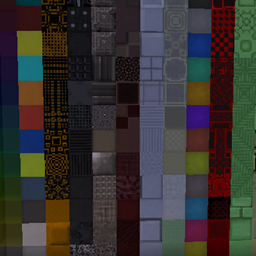
Minecraft 1.20.1, 1.19.2 के लिए Xtones Reworked मॉड
Mod Xtones का पोर्ट जो विभिन्न आधुनिक, भविष्यवादी और फैंटेसी शैली के सजावटी बिल्डिंग ब्लॉक जोड़ता है
 NeoForge
 Forge
Xtones Reworked मॉड के बारे में
मॉड अपडेट बंद कर दिया गया है। कृपया riciJak का BetterBlockZ मॉड इस्तेमाल करें:
https:/www.curseforge.com/minecraft/mc-mods/betterblockz

Xtones Reworked
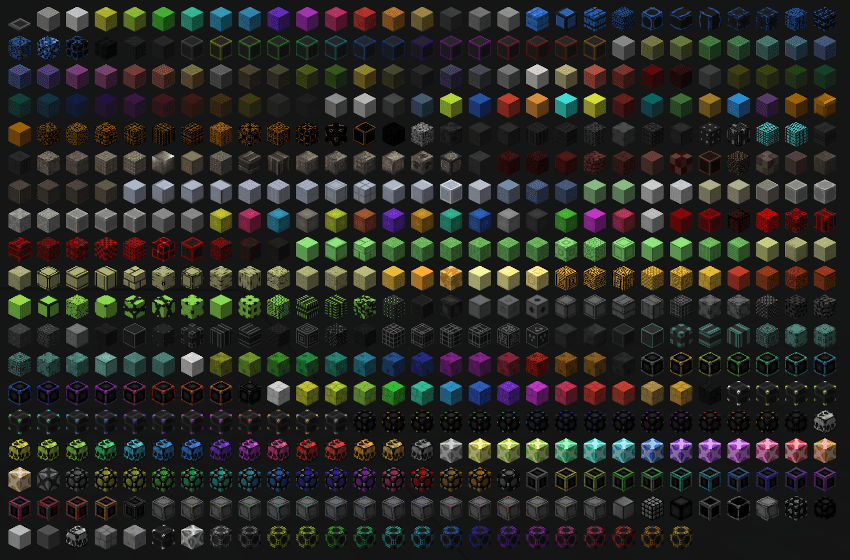
Xtones Reworked, Minecraft 1.19.2 और उससे ऊपर के लिए एक मॉड है जो कई आधुनिक, भविष्यवादी और फैंटेसी शैली के सजावटी बिल्डिंग ब्लॉक्स और एक लैंप जोड़ता है!
यह मॉड 512 अलग-अलग बिल्डिंग ब्लॉक्स जोड़ेगा जिन्हें बनाने और सजाने के लिए इस्तेमाल किया जा सकता है.. आपको मूल Xtones मॉड में मिलने वाली सभी 34 मूल किस्मों के ब्लॉक्स उनकी 15 उप-किस्मों के साथ मिलेंगे।
आप Agon या Kryp जैसे बेस ब्लॉक्स को एक साधारण रेसिपी से बना सकते हैं और फिर उन्हें डाई रेसिपी या स्टोनकटर से अलग-अलग वेरिएंट में बदल सकते हैं।
यह TehNut के मॉड Xtones का पोर्ट है। कोड को शुरू से दोबारा लिखा गया है और मौजूदा टेक्सचर रखे गए हैं।
नोट
मैं Forge सपोर्ट जारी नहीं रखूंगा और Neoforged पर ध्यान केंद्रित करूंगा, लेकिन मैं इस मॉड के लिए एक fabric प्रोजेक्ट का सपोर्ट शुरू करूंगा।
Xtones Reworked कैसे इंस्टॉल करें
With Millida Launcher
Install Millida Launcher
The launcher is free: download it at millida.net/launcher and sign in with any nickname.
Click “Install” on this page
The launcher opens and installs the mod for Minecraft 1.19.2–1.21.10 on Forge or NeoForge automatically.
Launch the game
A profile with it appears in the launcher: click “Play”.
Manually
Install Forge or NeoForge
The loader must match the game version of the mod file, for example Minecraft 1.21.10. After installing it, a separate profile appears in your launcher.
Download the file for your version
In the version list above, pick the file xtonesreworked-1.0.0-1.21.9.jar (1.3 MB) for your game version and loader.
Put it in the mods folder
The folder is inside .minecraft (Windows: %appdata%\.minecraft\mods). If it does not exist, create it.
Launch the loader profile
Open “Mods” in the main menu: Xtones Reworked should be in the list.
Minecraft 1.21.10 runs on Java 21: with a different Java version the game may close right after launch.
वर्ज़न
डिपेंडेंसी के साथ
| Minecraft | लोडर | फ़ाइल | तारीख़ | क्रियाएँ |
|---|---|---|---|---|
| 1.21.9 | NeoForge | xtonesreworked-1.0.0-1.21.9-1.21.x.jar1.3 MB | ||
| 1.20.1 | Forge | xtonesreworked-1.0.4-F_1.20.1-47.2.0.jar1.3 MB | ||
| 1.19.2 | — | xtonesreworked-1.0.1-1.19.2.jar1.3 MB |
रिव्यू
Xtones Reworked को सबसे पहले रेट करें


