

 Fabric
 NeoForge
 Forge
Waystones मॉड के बारे में
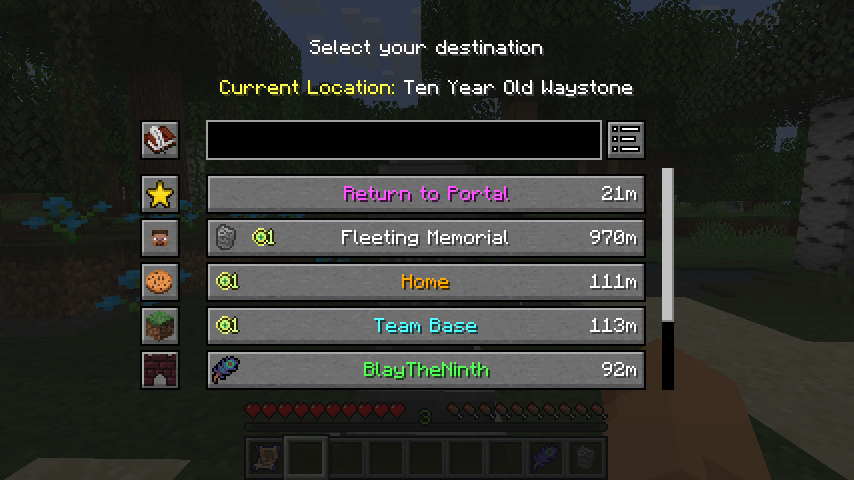
यह मॉड वेस्टोन ब्लॉक जोड़ता है, जिन पर खिलाड़ी एक बार सक्रिय होने के बाद वापस लौट सकता है, चाहे Warp Scroll, रिचार्जेबल Warp Stone के ज़रिए, या किसी मौजूदा वेस्टोन का उपयोग करके एक से दूसरे पर जाकर।
इसे सर्वाइवल मोड में, एडवेंचर मैप्स के लिए या मल्टीप्लेयर सर्वर पर /warp और /home कमांड के विकल्प के रूप में इस्तेमाल किया जा सकता है। वेस्टोन्स को सभी खिलाड़ियों के लिए ग्लोबली उपलब्ध बनाया जा सकता है और बिना किसी अतिरिक्त आइटम के वार्प करने की अनुमति देने के लिए एक कॉन्फ़िगर करने योग्य इन्वेंटरी बटन सेट किया जा सकता है।

इस मॉड के लिए Balm आवश्यक है, जिसे मॉड के साथ इंस्टॉल करना होगा।
Minecraft 26.1 और उससे ऊपर पर, इसके लिए Shogi भी आवश्यक है, जो अत्यधिक कॉन्फ़िगर करने योग्य वार्प आवश्यकताओं और मेरे मॉड्स में कई अन्य नियम-आधारित कॉन्फ़िगरेशन को शक्ति देता है।
- क्राफ्ट करने योग्य Waystones, Warp Plates और Warp Scrolls
- Waystones का उपयोग करके एक जगह से दूसरी जगह टेलीपोर्ट करना
- कम्युनिटी हब्स के लिए या दोस्तों के साथ साझा करने के लिए ग्लोबल Waystones
- आपकी इन्वेंटरी में वैकल्पिक टेलीपोर्ट बटन
- गाँवों में Waystone संरचना
Krzair द्वारा मॉड शोकेस
शामिल Return Scroll और Warp Stone आइटम आइकॉन @JoeCreates द्वारा बनाए गए हैं और यहाँ CC-BY-SA 3.0 लाइसेंस के तहत सार्वजनिक रूप से जारी किए गए थे।

Waystones कैसे इंस्टॉल करें
With Millida Launcher
Install Millida Launcher
The launcher is free: download it at millida.net/launcher and sign in with any nickname.
Click “Install” on this page
The launcher opens and installs the mod for Minecraft 1.16.5–26.3 on Fabric, Forge or NeoForge automatically, together with its dependencies: Balm, Fabric API, Shogi.
Launch the game
A profile with it appears in the launcher: click “Play”.
Manually
Install Fabric, Forge or NeoForge
The loader must match the game version of the mod file, for example Minecraft 26.3. After installing it, a separate profile appears in your launcher.
Download the file for your version
In the version list above, pick the file waystones-fabric-26.3-26.3.0.2.jar (1.2 MB) for your game version and loader.
Put it in the mods folder
The folder is inside .minecraft (Windows: %appdata%\.minecraft\mods). If it does not exist, create it. Required dependencies go there too: Balm, Fabric API, Shogi.
Launch the loader profile
Open “Mods” in the main menu: Waystones should be in the list.
On a server
A server on Fabric, Forge or NeoForge
The mod only works on a server with the same loader and game version, for example 26.3.
File goes into the server’s mods folder
Stop the server, put the mod file into the mods folder and start the server again.
Use the “To server” button
On Millida Hosting, the button at the top of the page uploads the file to your server and restarts it for you.
वर्ज़न
डिपेंडेंसी के साथ
| Minecraft | लोडर | फ़ाइल | तारीख़ | क्रियाएँ |
|---|---|---|---|---|
| 26.1.2 | NeoForge | 26.1.21.1 MB 2 | ||
| 26.1.2 | Fabric | 26.1.21.1 MB 7 | ||
| 26.2 | Fabric | 26.21.2 MB 12 | ||
| 26.2 | NeoForge | 26.21.1 MB | ||
| 26.3 | Fabric | 26.31.2 MB 43 | ||
| 26.3 | NeoForge | 26.31.1 MB 2 | ||
| 1.21.1 | NeoForge | 1.21.11.2 MB 144 | ||
| 1.21.1 | Fabric | 1.21.11.2 MB 71 |
चलाने के लिए क्या चाहिए
- Balmज़रूरी
- Fabric APIज़रूरी
- Shogiज़रूरी
कंटेंट जिसे इसकी ज़रूरत है
FAQ
Which Minecraft versions does Waystones work on?
There are files for 1.16.5–26.3, 15 versions in total. The newest is 26.3.
Is Waystones for Forge or Fabric?
There are files for Fabric: 1.18–26.3, for Forge: 1.16.5–1.21.1 and for NeoForge: 1.21–26.3.
What does Waystones need to work?
Required: Balm, Fabric API, Shogi. Without them the mod will not start: dependencies go into the same mods folder.
Does Waystones work on a server?
Yes. Waystones works both in singleplayer and on a server.
How do I download Waystones?
With Millida Launcher: it installs Waystones into a modpack by itself, for the right game version and loader. The launcher is free.
रिव्यू
Waystones को सबसे पहले रेट करें


