
Minecraft 1.10.2 के लिए WAILA Plugins मॉड
आपके पसंदीदा मॉड्स के लिए अतिरिक्त WAILA जानकारी!
WAILA Plugins मॉड के बारे में
यह मॉड कई लोकप्रिय मॉड्स के लिए WAILA प्लगइन्स जोड़ता है। इसका लाभ यह है कि आप WAILA HUD में उनके ब्लॉक्स की जानकारी देख सकते हैं।
इस मॉड को चलाने के लिए EnderCore आवश्यक है!
वर्तमान में समर्थित:
Blood Magic (ImLookingAtBlood से पोर्ट किया गया, Pokefenn द्वारा)
- altars की Capacity, LP, और tier
- altar के वर्तमान craft की प्रगति
- Chemistry set का वर्तमान recipe परिणाम
- chemistry set की प्रगति
- master ritual stone का owner
- master ritual stone का वर्तमान ritual
- teleposer में वर्तमान block/item
Flaxbeard's Steam Power [केवल 1.7]
- crucibles में fluids
- gauges पर pressure प्रतिशत
- tanks में steam की मात्रा
- valve pipes की state
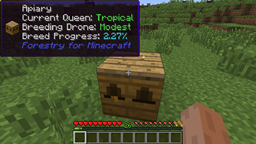
Forestry
- Sapling genomes
- Pollinated leaves की जानकारी
- apiaries/beehouses/alvearies के अंदर वर्तमान bees (और genome जानकारी)
- Apiary errors (No flowers, no drone, आदि)
- वर्तमान breed का प्रगति प्रतिशत
- engines में RF in
- engines में Heat
Magical Crops [केवल 1.7]
- पौधे के उत्पाद का growth प्रतिशत और hovering icon
Mekanism [केवल 1.7]
- सभी energy storing blocks में energy की मात्रा
- gas storage blocks में संग्रहीत Gas
- portable tanks में संग्रहीत Fluid
- salination plant पर Multiplier
- factories का प्रकार
Pam's Harvestcraft [केवल 1.7]
- tree fruits में growth प्रतिशत जोड़ता है
Railcraft [1.10 पर केवल आंशिक समर्थन]
- machines के अंदर Fluid
- Locomotive जानकारी (steam, heat, charge)
- coal burning machines पर Heat जानकारी
- multiblock बना है या नहीं
- blocks में charge की मात्रा
- Engine production rate
RedLogic [केवल 1.7]
- WAILA में Project:Red plugin से overlay rendering पोर्ट किया गया
- Timer, Repeater, आदि जैसे कुछ gates के लिए जानकारी
- red alloy wires की Strength
Resourceful Crops
- पौधे के उत्पाद का Hovering icon
Thermal Expansion
- Augment जानकारी
Minefactory Reloaded [केवल 1.7, DSU को छोड़कर]
- IDeepStorageUnit statistics
Vanilla/Forge
- IFluidHandler जानकारी
WAILA Plugins कैसे इंस्टॉल करें
With Millida Launcher
Install Millida Launcher
The launcher is free: download it at millida.net/launcher and sign in with any nickname.
Click “Install” on this page
The launcher opens and installs the mod for Minecraft 1.10.2 automatically.
Launch the game
A profile with it appears in the launcher: click “Play”.
Manually
Download the file for your version
In the version list above, pick the file WAILAPlugins-MC1.10.2-0.3.0-26.jar (59 KB) for your game version.
Put it in the mods folder
The folder is inside .minecraft (Windows: %appdata%\.minecraft\mods). If it does not exist, create it.
Launch the loader profile
Open “Mods” in the main menu: WAILA Plugins should be in the list.
Minecraft 1.10.2 runs on Java 8: with a different Java version the game may close right after launch.
वर्ज़न
डिपेंडेंसी के साथ
| Minecraft | लोडर | फ़ाइल | तारीख़ | क्रियाएँ |
|---|---|---|---|---|
| 1.10.2 | — | WAILA Plugins - MC1.10.2-0.3.0-2658.9 KB |
FAQ
Which Minecraft versions does WAILA Plugins work on?
Only Minecraft 1.10.2: there are no files for other versions.
Which Java does WAILA Plugins need?
Minecraft 1.10.2 runs on Java 8. If the game closes right after launch, the usual cause is the wrong Java version in the profile settings.
Where can I download WAILA Plugins safely?
On this page: the file WAILAPlugins-MC1.10.2-0.3.0-26.jar (59 KB) is stored on Millida’s server, with no link shorteners. SHA-1 checksum: 3f6874abf2c325c434dfd2ae1d343c3e4c6d03a0.
रिव्यू
WAILA Plugins को सबसे पहले रेट करें


