
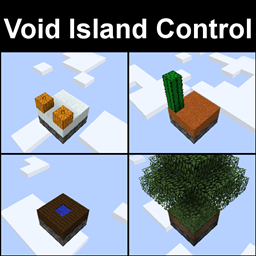
Minecraft 1.12.2 के लिए Void Island Control मॉड
अनुकूलन योग्य, मल्टीप्लेयर, "void" दुनिया के लिए एक वर्ल्ड टाइप जोड़ता है।
नोट: वर्तमान में इसे अपडेट या समर्थित नहीं किया जा रहा है।
कस्टम आइलैंड्स कैसे बनाएं, इसके निर्देशों के लिए....इस पृष्ठ पर नीचे देखें!
एक "void" दुनिया के लिए एक world type जोड़ता है जो multiplayer और teams के लिए काम करता है।
बुनियादी निर्देश
- सुनिश्चित करें कि CompatLayer इंस्टॉल है (केवल 1.10/1.11)
- single-player में world type Void? World चुनें, या servers पर voidworld चुनें।
- एक आइलैंड पर शुरू करने के लिए /island create <optional type> टाइप करें
इसमें 5 डिफ़ॉल्ट आइलैंड प्रकार शामिल हैं जिनमें कुछ कस्टमाइज़ कॉन्फ़िग्स हैं और जिन्हें enabled/disabled किया जा सकता है:
- Grass
- Sand
- Snow
- Wood
Garden of Glass (केवल तब जब config में enabled हो और Botania तथा Garden of Glass इंस्टॉल हों)
कस्टम आइलैंड्स
- structure block data का उपयोग करता है ("save folder/structures" में स्थित)
- structure blocks का उपयोग करके बनाई गई .nbt फ़ाइलों को "voidislandcontrolstructures" config फ़ोल्डर में रखें
- spawn point सेट करने के लिए, data mode में एक structure block रखें। tag को "spawnpoint" पर सेट करें।
- config में Custom Islands सूची में आइलैंड जोड़ें
ये आइलैंड प्रकार Sky Resources के साथ शुरुआती आइलैंड्स के रूप में काम करते हैं
(1.10 पर Sky Resources के साथ असंगत)
इनमें से कुछ शामिल configs को कस्टमाइज़ करें:
- आइलैंड्स के नीचे fill blocks
- bedrock हटाएं
- एक overworld जनरेट करें (और एक ही biome के साथ भी)
- Cloud और horizon Y level
- Island Y level, Size, Buffer Distance
- एक void nether dimension रखें, और portals को overworld से 1-1 लिंक करें
- 1 आइलैंड पर One Chunk Mode
- Starter Empty Chest
- Starting Inventory
- इसे आसानी से सेट करने के लिए startingInv command का उपयोग करें!
- बस आइटम्स को अपनी inventory में रखें और command का उपयोग करें!
- प्रत्येक आइलैंड के लिए command blocks spawn करें
- world start पर commands चलाएं
- साथ ही और भी उन्नत configs!
/island command में कई sub-commands हैं।
- create (optional int/string)[type] - create command दुनिया में एक स्थान पर नया आइलैंड बनाता है।
- invite [player] - invite command किसी अन्य खिलाड़ी से आपके आइलैंड में शामिल होने के लिए कहता है।
- join - अगर हाल ही में invite command द्वारा कहा गया हो तो join command आपको एक आइलैंड में शामिल कराता है।
- leave - leave command आपको उस आइलैंड से निकालता है जिस पर आप हैं, spawn पर भेजता है, और inventory साफ़ करता है। अगर आप आइलैंड पर अंतिम व्यक्ति हैं, तो आइलैंड को दोबारा claim नहीं किया जा सकता।
- home - home command खिलाड़ी को वापस उनके home island पर teleport करता है, लेकिन डिफ़ॉल्ट रूप से 500 blocks दूर होना चाहिए।
- spawn - spawn command खिलाड़ी को spawn पर teleport करता है।
- reset (optional int/string)[type] - reset command आइलैंड, inventory साफ़ करता है, और create command की तरह बिल्कुल नया शुरू करता है।
- onechunk - onechunk command spawn पर एक chunk size का world border बनाता है और spawn रीसेट करता है। यह command डिफ़ॉल्ट रूप से disabled है और इसे config में बदलना होगा।
Void Island Control कैसे इंस्टॉल करें
With Millida Launcher
Install Millida Launcher
The launcher is free: download it at millida.net/launcher and sign in with any nickname.
Click “Install” on this page
The launcher opens and installs the mod for Minecraft 1.12.2 automatically.
Launch the game
A profile with it appears in the launcher: click “Play”.
Manually
Download the file for your version
In the version list above, pick the file voidislandcontrol-1.5.3.jar (99 KB) for your game version.
Put it in the mods folder
The folder is inside .minecraft (Windows: %appdata%\.minecraft\mods). If it does not exist, create it.
Launch the loader profile
Open “Mods” in the main menu: Void Island Control should be in the list.
Minecraft 1.12.2 runs on Java 8: with a different Java version the game may close right after launch.
वर्ज़न
डिपेंडेंसी के साथ
| Minecraft | लोडर | फ़ाइल | तारीख़ | क्रियाएँ |
|---|---|---|---|---|
| 1.12.2 | — | voidislandcontrol-1.5.3.jar98.7 KB | ||
| 1.12.2 | — | voidislandcontrol-1.5.1.jar97.9 KB |
FAQ
Which Minecraft versions does Void Island Control work on?
Only Minecraft 1.12.2: there are no files for other versions.
Which Java does Void Island Control need?
Minecraft 1.12.2 runs on Java 8. If the game closes right after launch, the usual cause is the wrong Java version in the profile settings.
Where can I download Void Island Control safely?
On this page: the file voidislandcontrol-1.5.3.jar (99 KB) is stored on Millida’s server, with no link shorteners. SHA-1 checksum: ed445474d12245f55cac7f94b5a986b3154b1ba7.
रिव्यू
Void Island Control को सबसे पहले रेट करें


