
Minecraft 1.21.1, 1.12.2 के लिए Underground Biomes मॉड
24 विभिन्न प्रकार के पत्थर जोड़ता है
 NeoForge
 Forge
Underground Biomes मॉड के बारे में
पिछला विवरण
यह UndergroundBiomesConstructs मॉड का 1.12.2 के लिए पोर्ट है
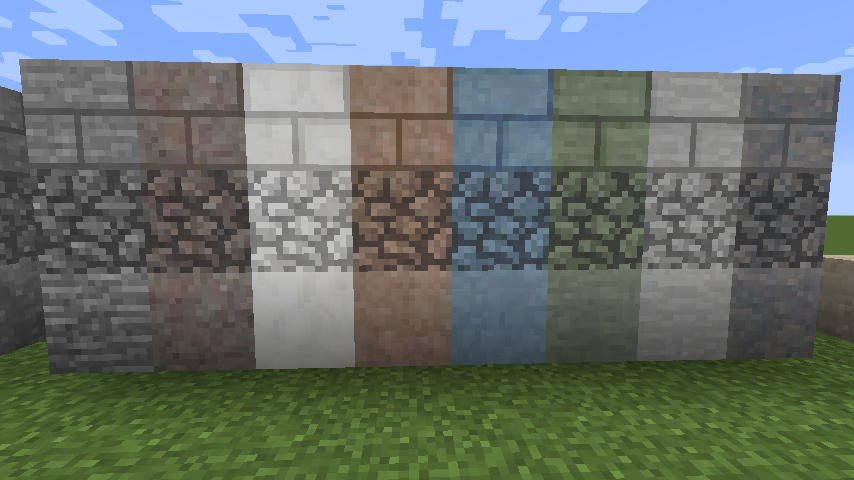
जोड़ता है
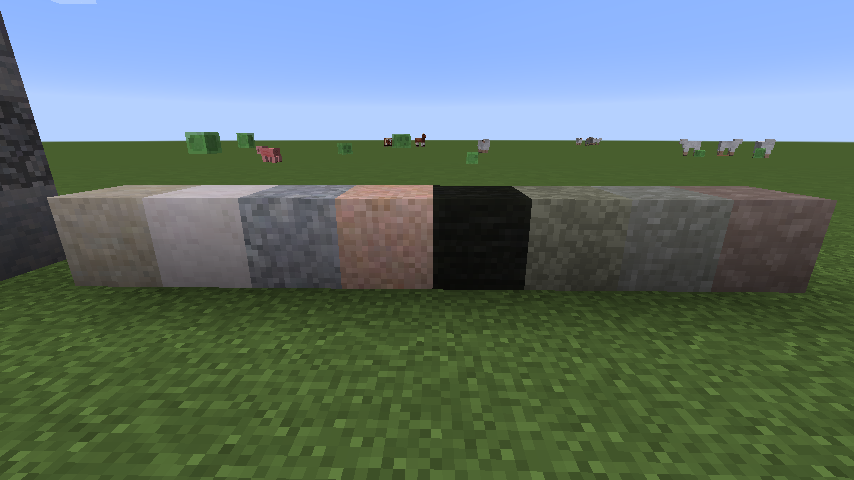
- 24 प्रकार के पत्थर
- 24 प्रकार की बजरी
- 24 प्रकार की रेत
- 16 प्रकार के कोबलस्टोन
- ईंटें
- स्लैब
- दीवारें
- सीढ़ियाँ
- बटन
- BOP के ओवरग्रोन स्टोन
- मॉस कोबलस्टोन
- मॉन्स्टर एग्स
- Minecraft और मॉड्स के ओर्स आसपास के पत्थर से मेल खाने के लिए एकीकृत हैं (या हो सकते हैं)।
मॉड्स से ओर्स जोड़ने में आपको यहाँ कुछ मदद मिल सकती है।
1.14.x पर नोट: ये बिल्ड्स शुरुआती अल्फा हैं। बग्स की उम्मीद की जा सकती है... कृपया उन्हें Github के इश्यू ट्रैकर पर रिपोर्ट करें! यदि आप पुराने बिल्ड से बिल्ड 32 पर अपग्रेड कर रहे हैं, तो कृपया अपना config/undergroundbiomes फ़ोल्डर हटा दें!
यह UndergroundBiomesConstructs मॉड का 1.12.2 और बाद के संस्करणों के लिए पोर्ट है।
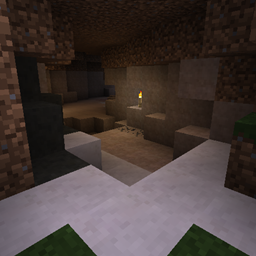
यह मॉड आपके भूमिगत हिस्से में बहुत विविधता जोड़ता है,
- मेटामॉर्फिक, इग्नियस और सेडिमेंट्री शैलियों के 24 नए अलग-अलग प्रकार के पत्थर जोड़ता है।
- वनीला और अन्य मॉड्स के ओर्स और गाँव जैसी संरचनाएँ भी विश्व जनरेशन के दौरान स्थानीय पत्थर के प्रकार में परिवर्तित हो जाती हैं।
- ये 24 प्रकार कोबलस्टोन, बजरी, रेत, सैंडस्टोन, मिट्टी, मॉन्स्टर एग्स, ओवरग्रोन स्टोन, ईंटों, मॉसी ईंटों और कोबलस्टोन, स्लैब, दीवारों, सीढ़ियों और बटनों में भी उपलब्ध हैं।
- यह मॉड वास्तविक दुनिया से प्रेरित है, जो और भी अधिक विविधता जोड़ता है: ग्रेनाइट जैसे इग्नियस पत्थरों को तोड़ना थोड़ा कठिन होता है, लिग्नाइट का उपयोग सस्ते कोयले के रूप में किया जा सकता है, सेडिमेंट्री कोबलस्टोन नहीं होता, खनन करते समय जीवाश्म पाए जा सकते हैं, आदि।
- कई मॉड्स के ओर्स पहले से ही मूल रूप से समर्थित हैं।
- quark के स्पेलियोथेम भी समर्थित हैं।
- एक सरल लेकिन व्यापक कॉन्फ़िगरेशन आपको सरल json कॉन्फ़िगरेशन के माध्यम से अन्य मॉड्स से नए ओर्स जोड़ने, विशिष्ट ब्लॉक विविधताओं को अक्षम करने आदि की अनुमति देता है (विकी देखें)।
यदि आप Underground Biomes मॉड का उपयोग करके बिना किसी प्रयास के सर्वर सेटअप चाहते हैं, तो BisectHosting के साथ सर्वर प्राप्त करें और नए ग्राहक के रूप में कोड kreezxil का उपयोग करके अपने पहले महीने पर 25% छूट प्राप्त करें
Underground Biomes कैसे इंस्टॉल करें
With Millida Launcher
Install Millida Launcher
The launcher is free: download it at millida.net/launcher and sign in with any nickname.
Click “Install” on this page
The launcher opens and installs the mod for Minecraft 1.12.2–1.21.1 on Forge or NeoForge automatically.
Launch the game
A profile with it appears in the launcher: click “Play”.
Manually
Install Forge or NeoForge
The loader must match the game version of the mod file, for example Minecraft 1.21.1. After installing it, a separate profile appears in your launcher.
Download the file for your version
In the version list above, pick the file undergroundbiomes-1.21-1.4.0.jar (3.0 MB) for your game version and loader.
Put it in the mods folder
The folder is inside .minecraft (Windows: %appdata%\.minecraft\mods). If it does not exist, create it.
Launch the loader profile
Open “Mods” in the main menu: Underground Biomes should be in the list.
Minecraft 1.21.1 runs on Java 21: with a different Java version the game may close right after launch.
वर्ज़न
डिपेंडेंसी के साथ
| Minecraft | लोडर | फ़ाइल | तारीख़ | क्रियाएँ |
|---|---|---|---|---|
| 1.21.1 | NeoForge | 1.21-1.4.03 MB 1 | ||
| 1.12.2 | Forge | 1.12-1.3.141.3 MB 2 | ||
| 1.14.4 | Forge | 1.14.4-1.0-53986 KB |
FAQ
Which Minecraft versions does Underground Biomes work on?
There are files for 1.21.1, 1.14.4, 1.12.2. The newest is 1.21.1.
Is Underground Biomes for Forge or Fabric?
There are files for Forge: 1.12.2–1.14.4 and for NeoForge: 1.21.1. There are no files for Fabric: a mod for another loader will not start.
Does Underground Biomes need other mods?
The author lists no required dependencies: the Forge or NeoForge loader is enough.
Which Java does Underground Biomes need?
Minecraft 1.21.1 runs on Java 21. If the game closes right after launch, the usual cause is the wrong Java version in the profile settings.
Where can I download Underground Biomes safely?
On this page: the file undergroundbiomes-1.21-1.4.0.jar (3.0 MB) is stored on Millida’s server, with no link shorteners. SHA-1 checksum: 95f400153a4146b872f4ae355546600bc11cd1fd.
रिव्यू
Underground Biomes को सबसे पहले रेट करें


