
Minecraft 26.3 के लिए Realistic Bees मॉड
🐝 छोटी मधुमक्खियाँ, या बड़ी! बड़े समूह में स्पॉन और बढ़ी हुई छत्ते की जगह।
 Fabric
 Forge
 NeoForge
 Quilt
Realistic Bees मॉड के बारे में
Realistic Bees एक मॉड है जो खेल में नए आइटम या ऑब्जेक्ट जोड़े बिना मधुमक्खियों के व्यवहार को अधिक यथार्थवादी बनाने का प्रयास करता है। मधुमक्खियाँ अपने सामान्य आकार की 25% होती हैं। मधुमक्खियों को थोड़ा कम दुर्लभ बनाने के लिए, मॉड एक कॉन्फ़िग वैल्यू (डिफ़ॉल्ट रूप से 4) भी जोड़ता है जो प्रत्येक प्राकृतिक मधुमक्खी स्पॉन के बाद स्पॉन होने वाली अतिरिक्त मधुमक्खियों की संख्या निर्धारित करती है। मधुमक्खी का छत्ता Minecraft के डिफ़ॉल्ट से अधिक मधुमक्खियाँ भी रख सकता है, जिसे 3 से 20 कर दिया गया है।
सभी उपलब्ध कॉन्फ़िग विकल्प:
beeSizeModifier डिफ़ॉल्ट 0.25, न्यूनतम 0.01, अधिकतम 5.0 यह मान मधुमक्खी का आकार निर्धारित करता है। डिफ़ॉल्ट रूप से 0.25, जिसका अर्थ है कि वे अपने वनीला आकार की 1/4th हैं। अलग मधुमक्खी आकार सुविधा को अक्षम करने के लिए इसे 1.0 पर सेट करें।
extraBeeSpawnsPerBee डिफ़ॉल्ट 9, न्यूनतम 0, अधिकतम 50 मधुमक्खियों को थोड़ा अधिक सामान्य बनाने के लिए। जब भी कोई मधुमक्खी प्राकृतिक रूप से स्पॉन होती है, मॉड अतिरिक्त 'extraBeeSpawnsPerBee' मधुमक्खियाँ स्पॉन करता है।
beeHiveBeeSpace डिफ़ॉल्ट 20, न्यूनतम 0, अधिकतम 50 कुल कितनी मधुमक्खियाँ छत्ते में प्रवेश कर सकती हैं। Minecraft का डिफ़ॉल्ट 3 है, लेकिन मधुमक्खियाँ बहुत छोटी हैं इसलिए अधिक जगह होनी चाहिए।
preventBeeSuffocationDamage डिफ़ॉल्ट true छोटी (शिशु) मधुमक्खियाँ कभी-कभी अपनी AI के साथ कुछ अप्रत्याशित कर सकती हैं और दम घुटने की क्षति उठा सकती हैं। इस क्षति को रोकने से उनका गायब होना ठीक हो जाता है।
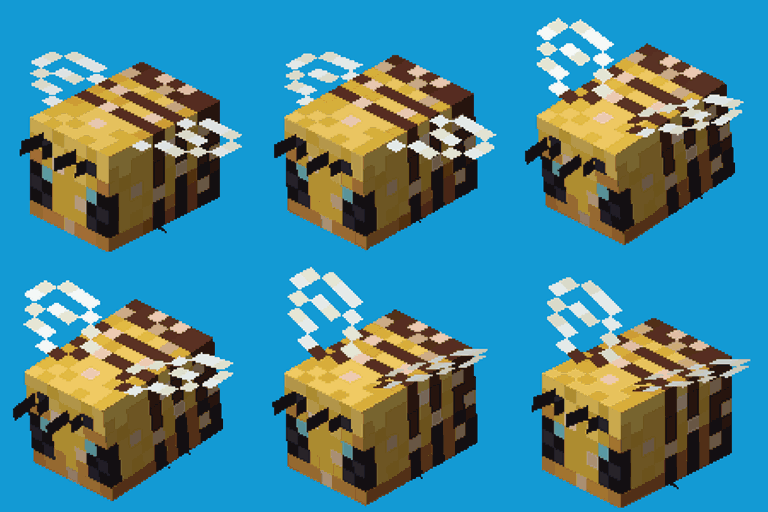
नन्हीं मधुमक्खियाँ! --या बड़ी। beeSizeModifier कॉन्फ़िग के आधार पर:
आप इस मॉड का उपयोग किसी भी मॉडपैक में स्वतंत्र रूप से कर सकते हैं, जब तक कि डाउनलोड CurseForge या Modrinth इकोसिस्टम के भीतर होस्ट रहता है।
Serilum.com में सभी उपलब्ध मॉड्स का अवलोकन और अधिक जानकारी है।
टिप्पणियाँ अक्षम हैं क्योंकि मैं इतने अलग-अलग मॉड पेजों पर उनका ट्रैक नहीं रख सकता। समस्याओं, विचारों, सुझावों या किसी और चीज़ के लिए Github रेपो है। धन्यवाद!
Realistic Bees कैसे इंस्टॉल करें
With Millida Launcher
Install Millida Launcher
The launcher is free: download it at millida.net/launcher and sign in with any nickname.
Click “Install” on this page
The launcher opens and installs the mod for Minecraft 1.19.3–26.3 on Fabric, Forge, NeoForge or Quilt automatically.
Launch the game
A profile with it appears in the launcher: click “Play”.
Manually
Install Fabric, Forge, NeoForge or Quilt
The loader must match the game version of the mod file, for example Minecraft 26.3. After installing it, a separate profile appears in your launcher.
Download the file for your version
In the version list above, pick the file realisticbees-26.3.0-4.3.jar (63 KB) for your game version and loader.
Put it in the mods folder
The folder is inside .minecraft (Windows: %appdata%\.minecraft\mods). If it does not exist, create it.
Launch the loader profile
Open “Mods” in the main menu: Realistic Bees should be in the list.
वर्ज़न
डिपेंडेंसी के साथ
| Minecraft | लोडर | फ़ाइल | तारीख़ | क्रियाएँ |
|---|---|---|---|---|
| 26.3 | Fabric, Forge, NeoForge, Quilt | [Fabric/Forge/Neo] 26.3.0-4.3 | Realistic Bees62.8 KB 57 | ||
| 1.19.3 | Forge | realisticbees_1.19.3-2.8.jar19.9 KB |
FAQ
Which Minecraft versions does Realistic Bees work on?
There are files for 26.3, 1.19.3. The newest is 26.3.
Is Realistic Bees for Forge or Fabric?
There are files for Fabric: 26.3, for Forge: 1.19.3–26.3, for NeoForge: 26.3 and for Quilt: 26.3.
Does Realistic Bees need other mods?
The author lists no required dependencies: the Fabric, Forge, NeoForge or Quilt loader is enough.
Where can I download Realistic Bees safely?
On this page: the file realisticbees-26.3.0-4.3.jar (63 KB) is stored on Millida’s server, with no link shorteners. SHA-1 checksum: 310f14d3ff1b78a43eaaa664018f6c8b0643297f.
रिव्यू
Realistic Bees को सबसे पहले रेट करें


