
Minecraft 1.21.1, 1.19.2 के लिए Raw's Visual keybinder मॉड
कीबाइंडिंग के लिए एक विज़ुअल समाधान।
 NeoForge
 Forge
Raw's Visual keybinder मॉड के बारे में
यह मॉड उन लोगों के लिए एक समाधान है जिनके पास बहुत सारे keybinds वाला बड़ा modpack होता है।
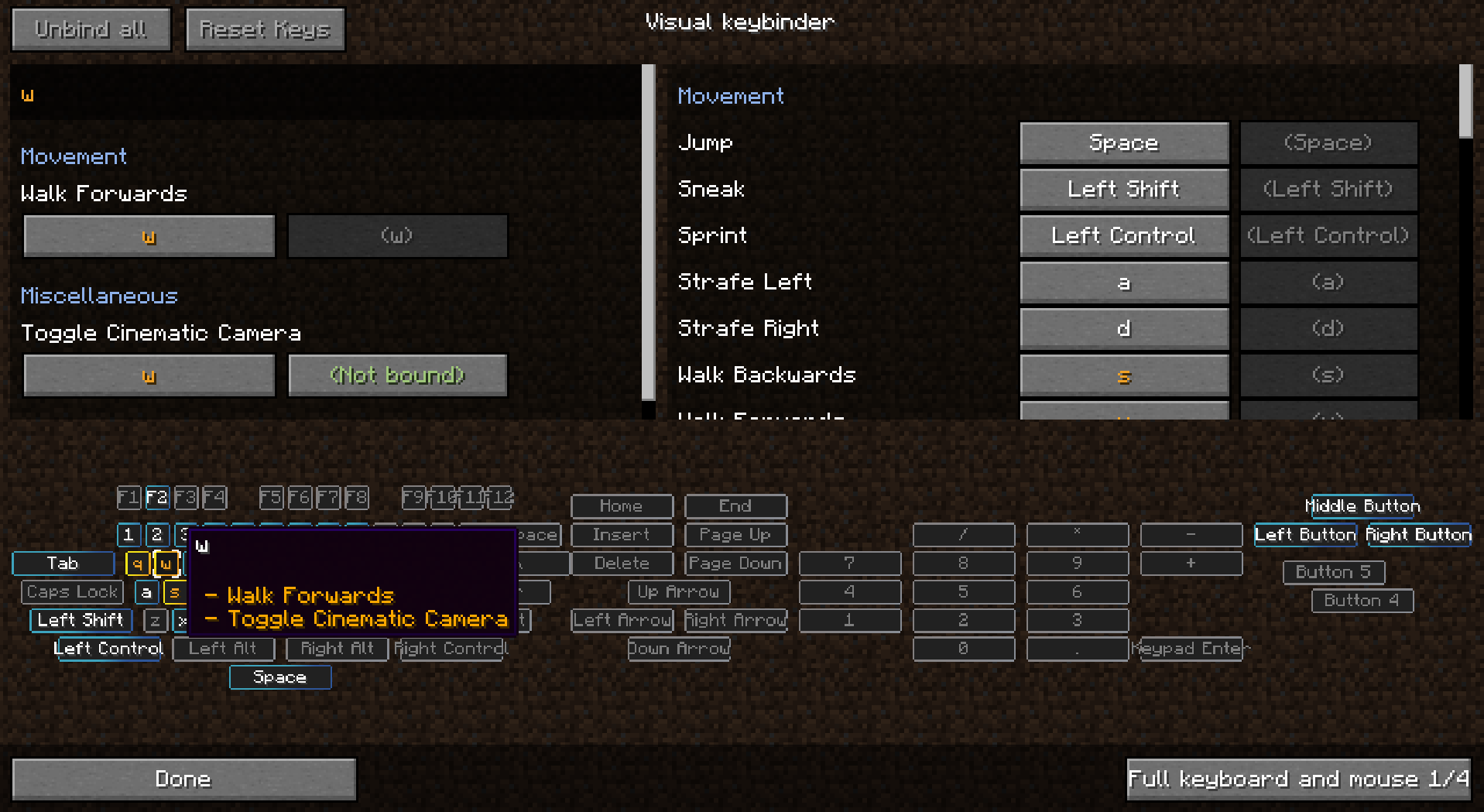
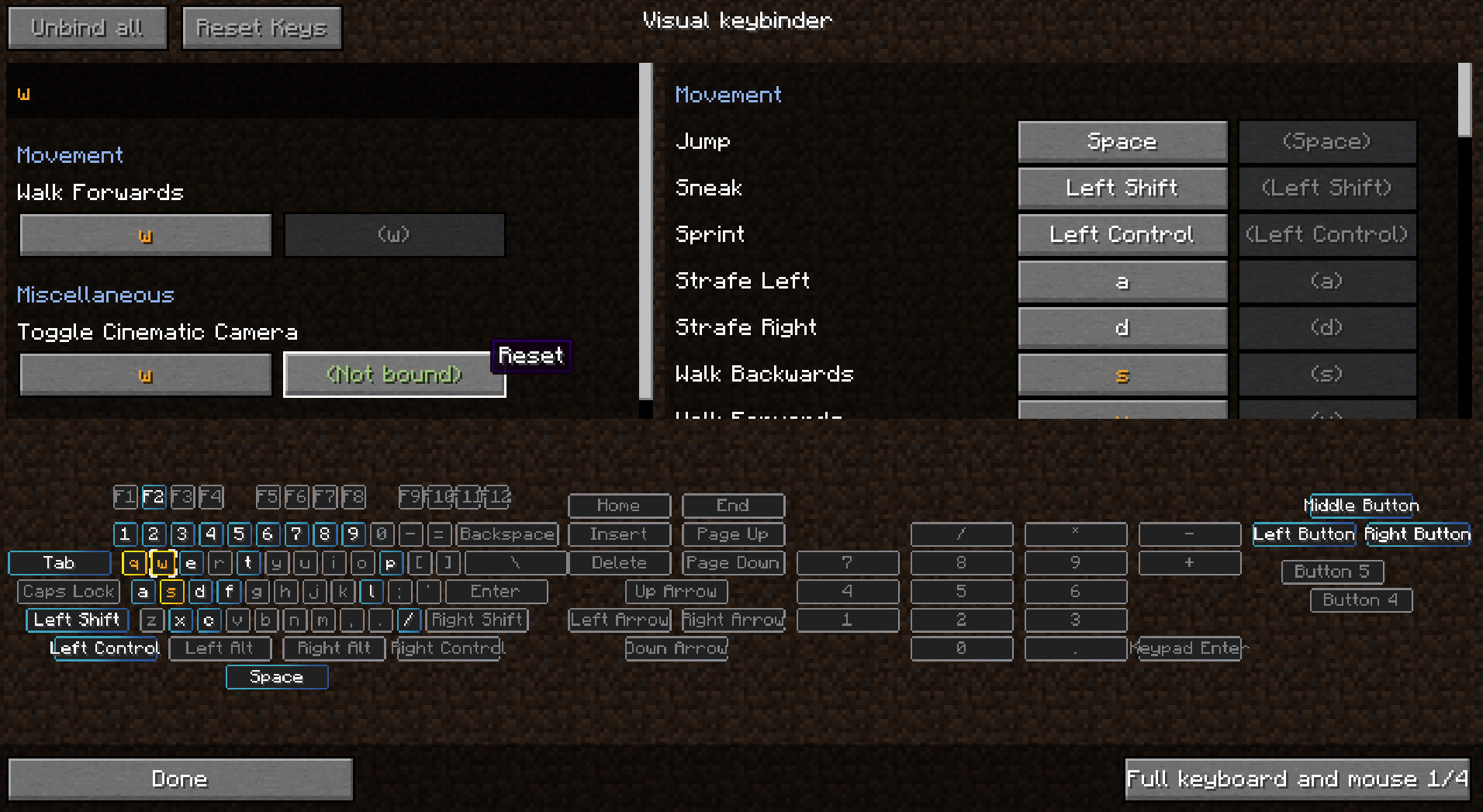
यह keybinds को प्रबंधित करने का एक अतिरिक्त तरीका जोड़ता है। यह एक अतिरिक्त स्क्रीन प्रदान करता है जो options menu में डिफ़ॉल्ट edit 'keybind button' के बगल वाले बटन से सुलभ होगी।
इस स्क्रीन का लेआउट कीबोर्ड जैसा होता है जिसमें सभी टकराव करने वाले और उपयोग किए गए बटन हाइलाइट किए जाते हैं। इस तरह खिलाड़ियों को यह अच्छी तरह दिख जाता है कि कौन सी कुंजियाँ अभी भी उपलब्ध हैं और किन पर ध्यान देने की जरूरत है।
इस मॉड को बनाने के एक साइड इफेक्ट के रूप में आप Shift+left click जैसे माउस बटन के साथ modifiers का भी उपयोग कर सकते हैं। यह कुछ स्थितियों में उपयोगी हो सकता है या नहीं भी।
कई लेआउट उपलब्ध हैं और लेआउट को config में बदला या जोड़ा जा सकता है।
Client mod। इसे सर्वर पर होने की जरूरत नहीं है।
कुछ स्क्रीनशॉट के लिए images देखें।
Presets
Presets को लोड और सेव किया जा सकता है। वे .minecraft फ़ोल्डर में 'keybinding presets' के अंतर्गत संग्रहीत होते हैं।
अपने पसंदीदा presets के लिए keybind सेट करके presets के बीच जल्दी से स्विच करें।
पहली बार शुरू होने पर preset लोड कैसे करें
'presettoloadonfirststartup.txt' का उपयोग यह निर्दिष्ट करने के लिए करें कि startup पर कौन सा keybind लोड होना चाहिए। ये bindings फिर startup पर लोड होंगे। initialized.dat फ़ाइल तब बनाई जाएगी जब कोई खिलाड़ी पहली बार गेम शुरू करेगा। जब यह फ़ाइल मौजूद होती है, तो presettoloadonfirststartup.txt में मौजूद preset लोड नहीं होगा।
Preset को readonly बनाना
जब किसी preset को notepad से खोलें तो आप पहली पंक्ति में 'readonly' टेक्स्ट जोड़ सकते हैं और फिर सेव कर सकते हैं।
Modpack के साथ keybinds शिप करना
- सुनिश्चित करें कि आप keybinding preset फ़ोल्डर export करते हैं
- keybinding presets/initialized.dat export न करें
- गेम में एक preset सेव करें
- बनाई गई फ़ाइल को notepad में edit करें
- फ़ाइल की शुरुआत में एक नई पंक्ति डालें जिसमें टेक्स्ट हो: readonly
- न कुछ अधिक न कुछ कम
- फिर presettoloadonfirststartup.txt फ़ाइल में, दूसरी पंक्ति पर अपने preset का नाम भरें, जो फ़ाइल नाम के अंत में मौजूद preset.txt के बिना फ़ाइल नाम है।
आप अपने modpack को कई presets के साथ शिप कर सकते हैं, लेकिन startup पर केवल एक preset लोड हो सकता है। फ़ाइल नाम में Capital letters का उपयोग करना संभव है।
Modpack में उपयोग बिना पूछे अनुमत है
1.18.2 पर backporting के लिए Radimous को धन्यवाद!
1.21.1 Neoforge पर porting के लिए Bubin7766 को धन्यवाद!
Raw's Visual keybinder कैसे इंस्टॉल करें
With Millida Launcher
Install Millida Launcher
The launcher is free: download it at millida.net/launcher and sign in with any nickname.
Click “Install” on this page
The launcher opens and installs the mod for Minecraft 1.19.2–1.21.1 on Forge or NeoForge automatically.
Launch the game
A profile with it appears in the launcher: click “Play”.
Manually
Install Forge or NeoForge
The loader must match the game version of the mod file, for example Minecraft 1.21.1. After installing it, a separate profile appears in your launcher.
Download the file for your version
In the version list above, pick the file visual_keybinder-1.21.1-0.1.13-neoforge.jar (345 KB) for your game version and loader.
Put it in the mods folder
The folder is inside .minecraft (Windows: %appdata%\.minecraft\mods). If it does not exist, create it.
Launch the loader profile
Open “Mods” in the main menu: Raw's Visual keybinder should be in the list.
Minecraft 1.21.1 runs on Java 21: with a different Java version the game may close right after launch.
वर्ज़न
डिपेंडेंसी के साथ
| Minecraft | लोडर | फ़ाइल | तारीख़ | क्रियाएँ |
|---|---|---|---|---|
| 1.19.2 | Forge | visual_keybinder-1.19.2 - 0.1.12.jar252 KB | ||
| 1.21.1 | NeoForge | visual_keybinder-1.21.1-0.1.13-neoforge.jar345 KB 8 |
FAQ
Which Minecraft versions does Raw's Visual keybinder work on?
There are files for 1.21.1, 1.19.2. The newest is 1.21.1.
Is Raw's Visual keybinder for Forge or Fabric?
There are files for Forge: 1.19.2 and for NeoForge: 1.21.1. There are no files for Fabric: a mod for another loader will not start.
Does Raw's Visual keybinder need other mods?
The author lists no required dependencies: the Forge or NeoForge loader is enough.
Which Java does Raw's Visual keybinder need?
Minecraft 1.21.1 runs on Java 21. If the game closes right after launch, the usual cause is the wrong Java version in the profile settings.
Where can I download Raw's Visual keybinder safely?
On this page: the file visual_keybinder-1.21.1-0.1.13-neoforge.jar (345 KB) is stored on Millida’s server, with no link shorteners. SHA-1 checksum: 58204c60c8f8b983dcb184b6104193ebf488b79f.
रिव्यू
Raw's Visual keybinder को सबसे पहले रेट करें


