
Minecraft 1.20.1, 26.1.2 के लिए KeyBind Bundles मॉड
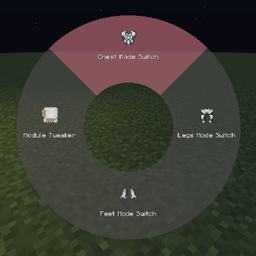
क्या आपके पास बहुत सारे कीबाइंड हैं लेकिन कुंजियाँ कम हैं? इस मॉड के साथ आप अपने खुद के की बंडल बना सकते हैं, कुंजियों के एक सेट को आसानी से उपयोग होने वाले रेडियल मेनू में बदल सकते हैं
 NeoForge
 Forge
ForgeKeyBind Bundles मॉड के बारे में
क्या आपके पास बहुत सारे keybinds हैं लेकिन उन सभी के लिए पर्याप्त physical keys नहीं हैं? क्या आप कम इस्तेमाल होने वाली keys को बार-बार दूसरे bindings में बदलते-बदलते थक गए हैं? क्या यह याद रखना बहुत मुश्किल है कि कौन सी key क्या करती है? तो यह mod आपके लिए है।
यह mod key bundles जोड़ता है, जो मूल रूप से एक ही key में कई keybinds होते हैं।
Bundles बनाना
नया bundle बनाने के लिए, keybinds screen खोलें और KeyBind Bundles category (जो सबसे पहली होनी चाहिए) के अंतर्गत Add key bundle button पर क्लिक करें, और फिर अपने bundle के लिए एक नाम दर्ज करें।
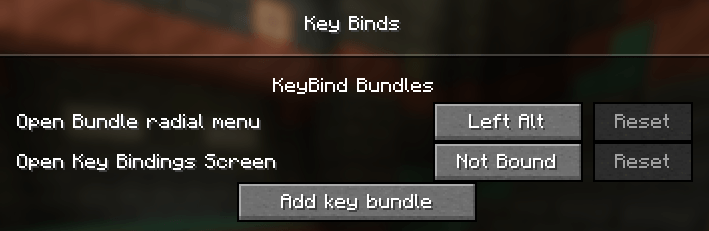
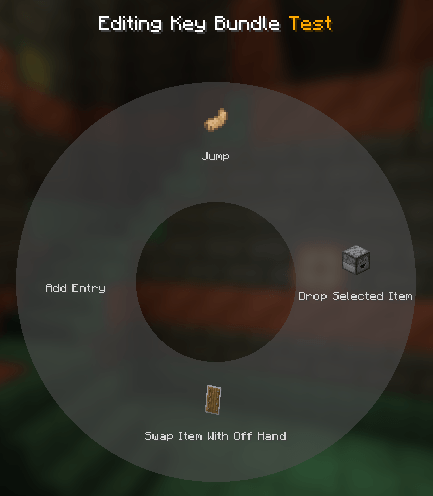
उसके बाद, bundle पर Edit button पर क्लिक करें। नई screen में बीच में मौजूद radial menu पर hover करें और Add entry पर क्लिक करें। इससे keybinds screen फिर से खुल जाएगी लेकिन अब हर keybind के पास एक select button होगा। यहाँ आप वे bindings चुन सकते हैं जिन्हें आप bundle में जोड़ना चाहते हैं।
bindings चुनने के बाद आप radial menu में हर entry को edit कर सकते हैं और उसे एक custom name और item icon दे सकते हैं।
Bundles का उपयोग करना
escape दबाकर edit menu से बाहर निकलें और bundle को किसी key से bind करें। उसके बाद, in-game होते हुए आप अपनी assign की गई key को दबाकर रख सकते हैं जिससे radial menu खुल जाएगा। किसी entry पर hover करें और उस keybind को trigger करने के लिए left click करें। यह उतना ही आसान है!
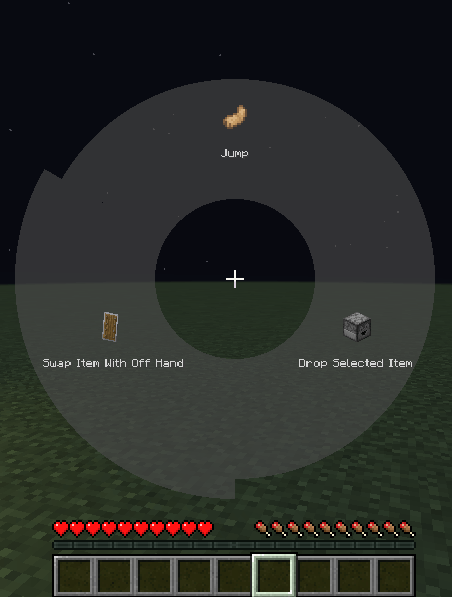
आप किसी key mapping को right click करके bookmark भी कर सकते हैं। एक बार bookmark हो जाने पर, bundle को assign की गई key दबाने से radial menu खोले बिना तुरंत वह mapping trigger हो जाएगी। जब कोई key bookmarked हो, तो Radial menu modifier को दबाकर रखने पर radial menu फिर से खोला जा सकता है, जो डिफ़ॉल्ट रूप से Left alt है। वर्तमान bookmarked key radial menu में लाल रंग में highlight की जाएगी।
यह mod Controlling के साथ compatible है
KeyBind Bundles कैसे इंस्टॉल करें
With Millida Launcher
Install Millida Launcher
The launcher is free: download it at millida.net/launcher and sign in with any nickname.
Click “Install” on this page
The launcher opens and installs the mod for Minecraft 1.20.1–26.1.2 on Forge or NeoForge automatically.
Launch the game
A profile with it appears in the launcher: click “Play”.
Manually
Install Forge or NeoForge
The loader must match the game version of the mod file, for example Minecraft 26.1.2. After installing it, a separate profile appears in your launcher.
Download the file for your version
In the version list above, pick the file keybindbundles-2.0.0.jar (90 KB) for your game version and loader.
Put it in the mods folder
The folder is inside .minecraft (Windows: %appdata%\.minecraft\mods). If it does not exist, create it.
Launch the loader profile
Open “Mods” in the main menu: KeyBind Bundles should be in the list.
वर्ज़न
डिपेंडेंसी के साथ
| Minecraft | लोडर | फ़ाइल | तारीख़ | क्रियाएँ |
|---|---|---|---|---|
| 26.1.2 | NeoForge | 26.1.2 - keybindbundles-2.0.0.jar90.2 KB 1 | ||
| 1.20.1 | NeoForge, Forge | keybindbundles-1.20.1-1.1.0.jar267 KB 1 |
रिव्यू
KeyBind Bundles को सबसे पहले रेट करें


