

Minecraft 1.20.1, 1.21.1 के लिए Etched मॉड
मनोरंजन का एक नया रूप
 NeoForge
 Forge
Forge Fabric
💿 Etched, मनोरंजन का एक नया रूप
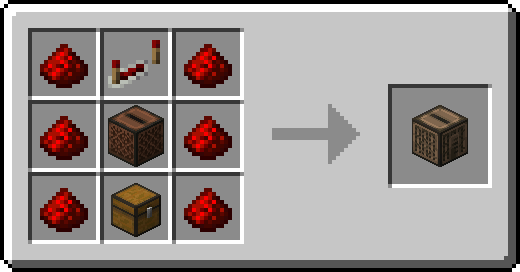
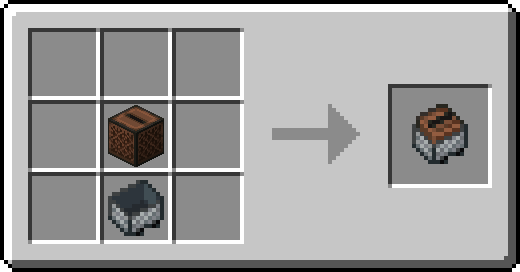
Etched आपको Minecraft में ही अपना संगीत बजाने के नए तरीके देता है! आप नए Etching Table के साथ पूरी कस्टमाइज़ेशन के साथ कस्टम रिकॉर्ड बना सकते हैं, और Etched सभी डिस्क बजाने के नए तरीके भी देता है। नया Album Jukebox आपको 9 रिकॉर्ड तक स्टोर करने देता है जो क्रम से और रिपीट पर बजेंगे, जब तक कि redstone से पावर न दी जाए, जिससे यह पॉज़ होकर पहली डिस्क पर रीसेट हो जाएगा। Jukebox Minecart आपको पटरियों पर संगीत बजाने देता है, जिसमें hoppers से रिकॉर्ड डालने की सुविधा है, या अगर गाना खत्म हो गया हो तो activator rail से गाना दोबारा शुरू कर सकते हैं!
📦 विशेषताएँ:
- गाँववालों के लिए नया bard पेशा, जिसमें कई संगीत संबंधी ट्रेड हैं।
- संगीत बजाने के नए तरीके जैसे Jukebox Minecart, Album Jukebox, या Radio! चलते-फिरते गाने बजाएँ, रेडियो स्टेशन से लाइव, या किसी एल्बम की तरह कई गाने क्रम से रिपीट पर।
- hoppers से jukeboxes में रिकॉर्ड डालें! Bedrock से एक parity फीचर।
- Etching Table से अपने खुद के कस्टम रिकॉर्ड बनाएँ! एक URL (SoundCloud, MP3, WAV, OGG, और Sound Events समर्थित), एक blank disc, और अपनी डिस्क सजाने के लिए एक label दें।
💽 डिस्क कैसे बनाएँ:
यह करना काफी आसान है, बस एक Blank Music Disc के साथ एक Music Label डालें (गाने की जानकारी कस्टमाइज़ करने के लिए उस पर राइट क्लिक करें, crafting table में dyes से रंग दें, और दो रंगे हुए music labels को मिलाकर एक Complex Music Label बनाएँ) और आप अपनी पहली डिस्क बनाने के लिए तैयार होंगे। ज़रूरी चीज़ें मिलने के बाद, आप अपनी डिस्क को सुंदर बनाने के लिए component slots के नीचे label का pattern चुन सकते हैं और आपके गाने का URL ऊपर वाली बार में जाता है! Etched वर्तमान में ऐसे URLs को समर्थित करता है जो MP3 File, WAV File, OGG File, SoundCloud Song (GO+ गाने समर्थित नहीं हैं, subscription स्थिति की परवाह किए बिना), Bandcamp Song, या Minecraft Sound Event की ओर ले जाते हैं।
मुझे Blank Music Disc कैसे मिलेगी?
किसी चुनौती के बिना ये रिकॉर्ड नहीं होंगे। Blank Music Disc पाने के लिए, आप या तो एक vanilla Music Disc को smelt कर सकते हैं या merchant level 2 पर नए Bard से ट्रेड कर सकते हैं।
Etched कैसे इंस्टॉल करें
With Millida Launcher
Install Millida Launcher
The launcher is free: download it at millida.net/launcher and sign in with any nickname.
Click “Install” on this page
The launcher opens and installs the mod for Minecraft 1.16.5–1.21.1 on Fabric, Forge or NeoForge automatically.
Launch the game
A profile with it appears in the launcher: click “Play”.
Manually
Install Fabric, Forge or NeoForge
The loader must match the game version of the mod file, for example Minecraft 1.21.1. After installing it, a separate profile appears in your launcher.
Download the file for your version
In the version list above, pick the file etched-5.1.0.jar (614 KB) for your game version and loader.
Put it in the mods folder
The folder is inside .minecraft (Windows: %appdata%\.minecraft\mods). If it does not exist, create it.
Launch the loader profile
Open “Mods” in the main menu: Etched should be in the list.
Minecraft 1.21.1 runs on Java 21: with a different Java version the game may close right after launch.
वर्ज़न
डिपेंडेंसी के साथ
| Minecraft | लोडर | फ़ाइल | तारीख़ | क्रियाएँ |
|---|---|---|---|---|
| 1.21.1 | NeoForge | Etched 5.1.0 NeoForge614 KB 15 | ||
| 1.20.1 | NeoForge, Forge | [Forge 1.20.1] Etched 3.0.4597 KB 14 | ||
| 1.19.2 | Fabric | [Fabric 1.19.2] Etched 2.3.2583 KB 1 | ||
| 1.16.5 | Fabric | [Fabric 1.16.5] Etched 1.1.0285 KB |
रिव्यू
Etched को सबसे पहले रेट करें


