
 Forge
Enderman Evolution मॉड के बारे में
Patreon: p455w0rd
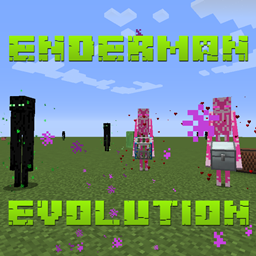
इस मॉड का मुख्य उद्देश्य शुरुआती गेम में Ender Pearls प्राप्त करना थोड़ा आसान बनाना है।
Evolved Enderman
ये Enderman इतने विकसित हो गए हैं कि वे पानी में चल सकते हैं और दिन में बिना किसी नकारात्मक परिणाम के spawn हो सकते हैं।
Frienderman
Frienderman मित्रवत Enderman हैं जो आपकी मदद करने के लिए कई तरह के काम कर सकते हैं। यदि आप Friender Pearl (यादृच्छिक संभावना) का उपयोग करके किसी को tame करते हैं, तो आप उसका मोड Follow या Idle पर सेट कर सकेंगे। आपका tame किया हुआ Frienderman आप पर हमला होने पर आपकी रक्षा करेगा (जैसे tame किया हुआ भेड़िया करता है)। आप अपने tame किए हुए Frienderman को एक chest (EnderStorage, IronChests, और Vanilla वर्तमान में समर्थित) भी दे सकते हैं जिसे वह उठाएगा और पास में गिरने वाले items को उठा लेगा।
Ender Daisy
Ender Daisies overworld, nether, और end में प्राकृतिक रूप से spawn होते हैं। उन्हें दोबारा लगाने के लिए, बस उन्हें harvest करें, और समर्थित growth block (grass, dirt, farmland, netherrack, end stone, end stone brick, या end portal frame) पर right click करें। वे केवल 8 से कम light level में ही उगेंगे। उन्हें केवल समर्थित growth blocks के end variants पर ही bonemeal किया जा सकता है।
Discord पर मेरे साथ जुड़ें
कुछ प्यार दिखाएं
@TheRealp455w0rd
Enderman Evolution कैसे इंस्टॉल करें
With Millida Launcher
Install Millida Launcher
The launcher is free: download it at millida.net/launcher and sign in with any nickname.
Click “Install” on this page
The launcher opens and installs the mod for Minecraft 1.12.2 on Forge automatically.
Launch the game
A profile with it appears in the launcher: click “Play”.
Manually
Install Forge
The loader must match the game version of the mod file, for example Minecraft 1.12.2. After installing it, a separate profile appears in your launcher.
Download the file for your version
In the version list above, pick the file EndermanEvolution-1.12.2-1.0.33.jar (269 KB) for your game version.
Put it in the mods folder
The folder is inside .minecraft (Windows: %appdata%\.minecraft\mods). If it does not exist, create it.
Launch the loader profile
Open “Mods” in the main menu: Enderman Evolution should be in the list.
Minecraft 1.12.2 runs on Java 8: with a different Java version the game may close right after launch.
वर्ज़न
डिपेंडेंसी के साथ
| Minecraft | लोडर | फ़ाइल | तारीख़ | क्रियाएँ |
|---|---|---|---|---|
| 1.12.2 | Forge | EndermanEvolution-1.12.2-1.0.33.jar269 KB 1 | ||
| 1.12.2 | — | EndermanEvolution-1.12.2-1.0.30.jar273 KB | ||
| 1.12.2 | — | EndermanEvolution-1.12.2-1.0.29.jar274 KB |
FAQ
Which Minecraft versions does Enderman Evolution work on?
Only Minecraft 1.12.2: there are no files for other versions.
Is Enderman Evolution for Forge or Fabric?
Only for Forge: 1.12.2. There are no files for Fabric or NeoForge: a mod for another loader will not start.
Does Enderman Evolution need other mods?
The author lists no required dependencies: the Forge loader is enough.
Which Java does Enderman Evolution need?
Minecraft 1.12.2 runs on Java 8. If the game closes right after launch, the usual cause is the wrong Java version in the profile settings.
Where can I download Enderman Evolution safely?
On this page: the file EndermanEvolution-1.12.2-1.0.33.jar (269 KB) is stored on Millida’s server, with no link shorteners. SHA-1 checksum: abcc72f5a87a47197216b6b4fb84665892783d62.
रिव्यू
Enderman Evolution को सबसे पहले रेट करें


