
Minecraft 1.20.1, 1.21.1 के लिए Create: Netherless ((Neo)Forge) मॉड
🚫 नेथर की कभी आवश्यकता के बिना नेथर संसाधन इकट्ठा करें और स्वचालित करें
 NeoForge
 Forge
Create: Netherless ((Neo)Forge) मॉड के बारे में
अगर आपको fabric वर्ज़न चाहिए तो यहाँ क्लिक करें
Create: Netherless, Create Mod के लिए एक ऐडऑन है;
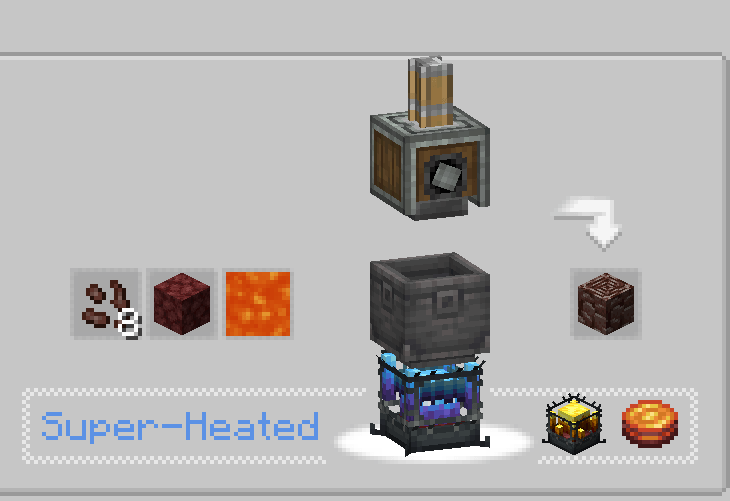
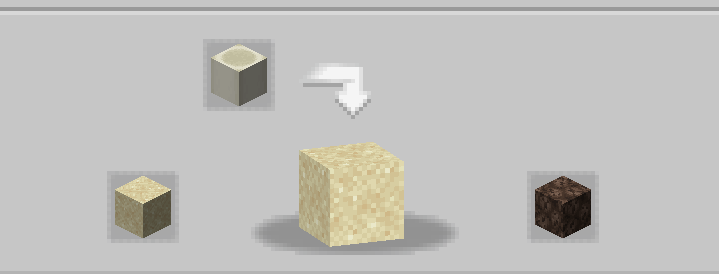
इस मॉड का उद्देश्य खिलाड़ियों को नेदर तक पहुँच के बिना भी ज़्यादातर नेदर संसाधन बनाने और ऑटोमेट करने की संभावना देना है! इसमें Blazes, Netherite, Netherrack, या नेदर के पीछे लॉक किसी भी चीज़ को शामिल किया गया है जो आप सोच सकते हैं। अगर आपको लगता है कि कुछ रेसिपी असंतुलित हैं/काम नहीं कर रही हैं/गायब हैं, तो मुझे कमेंट सेक्शन में बताएं💬!
अक्सर पूछे जाने वाले प्रश्न (FAQ):
▶प्रश्न: रेसिपी कैसे देखूँ? उत्तर: आप JEI या EMI जैसे रेसिपी-देखने वाले मॉड इस्तेमाल कर सकते हैं।
▶प्रश्न: क्या इस ऐडऑन को मौजूदा वर्ल्ड से हटाने/जोड़ने पर समस्याएँ होंगी? उत्तर: आप बिना किसी परेशानी के इसे किसी भी वर्ल्ड से सुरक्षित रूप से हटा/जोड़ सकते हैं।
▶प्रश्न: क्या यह मॉड कभी fabric पर आएगा? उत्तर: आएगा! यहाँ क्लिक करें!
▶प्रश्न: क्या यह ऐड-ऑन 6.0.x के लिए उपलब्ध है? उत्तर: हाँ, है!
▶प्रश्न: मॉड के लिए आगे क्या? उत्तर: ऐड-ऑन अभी रोका हुआ है क्योंकि हम अन्य प्रोजेक्ट्स पर काम कर रहे हैं। नई सामग्री और बैलेंसिंग की योजना है, जैसे ectoplasm की शुरुआत, लेकिन अभी आपको इंतज़ार करना होगा!
▶कोई और सवाल? आप Honeycomb Studio के Discord Server में शामिल होकर वहाँ पूछ सकते हैं!
माफ़ करें अगर मैं गलतियाँ करता हूँ, मैं फ़्रेंच हूँ.. अगर आपको वर्तनी की गलतियाँ दिखें, तो कृपया मुझे बताएं!
यह मॉड नेदर को बंद नहीं करता!
Create: Netherless ((Neo)Forge) कैसे इंस्टॉल करें
With Millida Launcher
Install Millida Launcher
The launcher is free: download it at millida.net/launcher and sign in with any nickname.
Click “Install” on this page
The launcher opens and installs the mod for Minecraft 1.19.2–1.21.1 on Forge or NeoForge automatically.
Launch the game
A profile with it appears in the launcher: click “Play”.
Manually
Install Forge or NeoForge
The loader must match the game version of the mod file, for example Minecraft 1.21.1. After installing it, a separate profile appears in your launcher.
Download the file for your version
In the version list above, pick the file create_netherless-2.0.0-1.21.1.jar (30 KB) for your game version and loader.
Put it in the mods folder
The folder is inside .minecraft (Windows: %appdata%\.minecraft\mods). If it does not exist, create it.
Launch the loader profile
Open “Mods” in the main menu: Create: Netherless ((Neo)Forge) should be in the list.
Minecraft 1.21.1 runs on Java 21: with a different Java version the game may close right after launch.
वर्ज़न
डिपेंडेंसी के साथ
| Minecraft | लोडर | फ़ाइल | तारीख़ | क्रियाएँ |
|---|---|---|---|---|
| 1.21.1 | NeoForge | create_netherless-2.0.0-1.21.1.jar30.2 KB 65 | ||
| 1.20.1 | Forge | create_netherless-2.0.0-1.20.1.jar30.1 KB 19 | ||
| 1.19.2 | Forge | Create: Netherless 1.19.2-1.137.6 KB 1 |
FAQ
Which Minecraft versions does Create: Netherless ((Neo)Forge) work on?
There are files for 1.21.1, 1.20.1, 1.19.2. The newest is 1.21.1.
Does Create: Netherless ((Neo)Forge) need other mods?
The author lists no required dependencies: the Forge or NeoForge loader is enough.
Which Java does Create: Netherless ((Neo)Forge) need?
Minecraft 1.21.1 runs on Java 21. If the game closes right after launch, the usual cause is the wrong Java version in the profile settings.
Where can I download Create: Netherless ((Neo)Forge) safely?
On this page: the file create_netherless-2.0.0-1.21.1.jar (30 KB) is stored on Millida’s server, with no link shorteners. SHA-1 checksum: 2d3499b77c8bcbe8c7a301750271c3d2a0b35cbe.
रिव्यू
Create: Netherless ((Neo)Forge) को सबसे पहले रेट करें


