
Minecraft 1.20.1, 1.21.1 के लिए Construction Sticks मॉड
स्टिक्स जो निर्माण को आसान बनाती हैं
 NeoForge
 Forge
ForgeConstruction Sticks मॉड के बारे में
Construction Sticks आपको एक साथ कई ब्लॉक रखने की सुविधा देती हैं, एक बार में 1024 तक, आपके सामने की दिशा में आपके निर्माण को बढ़ाती हैं। आप अपनी स्टिक को अपग्रेड करके उसकी क्षमताओं को बढ़ा सकते हैं, जिससे निर्माण तेज़ और अधिक कुशल हो जाता है।
Sticks
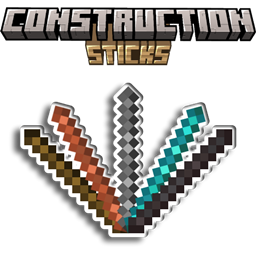
Construction Sticks के पाँच अलग-अलग टियर हैं: Wood, Copper, Iron, Diamond, और Netherite। प्रत्येक टियर बेहतर टिकाऊपन और ब्लॉक रखने की क्षमताएँ प्रदान करता है, और इसे टेम्पलेट्स के साथ और अपग्रेड किया जा सकता है।
Stick Durability Max. Blocks Upgradeable Angel Distance Max. Blocks (Destroy)
Wood 59 3 Yes 1 1
Copper 131 9 Yes 2 3
Iron 250 27 Yes 4 9
Diamond 1561 128 Yes 8 25
Netherite 2031 1024 Yes 16 81
Upgrade Templates
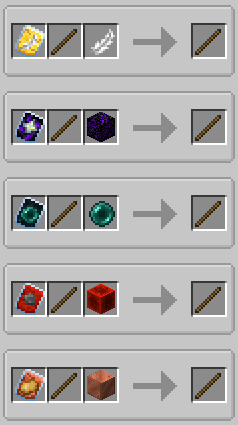
Templates आपकी Construction Sticks में विशेष अपग्रेड जोड़ते हैं। किसी टेम्पलेट को लागू करने के लिए, Smithing Table में स्टिक, टेम्पलेट और एक अतिरिक्त आइटम को मिलाएँ।
Available Templates:
- Angel: आप जिन ब्लॉक्स के सामने हैं उनके पीछे या हवा में ब्लॉक रखें।
- Destruction: ब्लॉक्स को जल्दी और कुशलता से हटाएँ।
- Unbreakable: टिकाऊपन की खपत को हटाता है, जिससे अनंत ब्लॉक रखने की सुविधा मिलती है।
- Battery: स्टिक को टिकाऊपन के बजाय RF का उपयोग करने देता है।
Additional Features
- Shulker Boxes, Bundles, और अन्य Containers: इन्हें बिल्डिंग ब्लॉक्स के स्रोत के रूप में उपयोग करें।
- Offhand Placement: आप जिस ब्लॉक को देख रहे हैं उसके बजाय अपने offhand से ब्लॉक रखें।
Disclaimer
यह मूल ConstructionWand मॉड का एक फोर्क है, जो MIT लाइसेंस के अंतर्गत है। इसे नई सुविधाओं और सुधारों को जोड़ने के लिए संशोधित किया गया है, जिसमें नए टियर, टेम्पलेट्स और कार्यक्षमता शामिल हैं। मूल मॉड Theta-Dev द्वारा बनाया गया था।
सर्वर चाहिए? प्रोमो कोड "mrbysco" का उपयोग करके अपने पहले महीने पर 20% छूट पाएँ
प्रश्नों के लिए बेझिझक मेरे Discord से जुड़ें।
हमें सपोर्ट करना चाहते हैं?
-Mrbysco
-ShyNieke
Construction Sticks कैसे इंस्टॉल करें
With Millida Launcher
Install Millida Launcher
The launcher is free: download it at millida.net/launcher and sign in with any nickname.
Click “Install” on this page
The launcher opens and installs the mod for Minecraft 1.20.1–26.1.2 on Forge or NeoForge automatically.
Launch the game
A profile with it appears in the launcher: click “Play”.
Manually
Install Forge or NeoForge
The loader must match the game version of the mod file, for example Minecraft 26.1.2. After installing it, a separate profile appears in your launcher.
Download the file for your version
In the version list above, pick the file ConstructionSticks-26.1.2-3.2.1.jar (264 KB) for your game version and loader.
Put it in the mods folder
The folder is inside .minecraft (Windows: %appdata%\.minecraft\mods). If it does not exist, create it.
Launch the loader profile
Open “Mods” in the main menu: Construction Sticks should be in the list.
वर्ज़न
डिपेंडेंसी के साथ
| Minecraft | लोडर | फ़ाइल | तारीख़ | क्रियाएँ |
|---|---|---|---|---|
| 26.1.2 | NeoForge | ConstructionSticks-26.1.2-3.2.1.jar264 KB | ||
| 1.21.1 | NeoForge | ConstructionSticks-1.21.1-1.5.0.jar259 KB 5 | ||
| 1.20.1 | Forge, NeoForge | ConstructionSticks-1.20.1-1.2.7.jar253 KB 5 | ||
| 1.20.1 | Forge, NeoForge | ConstructionSticks-1.20.1-1.2.6.jar253 KB | ||
| 1.21.1 | NeoForge | ConstructionSticks-1.21.1-1.0.0.jar189 KB |
रिव्यू
Construction Sticks को सबसे पहले रेट करें


