

Minecraft 1.20.1, 1.21.1 के लिए Accessories मॉड
Minecraft के लिए एक विस्तारणीय और डेटा-संचालित एक्सेसरी मॉड
 Fabric
 NeoForge
 Forge
ForgeAccessories मॉड के बारे में
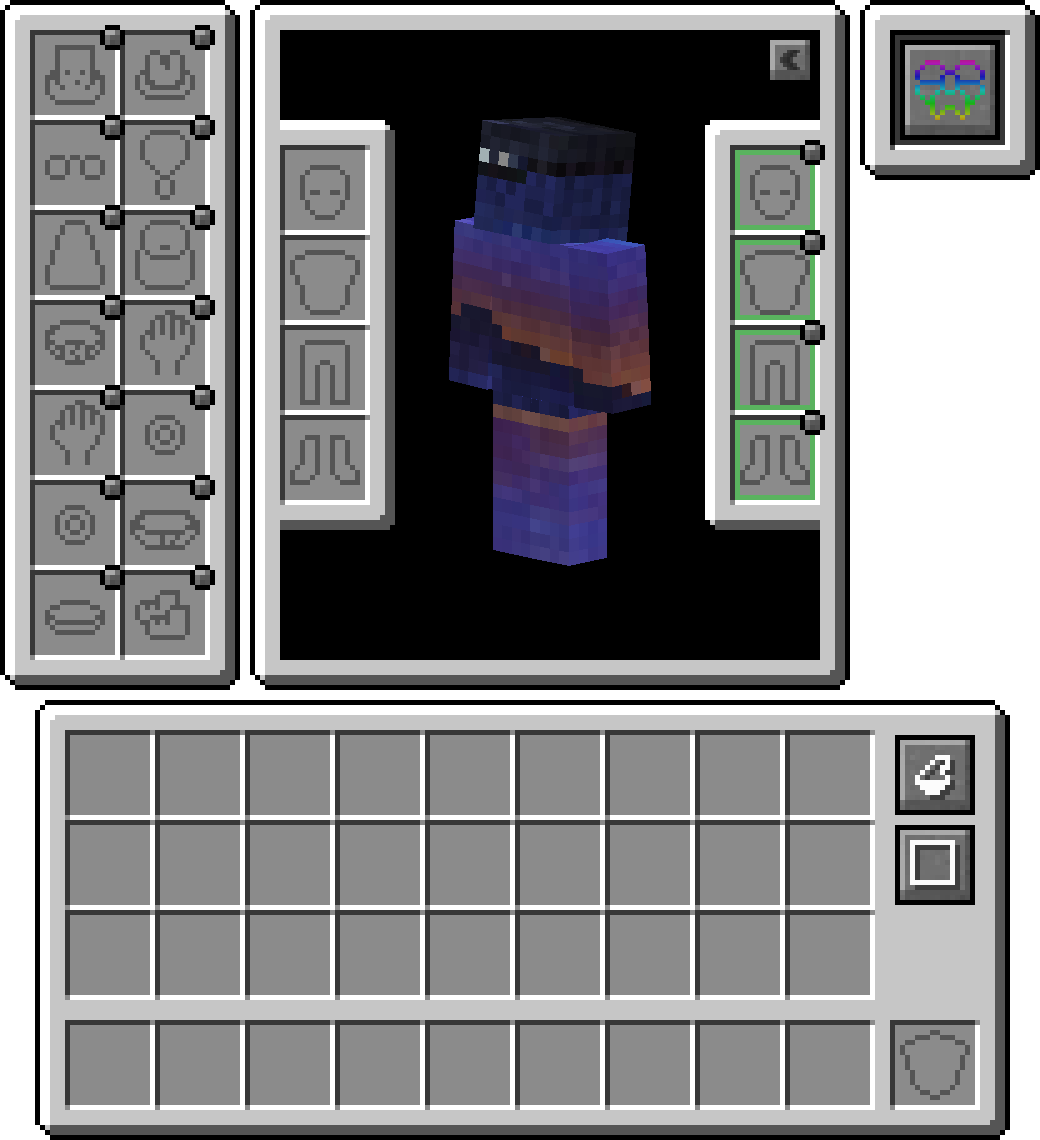
Accessories, NeoForge और Fabric के लिए एक Data-Driven Accessory मॉड है, जिसमें जहाँ संभव हो दोनों प्लेटफ़ॉर्मों के लिए एक Common API का उपयोग करने पर ज़ोर दिया गया है।
इस लाइब्रेरी के API की शैली Curios और Trinkets के कामों पर आधारित है, और Minecraft के लिए Accessory मॉड्स पर उनके काम के लिए TheIllusiveC4 और emilyploszaj दोनों को श्रेय दिया जाता है।
विशेषताएँ
Compatibility Layer
Trinket और Curios जैसे मौजूदा API मुख्य रूप से उपयोग किए जाने के कारण, आप एकीकृत अनुभव के लिए Accessories Compatibility Layer इंस्टॉल कर सकते हैं ताकि वे Accessories के अंतर्गत काम करें
Model Translation API
डेवलपर्स के लिए एक उचित transformation API शामिल है जिसका उपयोग native Accessories को रेंडर करने में किया जाता है, जो किसी दिए गए entity model के parts से उचित लिंकिंग की अनुमति देता है, जिससे Fresh Animations जैसे EMF Resourcepacks के लिए उचित समर्थन और Figura जैसे अन्य रेंडरिंग मॉड्स के लिए नियोजित समर्थन सक्षम होता है।
Equipped Accessories का प्रबंधन
अन्य tamed entities तक पहुँचने की क्षमता अन्य मॉड्स को pets या mounts के लिए accessory items रखने की सुविधा देती है। साथ ही यह server owners के लिए ज़रूरत पड़ने पर अन्य players के accessories को सीधे management commands के उपयोग के बिना प्रबंधित करने में उपयोगी है। बस shift दबाएँ और किसी भी entity पर 'Accessories Open Screen' का उपयोग करें (यदि owned है, तो owner होना चाहिए) स्क्रीन खोलने के लिए, या यदि OPed हैं तो कमांड /accessories edit <target> चलाएँ।
API Additions
यहाँ Accessories में लागू API के कुछ उदाहरण दिए गए हैं जो आपकी मॉड डेवलपमेंट में सहायता कर सकते हैं:
- NBT-based Accessories के लिए पूर्ण समर्थन: Wiki
- Piglin Neutral Items, Enderman Masks, Looting Adjustments, Fortune Adjustments, और Snow Walking Ability के लिए मौजूदा API Events: Wiki
- Mod Specific Accessories के लिए Unique Slot API: Wiki
Accessories कैसे इंस्टॉल करें
With Millida Launcher
Install Millida Launcher
The launcher is free: download it at millida.net/launcher and sign in with any nickname.
Click “Install” on this page
The launcher opens and installs the mod for Minecraft 1.20.1–1.21.1 on Fabric, Forge or NeoForge automatically.
Launch the game
A profile with it appears in the launcher: click “Play”.
Manually
Install Fabric, Forge or NeoForge
The loader must match the game version of the mod file, for example Minecraft 1.21.1. After installing it, a separate profile appears in your launcher.
Download the file for your version
In the version list above, pick the file accessories-fabric-1.1.0-beta.53+1.21.1.jar (1.0 MB) for your game version and loader.
Put it in the mods folder
The folder is inside .minecraft (Windows: %appdata%\.minecraft\mods). If it does not exist, create it.
Launch the loader profile
Open “Mods” in the main menu: Accessories should be in the list.
Minecraft 1.21.1 runs on Java 21: with a different Java version the game may close right after launch.
वर्ज़न
डिपेंडेंसी के साथ
| Minecraft | लोडर | फ़ाइल | तारीख़ | क्रियाएँ |
|---|---|---|---|---|
| 1.21.1 | Fabric | [1.21.1] Accessories [Fabric] - 1.1.01 MB 15 | ||
| 1.21.1 | NeoForge | [1.21.1] Accessories [Neoforge] - 1.1.01 MB 26 | ||
| 1.20.1 | NeoForge, Forge | [1.20.1] Accessories [Neoforge] - 1.0.01 MB 42 | ||
| 1.20.1 | Fabric | Accessories Fabric 1.0.0 Alpha 27 for 1.20392 KB 15 | ||
| 1.20.1 | NeoForge | Accessories Neoforge 1.0.0 Alpha 27 for 1.20697 KB | ||
| 1.20.1 | NeoForge, Forge | Accessories Neoforge 1.0.0 Alpha 24 for 1.20696 KB |
FAQ
Which Minecraft versions does Accessories work on?
There are files for 1.21.1, 1.20.1. The newest is 1.21.1.
Is Accessories for Forge or Fabric?
There are files for Fabric: 1.20.1–1.21.1, for Forge: 1.20.1 and for NeoForge: 1.20.1–1.21.1.
Does Accessories need other mods?
The author lists no required dependencies: the Fabric, Forge or NeoForge loader is enough.
Which Java does Accessories need?
Minecraft 1.21.1 runs on Java 21. If the game closes right after launch, the usual cause is the wrong Java version in the profile settings.
Where can I download Accessories safely?
On this page: the file accessories-fabric-1.1.0-beta.53+1.21.1.jar (1.0 MB) is stored on Millida’s server, with no link shorteners. SHA-1 checksum: fa0b11de088893bb14aff945d0e8efdee165457b.
रिव्यू
Accessories को सबसे पहले रेट करें


