
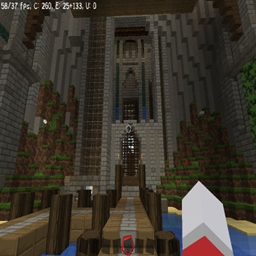
Minecraft 1.20.1, 1.21.1 के लिए TU69 map tutorial PS3 and XBOX Java Version
आपको nostalgia चाहिए तो PS3 और Xbox minecraft version की यह map अब mods के साथ java पर है।
TU69 map tutorial PS3 and XBOX Java Version मैप के बारे में
Require Create mod: https://www.curseforge.com/minecraft/mc-mods/create
Flywheel: https://www.curseforge.com/minecraft/mc-mods/flywheel
(Create mod is require)
TU69 Map Description (PS3/Xbox)
Welcome to the TU69 Map for Minecraft on PS3 and Xbox! This map has been designed to offer a unique experience inspired by the building and movement mechanics featured in the Create mod. While the Create mod is not directly available on these platforms, this map recreates some of the feelings and gameplay elements of the mod using the native game mechanics.
Theme and Environment
The TU69 Map stands out for its advanced mechanics, interactive structures, and complex puzzles. Players will explore various landscapes, ranging from lush forests, abandoned villages, to factories and mechanical systems, where ingenuity is put to the test. Each area of the map is filled with puzzles to solve, complex circuits, and mechanisms that mimic the functionality of the Create mod, such as block movement, mechanical pushes, and gears.
Key Features of the Map:
- Create-inspired Mechanical Systems: Dynamic structures that, although simple, mimic block movements, pistons, and complex mechanisms.
- Mini-games and Challenges: In dedicated zones, players can test their skills with interactive mechanisms, ingenuity challenges, and puzzles.
- Exploration and Adventure: Traverse uncharted lands, discover hidden secrets, and embark on an immersive adventure where every mechanism could hold the key to progressing further.
Description de la carte TU69 (PS3/Xbox)
Bienvenue dans la map TU69 pour Minecraft sur PS3 et Xbox ! Cette carte a été conçue pour offrir une expérience unique inspirée des mécaniques de construction et de mouvement présentes dans le mod Create. Bien que le mod Create ne soit pas directement disponible sur ces plateformes, cette carte recrée certaines des sensations offertes par ce mod à travers l’utilisation des outils et mécaniques natives du jeu.
Thème et Environnement
La map TU69 se distingue par ses mécanismes avancés, ses structures interactives et ses énigmes complexes. Les joueurs peuvent explorer des paysages variés allant de forêts luxuriantes, de villages abandonnés, à des usines et systèmes mécaniques où l'ingéniosité est mise à l'épreuve. Chaque section de la carte est remplie de puzzles à résoudre, de circuit complexes et de mécanismes qui imitent les éléments du mod Create, comme des mouvements de blocs, des poussées mécaniques et des engrenages.
Caractéristiques principales de la map :
- Systèmes mécaniques inspirés de Create : Des structures dynamiques qui, bien que simples, imitent le mouvement de blocs, de pistons et de mécanismes complexes.
- Mini-jeux et défis : À travers des zones dédiées, vous pourrez tester vos compétences avec des mécanismes interactifs, des défis d'ingéniosité et des puzzles.
- Exploration et aventure : Parcourez des terres inconnues, découvrez des secrets cachés et prenez part à une aventure immersive où chaque mécanisme pourrait bien être une clé pour avancer.
ENJOY IT ^^ ( achivement unlocked: You read this!)
TU69 map tutorial PS3 and XBOX Java Version कैसे इंस्टॉल करें
With Millida Launcher
Install Millida Launcher
The launcher is free: download it at millida.net/launcher and sign in with any nickname.
Click “Install” on this page
The launcher opens and installs the map for Minecraft 1.19.2–1.21.4 automatically.
Launch the game
A profile with it appears in the launcher: click “Play”.
Manually
Download the map archive
Pick the file TU69_Tutorial_World.zip (17 MB).
Unpack it into the saves folder
The world folder (with level.dat inside) must sit directly in .minecraft/saves.
Open the world
“Singleplayer”: the map will be in your world list.
On a server
Replace the world folder
Stop the server and put the map folder in place of world (or set its name in level-name).
Use the “To server” button
On Millida Hosting, the button at the top of the page uploads the file to your server and restarts it for you.
वर्ज़न
डिपेंडेंसी के साथ
| Minecraft | लोडर | फ़ाइल | तारीख़ | क्रियाएँ |
|---|---|---|---|---|
| 1.19.3 | — | TU69_Tutorial_World.zip16.8 MB 1 |
FAQ
Which Minecraft versions does TU69 map tutorial PS3 and XBOX Java Version work on?
There are files for 1.19.2–1.21.4, 15 versions in total. The newest is 1.21.4.
Where can I download TU69 map tutorial PS3 and XBOX Java Version safely?
On this page: the file TU69_Tutorial_World.zip (17 MB) is stored on Millida’s server, with no link shorteners. SHA-1 checksum: 915d0f4b02074b52c07067f9112e1be607c74e7f.
रिव्यू
TU69 map tutorial PS3 and XBOX Java Version को सबसे पहले रेट करें



