
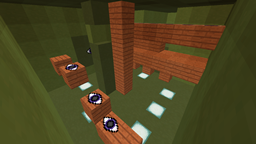
Minecraft 1.8.8 के लिए Look Up मैप
आप एक हरे कमरे में हैं जिससे निकलने का कोई रास्ता नहीं है, जब आप बाहर निकलते हैं तो आप एक नए कमरे में पहुंचते हैं जिसमें एक नई पहेली है...
Look Up
a map by: vilder50
This is a small puzzle map by me (vilder50).
Story: you look around you see that you are trapped in a room,
But you find your way out of it and get into a new room with a new puzzle in.
Screenshots:
Info:
if you record this map then please put the download link to this map in the description =)
you are not allowed to cheat.
This map was made in 11 hours!
the map takes 10-20 minutes to complete.
this is a single player map.
forum post: http://www.minecraftforum.net/forums/mapping-and-modding/maps/2280595-look-up-a-short-puzzle-map
Look Up कैसे इंस्टॉल करें
With Millida Launcher
Install Millida Launcher
The launcher is free: download it at millida.net/launcher and sign in with any nickname.
Click “Install” on this page
The launcher opens and installs the map for Minecraft 1.8.3–1.8.8 automatically.
Launch the game
A profile with it appears in the launcher: click “Play”.
Manually
Download the map archive
Pick the file Look Up.zip (532 KB).
Unpack it into the saves folder
The world folder (with level.dat inside) must sit directly in .minecraft/saves.
Open the world
“Singleplayer”: the map will be in your world list.
On a server
Replace the world folder
Stop the server and put the map folder in place of world (or set its name in level-name).
Use the “To server” button
On Millida Hosting, the button at the top of the page uploads the file to your server and restarts it for you.
वर्ज़न
डिपेंडेंसी के साथ
| Minecraft | लोडर | फ़ाइल | तारीख़ | क्रियाएँ |
|---|---|---|---|---|
| 1.8.8 | — | Look Up532 KB | ||
| 1.8.3 | — | Look Up I531 KB |
रिव्यू
Look Up को सबसे पहले रेट करें



