
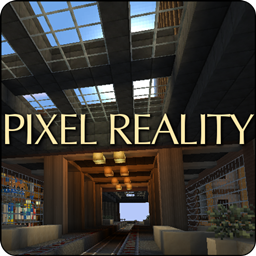
Pixel Reality Resource pack for Minecraft 1.12.2, 1.17.1
[1.17] The only realistic pack at default resolution, with custom lighting and sky, and complex biome colors.
The only realistic texture pack at default resolution!
Includes (most) blocks, items, armors, mobs, weather, particles, complex biome colors, custom lighting, custom clouds and sky, a stylish, minimalist graphical interface and a few add-ons with optional variations.
Realistic colors, subtle shading, seamless tiling, unbelievable detail, everything was designed to make Minecraft look more real without sacrificing its blocky style. This is not your average flat, amateurish 16x pack!

You're free to use and distribute this pack or parts of it as long as you:
- don't make any money from it
- apply to it the same license or similar ones
- clearly state where you took it from by linking to this page
Thanks!
NOTE: you don't need mods to correctly view this pack in game, but if you use Optifine you'll enjoy a much better experience, especially regarding lighting, colors and sky effects.

The Pixel Reality family
Pixel Reality Luminance
This pack features lighting effects only, all textures stay vanilla. Excellent if you just want a more realistic experience but don't care for different graphics. Includes many versions, from full changes to lightmaps to realistic shadows only.
Pixel Reality Atmosphere
Adds a realistic sky to vanilla or any pack, of any resolution.
This pack is also available for Minecraft Bedrock Edition (Win10/console/mobile): Pixel Reality
How to install Pixel Reality
With Millida Launcher
Install Millida Launcher
The launcher is free: download it at millida.net/launcher and sign in with any nickname.
Click “Install” on this page
The launcher opens and installs the resource pack for Minecraft 1.12.2–1.17.1 automatically.
Launch the game
A profile with it appears in the launcher: click “Play”.
Manually
Download the archive
Pick the file Pixel Reality 1.17.zip (10 MB) for your game version. No need to unpack it.
Put it in the resourcepacks folder
The easiest way: “Options”, then “Resource Packs”, then “Open Pack Folder”, and drag the archive there.
Enable the pack
In the same window, move the pack to the right-hand “Selected” column and click “Done”.
Versions
With dependencies
| Minecraft | Loader | File | Date | Actions |
|---|---|---|---|---|
| 1.12.2 | — | Pixel Reality 1.12.2-4.zip9.1 MB 2 | ||
| 1.17.1 | — | Pixel Reality 1.17.zip10.2 MB |
Reviews
Be the first to rate Pixel Reality


