
Mini Debug Menu Resource pack for Minecraft 1.21
This resource pack brings several features of the Minecraft Java Edition Debug Menu to Bedrock Edition. While it’s not possible to replicate every feature due to platform limitations, the pack includes some of the essential and useful tools.
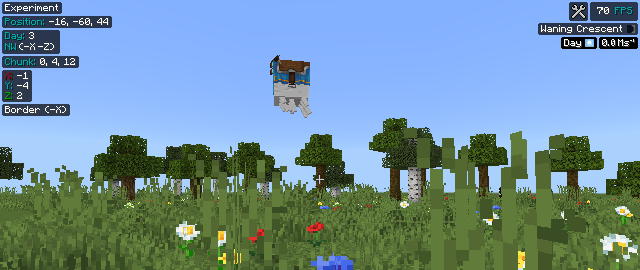
Features:
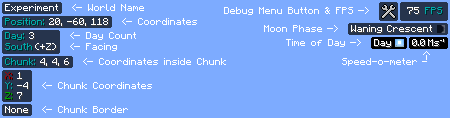
- World Name: Shows the name of the world currently being played

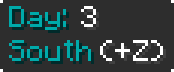
- Day count and Direction: Shows the current day count and the Direction facing
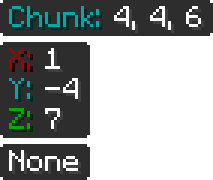
- Chunk Information: Shows inforation about the chunk you're currently in
- Your location relative to the chunk
- The coordinate of the chunk
- Chunk Border
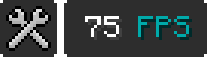
- FPS: Shows FPS count. [The button only shows in touch devices]
- Moon Phase: Shows current moon phase

- Time of Day and Speed-o-meter: Shows the current time (e.g.- Day, Noon etc.) of day. Speed-o-meter measures the speed of the player

N.B: Make sure to turn on "Show coordinates" and "Show days played"
Subpacks:
- Always shown: All data are always shown on screen.
- Toggle: Same as "Always shown" but the debug menu appears if F8 is pressed. [Or the button for Android/iOS]
Known Issue:
- Time of Day and Speed-o-meter doesn't show while Gliding with Elytra. It is very hard to fix.
MSG:
I'm changing this from a resource pack to an add-on for incompatibility issues. But that'll disable the achievements. So, this is the last version of this pack that's still only resource pack.
I'm trying to find a way to update the information instantly or at least very fast. Then I'll upload the add-on.
Warning: If you have a resource pack that modifies the style of the position text, then it might cause crash. To avoid any issues, keep this pack on top.
MCPEDL Link: Mini Debug Menu
*** - If you find any bugs or issues, feel free to let me know in my Discord
How to install Mini Debug Menu
With Millida Launcher
Install Millida Launcher
The launcher is free: download it at millida.net/launcher and sign in with any nickname.
Click “Install” on this page
The launcher opens and installs the resource pack for Minecraft 1.18–1.21 automatically.
Launch the game
A profile with it appears in the launcher: click “Play”.
Manually
Download the archive
Pick the file Mini Debug Menu [V-1.3].mcpack (42 KB) for your game version. No need to unpack it.
Put it in the resourcepacks folder
The easiest way: “Options”, then “Resource Packs”, then “Open Pack Folder”, and drag the archive there.
Enable the pack
In the same window, move the pack to the right-hand “Selected” column and click “Done”.
Versions
With dependencies
| Minecraft | Loader | File | Date | Actions |
|---|---|---|---|---|
| 1.18 | — | Mini Debug Menu [V-1.3]41.9 KB 1 |
FAQ
Which Minecraft versions does Mini Debug Menu work on?
There are files for 1.21, 1.20, 1.19, 1.18. The newest is 1.21.
Where can I download Mini Debug Menu safely?
On this page: the file Mini Debug Menu [V-1.3].mcpack (42 KB) is stored on Millida’s server, with no link shorteners. SHA-1 checksum: 0717e172e3610b9db425bfd3087cc75e63855325.
Reviews
Be the first to rate Mini Debug Menu



