

Forager Resource pack for Minecraft 1.20.1, 1.21.1
16x16 Natural inspired look for Minecraft
- downloads
- 8 downloads
- views
- 75 views
- Updated
- Updated 13.10.2026
- 1.19.4 — 26.3
 Vanilla game
- Client
About the Forager resource pack
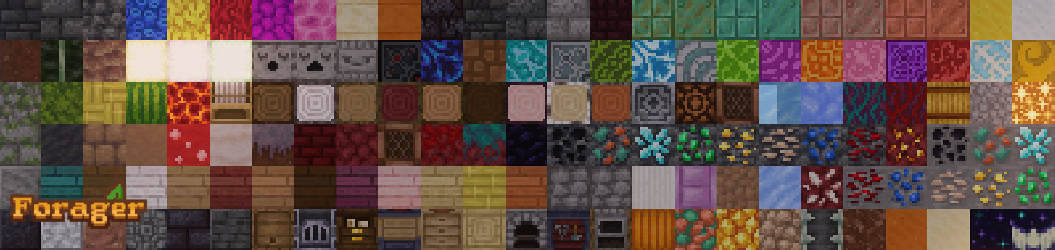
Forager is a 16x Resourcepack that aims to make Minecraft feel rustic, cozy, and cute while enhancing details through extra 3D models and tons of varied textures.

Vanilla & Modded compatible
Check out the Add-ons page for extra packs!

Features
- Custom mob models
- 3D foliage and blocks: from mushrooms to iron bars to ladders
- Varied textures: randomized grass textures and heights
- Fixes and changes to incorrect resolutions and errors
Mod support
- Apple skin
- Particle Effects
- Subtle Effects
- Visuality
- Guard Villagers
- Jade
- TrashSlot
- Natures Compass
- Explorers Compass
- Just Enough Items
- Roughly Enough Items
Mods Required for full features
- OptiFine or EMF&ETF for custom entity/mob models (Pack will NOT work without ETF when using EMF)
Terms
Feel free to:
- Add to servers
- Modify content for personal use
- Share with proper credit
Please do not:
- Reupload or sell
- Modify or copy designs and/or claim ownership
- Share without credit
- Feed into any type of AI in anyway, shape, or form
If you are unsure, please ask permission in a DM
If you want to get the latest updates or access to newest versions first, check out my Patreon or Kofi!
How to install Forager
With Millida Launcher
Install Millida Launcher
The launcher is free: download it at millida.net/launcher and sign in with any nickname.
Click “Install” on this page
The launcher opens and installs the resource pack for Minecraft 1.19.4–26.3 automatically.
Launch the game
A profile with it appears in the launcher: click “Play”.
Manually
Download the archive
Pick the file Forager.zip (10.0 MB) for your game version. No need to unpack it.
Put it in the resourcepacks folder
The easiest way: “Options”, then “Resource Packs”, then “Open Pack Folder”, and drag the archive there.
Enable the pack
In the same window, move the pack to the right-hand “Selected” column and click “Done”.
Versions
With dependencies
| Minecraft | Loader | File | Date | Actions |
|---|---|---|---|---|
| 26.3 | — | 26.310 MB 4 | ||
| 26.3 | — | 26.39.6 MB 2 | ||
| 26.3 | — | 26.39.6 MB 1 | ||
| 26.3 | — | 26.39.6 MB | ||
| 26.2 | — | 26.29.6 MB |
FAQ
Which Minecraft versions does Forager work on?
There are files for 1.19.4–26.3, 25 versions in total. The newest is 26.3.
Does Forager need mods?
No, the resource pack works in the plain game without loaders: put it into the resourcepacks folder and enable it in the options.
How do I download Forager?
With Millida Launcher: it installs Forager into a modpack by itself, for the right game version and loader. The launcher is free.
Reviews
Be the first to rate Forager



