
Font Trim Resource pack for Minecraft 1.20.1, 1.20.6
Fancy font and icons helpful on gameplay
About the Font Trim resource pack
Module of Vanilla Expansion Collection
Description:
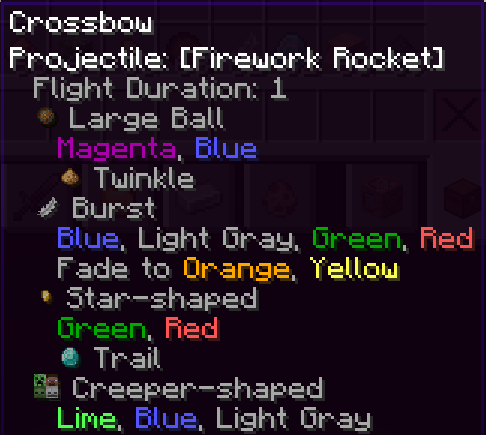
A vanilla+ custom font to allow to see helpful things like ingredient material , item rarity and warden stages
All feature implemented:
Goat Horns: An updated port from Goat Utils
- All horns have a custom icon that can define the rarity
Subtitles: An updated port from Warden Gadgets
- Shrieker Subtitles show how many shrieker left after the spawn of warden and some warden stages
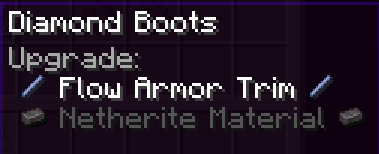
Smithing Template:
- A custom font to allow to see ingredient materials and ingredient of trimming
Firework ingredients:
- A custom font to allow to see ingredient materials and colors
Pottery Sherd on Decorative Pots
- A custom font to allow to see shards used as item icon
Banner Pattern icons
- A custom font to allow to see colors and pattern used on ANY banner
Falling Block Damage
- A custom font to allow to see the damage (anvil was multiplied on block height)
Poison Damage
- A custom font to see the damage of poison
More intuitive Tooltips
- Custom font to allow a view more intuitive on any armor
Absorption and Regen Hearts
- A custom font to see hearts from absorption and regeneration effects from consumable items
Enchantments Overhal
- Any enchantment now show with all valid items to be applied
- All enchantments with levels now show with "max level" tip before the level
- All enchantments levels are now colored
How to install Font Trim
Install Millida Launcher
The launcher is free: download it at millida.net/launcher and sign in with any nickname.
Click “Install” on this page
The launcher opens and installs the resource pack for Minecraft 1.20–1.20.6 automatically.
Launch the game
A profile with it appears in the launcher: click “Play”.
Versions
With dependencies
| Minecraft | Loader | File | Date | Actions |
|---|---|---|---|---|
| 1.20.2 | — | 1.0.371.8 KB |
FAQ
Which Minecraft versions does Font Trim work on?
There are files for 1.20–1.20.6, 7 versions in total. The newest is 1.20.6.
How do I download Font Trim?
With Millida Launcher: it installs Font Trim into a modpack by itself, for the right game version and loader. The launcher is free.
Reviews
Be the first to rate Font Trim


