

About the Control overhaul resource pack
https://youtu.be/NFYvKK31z58?si=9S9O6EPFo_DqxYTR
Control Overhaul v1
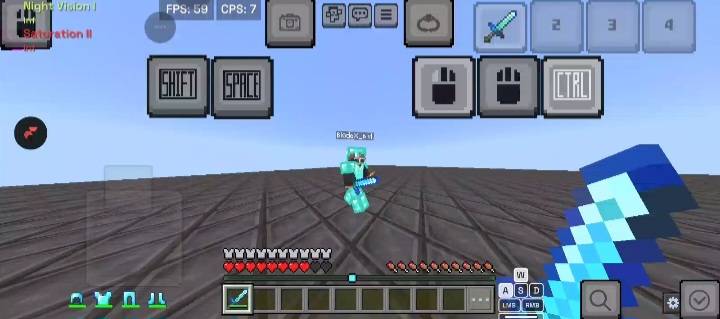
Tired of clunky touch controls clogging up your screen while playing Minecraft Bedrock/Pocket Edition? Control Overhaul v1 redesigns your mobile HUD into a streamlined, high-efficiency interface optimized for fast-paced PvP, End Crystal fighting, and overall smoother gameplay.
🔑 Key Features
1. Cleaner On-Screen Action Buttons
Hitting & Placing Refined: Replaces bulky action icons with transparent, minimalist, high-contrast buttons for hitting and block placing.
Unobstructed View: Maximizes screen visibility so you never lose sight of your target or crosshair in high-stakes fights.
2. Custom Subpack Configurations
Customize your HUD according to your preferred layout directly from the Resource Pack settings:
Default Resolution: Keeps intuitive, clean icon designs for quick touch targets.
Clean v2 Mode: Replaces standard button icons with crisp text labels (LEFT, RIGHT, CTRL, SHIFT, SPACE) for a distinct, minimal aesthetics layout.
3. Built for PvP Performance
Perfect for Crystal PvP, Anchor PvP, and fast-paced mobile combat.
Provides immediate visual clarity when swapping items, placing crystals, or pearling under pressure.
Lightweight resource size with zero impact on frame rates.
How to install Control overhaul
With Millida Launcher
Install Millida Launcher
The launcher is free: download it at millida.net/launcher and sign in with any nickname.
Click “Install” on this page
The launcher opens and installs the resource pack for Minecraft 1.21.130–26.30 automatically.
Launch the game
A profile with it appears in the launcher: click “Play”.
Manually
Download the archive
Pick the file CleanButtonProjV1.mcpack (20 KB) for your game version. No need to unpack it.
Put it in the resourcepacks folder
The easiest way: “Options”, then “Resource Packs”, then “Open Pack Folder”, and drag the archive there.
Enable the pack
In the same window, move the pack to the right-hand “Selected” column and click “Done”.
Versions
With dependencies
| Minecraft | Loader | File | Date | Actions |
|---|---|---|---|---|
| 1.21.130 | — | CleanButtonProjV1.mcpack19.5 KB |
FAQ
Which Minecraft versions does Control overhaul work on?
There are files for 26.30, 26.11, 1.21.132, 1.21.131, 1.21.130. The newest is 26.30.
Where can I download Control overhaul safely?
On this page: the file CleanButtonProjV1.mcpack (20 KB) is stored on Millida’s server, with no link shorteners. SHA-1 checksum: 25de58bed1ae9a42529a044241ce586ddf794db6.
Reviews
Be the first to rate Control overhaul


