

VIP wardrobe Plugin for Minecraft 1.8.1
A new wardrobe plugin for your hub servers!
About the VIP wardrobe plugin
VIP wardrobe is as the says a wardrobe plugin allowing players to equip armor, the layout is very user friendly and VERY easy to navigate!
NEW RAINBOW ARMOR UPDATE
Looking for an english youtuber to showcase the plugin
1800 downloads!

What does it do?:
VIP wardrobe is a great plugin to use on your hub server, just type /wardrobe and it will open up a custom inventory menu(As seen in picture below). All you have to do is click one of the armor pieces you want to equip! If you want to equip a whole set click the item at the top. You can mix and match by selecting different armor pieces to go with each other. Currently this is a pretty plain plugin but if you think something should be added don't hesitate to ask
This is my version of a wardrobes plugin you can currently equip gold, diamond, iron, chain armor, almost every block in the game, and lots of colored armor
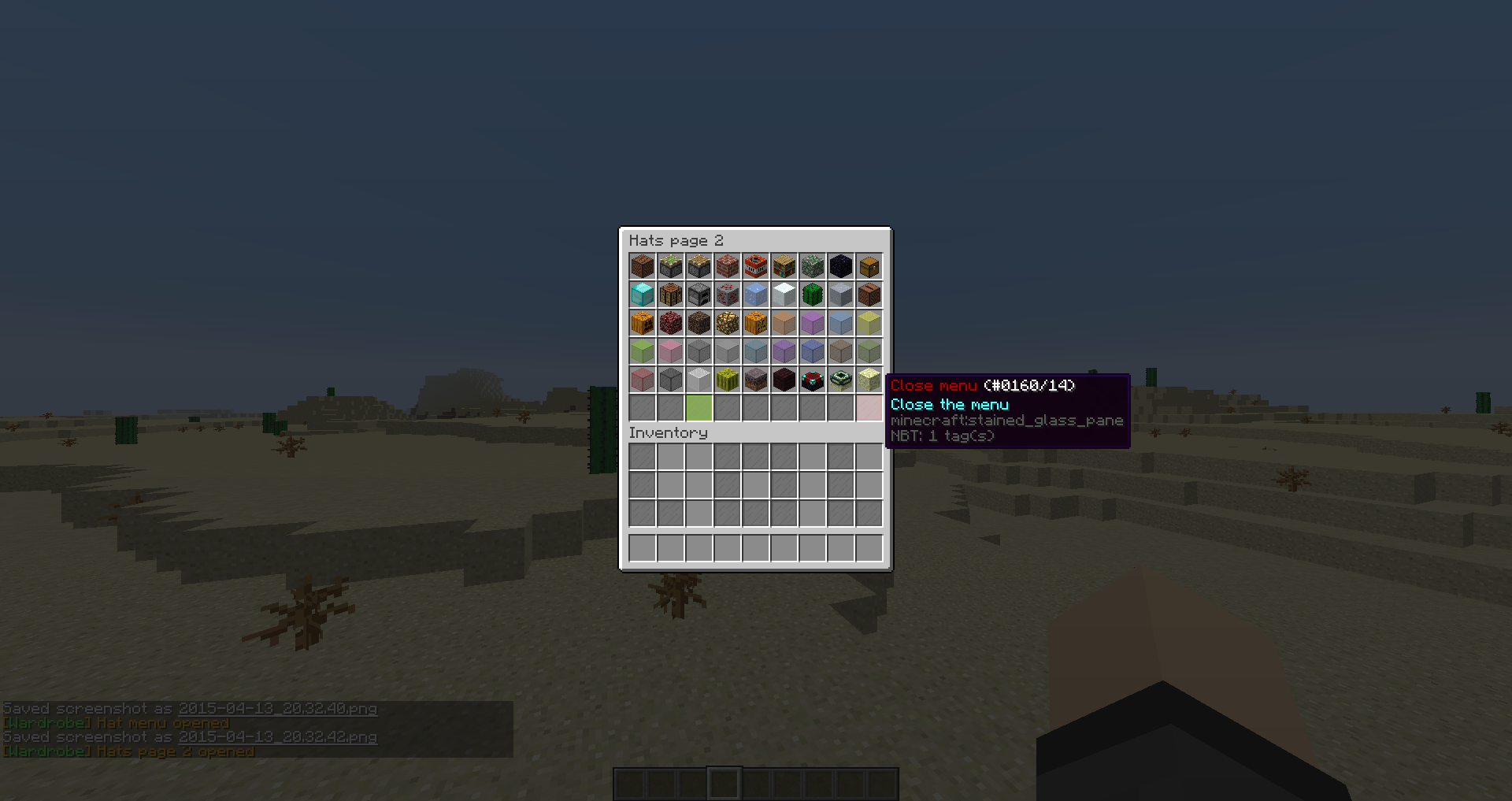
Permissions:
- wardrobe.gui: This allows the player to open the gui and use all armor features
- wardrobe.*: Gives the player all armor types [BROKEN ATM]
- wardrobe.cancelarmortakeoff: Stops the user from taking off armor
- wardrobe.gold: Gives the player the gold armor type
- wardrobe.diamond: Gives the player the diamond armor type
- wardrobe.iron: Gives the player the iron armor type
- wardrobe.chain: Gives the player the chain armor type
- wardrobe.leather: Gives the player the leather armor type
- wardrobe.enchant: Lets the user enchant their armor
- wardrobe.signmake: Lets the user make a sign that can be right clicked to open wardrobe
- wardrobe.hats.*: Allows access to all hats
- wardrobe.hats.<MATERIAL>: Allows access to a specific hat (Look for the block here http://pastebin.com/P34xhA72 and make sure it is in the hat gui first ex:dirt block would wardrobe.hats.DIRT)
- wardrobe.heads: Allows the user to equip heads
- wardrobe.colorarmor: Allows the user to equip colored leather armor
- wardrobe.rainbow: lets the user equip rainbow armor
Commands:
/wardrobe: Opens the gui to equip armor
Config:
(New option at line 120) http://hastebin.com/imoqevinur.vala (If you need to replace config just delete it and then reload/restart server thanks :)
To do:
- Add leather armor [DONE]
- Add a sign menu[DONE]
- Add colored leather armor [DONE MORE COMING IN FUTURE]
- Add per armor type permissions [DONE]
- Add config to set the wardrobe prefix [DONE]
- Add more pictures! [DONE]
- Add a nicer layout [DONE]
- Add option to disable in certain worlds
- Add a menu to show unlocked hats
- Add per hat permissions. Suggested by: TenchiPlaysMC [DONE]
Features:
- Type /wardrobe to open a gui with 5 sets of armor for your players to equip. The lava buckets on the left removes the piece of armor(All armor types are in-line top bottom=Boots)
- Create a sign by typing [wardrobe] when creating a sign, all you have to do to use it is right click it! (You can even add your own message on the third and fourth line of the sign)
- Use a custom item(set in config) to open up the menu when you right click!
EXAMPLE:
http://dev.bukkit.org/bukkit-plugins/seans-wardrobe/images/ Is the pictures
Servers using this plugin:
- kubos.fluctis.com
- UnbreakableNetwork.mcraft.nl
- If you want your server to be featured here post the ip in the description
Tutorial video(s):
- [GERMAN] (New features have been added since)
- [CASTILIAN/SPANISH]
- [PORTUGESE]
If anyone wants to showcase this plugin we need an english tutorial video so just message me and you get your video showcased and channel/bukkitprofile in the credits :)
Thanks to:
- Jackalantern29 (Helped me when I got stuck)
- ManuGun's bukkitdev / His Youtube
- Tekno gamer (youtube channel)
Side notes:
- If you want VIP Wardrobe to be disabled in certain worlds user this: http://dev.bukkit.org/bukkit-plugins/perworldplugins/
- I am working on making it per world
How to install VIP wardrobe
A server on Paper or Spigot
The plugin runs on the server core for Minecraft 1.8.1; players do not need to install anything.
File goes into the plugins folder
Download the file Wardrobe.jar (88 KB) and put it into the server’s plugins folder.
Restart the server
On startup the plugin creates its own settings folder in plugins.
Or use the “To hosting” button
On Millida Hosting, the button at the top of the page uploads the file to your server and restarts it for you.
Minecraft 1.8.1 runs on Java 8: with a different Java version the game may close right after launch.
Versions
With dependencies
| Minecraft | Loader | File | Date | Actions |
|---|---|---|---|---|
| 1.8.1 | — | Wardrobe V 2.5 (Bug fixes and config option)88.5 KB |
FAQ
Which Minecraft versions does VIP wardrobe work on?
Only Minecraft 1.8.1: there are no files for other versions.
Do players need to install VIP wardrobe?
No, the plugin goes only on the server, into the plugins folder: players do not need to download anything.
Which Java does VIP wardrobe need?
Minecraft 1.8.1 runs on Java 8. If the game closes right after launch, the usual cause is the wrong Java version in the profile settings.
Where can I download VIP wardrobe safely?
On this page: the file Wardrobe.jar (88 KB) is stored on Millida’s server, with no link shorteners. SHA-1 checksum: fd49e3ba0475c1aeb7203f743af05397fd08c7f0.
Reviews
Be the first to rate VIP wardrobe


