
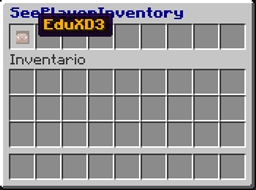
SeePlayerInventory - Real time inventory editor!
Description:
- Open a player's inventory as a chest and interact with it in real time.
- Add/Remove items from a players's inventory in real time.
- Add/Remove items from a player's enderchest.
- An easy way to look for illegal items.
- Allow players to request to see other player's inventory.
How to install SeePlayerInventory:
- Stop the server!
- Download the file: Up/Right.
- Drop it in your plugin bukkit folder.
- Start the server.
- Enjoy!
Commands:
Command Permission Description
/spi ? seeplayerinventory.use.help Show the help page from the plugin.
/spi open inv <player> seeplayerinventory.use.open.inv Open the inventory from a user.
/spi open ec <player> seeplayerinventory.use.open.enderchest Open the enderchest from a user.
/spi see inv <player> seeplayerinventory.use.see.inv View the Inventory from a user.
/spi see ec <player> seeplayerinventory.use.see.enderchest View the enderchest from a user.
/spi see chest seeplayerinventory.use.see.chest View the chest who your are looking at the moment.
/spi see request <player> seeplayerinventory.use.see.request Send a request to a player.
/spi see request <accept/decline> <player> seeplayerinventory.use.see.request Accepts or decline a players request.
/spi target seeplayerinventory.use.target See information about the Target Mode.
/spi target inv seeplayerinventory.use.target.inv Active/Deactivate the inventory Target Mode.
/spi target ec seeplayerinventory.use.target.enderchest Active/Deactivate the enderchest Target Mode.
/spi menu seeplayerinventory.use.menu Open the inventory with all user online(click on one face and you open her inventory).
/spi inspect seeplayerinventory.use.inspect //
/spi inspect toggle seeplayerinventory.use.inspect.toggle Active/Deactivate the target Mode to inspect the inventories.
/spi inspect togglevisibility seeplayerinventory.use.inspect.togglevisibility Active/Deactivate the ability for other players to inspect your inventory.
/spi inspect status seeplayerinventory.use.inspect.status Shows the inspection status of the toogle and toggle visibility.
/spi reload seeplayerinventory.use.reload Reload the Config.
.... seeplayerinventory.admin Access to all commands.
.... seeplayerinventory.use.open Access to the command /spi open if you haven't this permission you cant use any /spi open commands
.... seeplayerinventory.use.see Access to the command /spi see if you haven't this permission you cant use any /spi see commands
.... seeplayerinventory.checkupdates If you have this permissions and your enter to the server, the server will check for updates and tell your when a new version is available
Editing player's inventory:
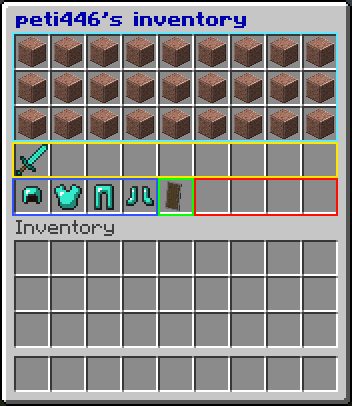
Inventory match up:
- Blue Cyan: Players Inventory.
- Yellow: Players Hotbar.
- Dark Blue: Players armour.
- Green: Players offhand slot.
- Red: Items in this slots will be doped in front of the player.
Bug Report/Suggestion:
Have a Bug and you want to report it? Please use the build in issues functionality, you can get there by pressing Issues at the top menu or visit here: https://dev.bukkit.org/projects/seeplayer-inventory/issues
Changelog:
Version 2.7
- + Upgraded version to support CraftBukkit/Spigot 1.16.2
Version 2.6
- + Upgraded version to support CraftBukkit/Spigot 1.16.1
- ! Fixed some color coding on inventories and tools producing two strange letters in front of name.
Version 2.5
- + Added bstats
Version 2.4
- + Added compatibility with Craftbukkit 1.15.2
- ! Fixed the updater checker
- ! Fixed some spelling mistakes in the menu
- ! Fixed server errors during open menu
The complete Changelog Here.
My other plugin:
SignWithLink: https://dev.bukkit.org/bukkit-plugins/signwithlink/
Metrics:
For more information about Metrics Click Here
How to install SeePlayerInventory
A server on Paper or Spigot
The plugin runs on the server core for Minecraft 1.16; players do not need to install anything.
File goes into the plugins folder
Download the file SeePlayerInventory-2.7.2.jar (92 KB) and put it into the server’s plugins folder.
Restart the server
On startup the plugin creates its own settings folder in plugins.
Or use the “To hosting” button
On Millida Hosting, the button at the top of the page uploads the file to your server and restarts it for you.
Minecraft 1.16 runs on Java 8: with a different Java version the game may close right after launch.
Versions
With dependencies
| Minecraft | Loader | File | Date | Actions |
|---|---|---|---|---|
| 1.16 | — | SeePlayerInventory V 2.7.292 KB |
FAQ
Which Java does SeePlayerInventory need?
Minecraft 1.16 runs on Java 8. If the game closes right after launch, the usual cause is the wrong Java version in the profile settings.
Where can I download SeePlayerInventory safely?
On this page: the file SeePlayerInventory-2.7.2.jar (92 KB) is stored on Millida’s server, with no link shorteners. SHA-1 checksum: 088b6d5d6f3a0547f387a3c603e66861b2272f23.
Reviews
Be the first to rate SeePlayerInventory


