
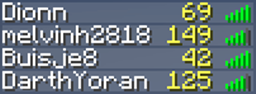
PingList Plugin for Minecraft
PingList is a simple plugin to show your players their ping to the server in the player list.
PingList
PingList is a simple plugin to show your players their ping to the server in the player list.
Setup
- Download the .jar.
- Copy it to your plugins folder.
- Start or reload the server.
- Optional: change settings in 'config.yml'.
Changelog
1.1.3:
- Updated to 1.7.
1.1.2:
- Updated to 1.6.2.
- Added a message in the console when a player is kicked.
1.1.1:
- Fixed the '0 ping' bug.
1.1:
- Added a kick system if someone's ping is too high.
Make sure you regenerate the config file if you've been using PingList 1.0.1 or 1.0 before!
1.0.1:
- Updated to 1.6.1.
1.0:
- First release.
Statistics
More fancy statistics can be found over at mcstats.org.
How to install PingList
A server on Paper or Spigot
The plugin runs on the server core; players do not need to install anything.
File goes into the plugins folder
Download the file PingList.jar (12 KB) and put it into the server’s plugins folder.
Restart the server
On startup the plugin creates its own settings folder in plugins.
Use the “To server” button
On Millida Hosting, the button at the top of the page uploads the file to your server and restarts it for you.
Versions
With dependencies
| Minecraft | Loader | File | Date | Actions |
|---|---|---|---|---|
| — | — | PingList 1.1.312.1 KB |
Reviews
Be the first to rate PingList


