

OceManaBar Plugin for Minecraft
Displays a mana bar floating on the screen with Spout
About the OceManaBar plugin
Introduction.
Last Dev Build
here is the last development build that contains ALL changes written here

03/05/2012
Hi, filled by requestes, i've found some time to understand how new bukkit event system works, and i've rewritten my plugin to have it work. I've tested on my server and seems fine, no errors, but let me know. As i told many times, i'm not a java expert and i just copied something from other plugins code, mainly MobHealth. Thanks to his author, so.
Note: you need to delete old config and put the included new one. Due to a bug that i'm trying to fix, the autogenerated configuration file is missing from everything except header with instructions -_- Also, i've added a link to my github page with the source code. If you like this plugin and you think it helps your server, please consider a small donation ;)
11/01/2012
MagicSpells has a new version, with listerner bug fixed, so please download it before using this plugin!
08/01/2012
Updated again, work as I wanted (with listener) but listener of magicspells is incomplete. wait for a new version of magicspells, then this will work as intended. For now it wont refill bar when mana is regenerated. Link is same as always: last working version (or just wait for approval on bukkitdev)
source code is now released inside .jar file new todo things added
Donations
Want to offer me a beer? Here you go!:P
Configuration
Configure this plugin is easy and intuitive, but if you want you can check this page
Permissions
ocemanabar.show Set manabar visible or not ocemanabar.user Allow players to change size and position of the bar ocemanabar.admin Allow players to reload plugin
Commands
Every command can begin with /manabar or /ocemanabar, both are identical
/manabar reload reload configuration from file /manabar on shows manabar for single player (not globally) /manabar off hides manabar for single player (not globally) /manabar position [X] [Y] for players with "user" permission, change the position of the bar according to the two numbers X and Y /manabar position reset for players with "user" permission, reset bar position to default (from config file) /manabar size [X] [Y] for players with "user" permission, change the width and the height of the bar according to the two numbers X and Y /manabar size reset for players with "user" permission, reset bar width and height to default (from config file)
Changelog
See this page.
Planned
- permission to show manabar or not done in v0.3
- configurable X and Y from the screen done in v0.2
- configurable height - width done in v0.2
- configurable size done in v0.2
- use values from magicspell config
- configurable colors for full/empty ascii bar
- configurable colors for gradient bar done in v2.5
- change the bar type to color-filled instead of text (it's a bit advanced I think, but I'll try) done in v0.4
- optional [current value / total value] near mana bar (now is always displayed) done in v0.2
- configurable X and Y from the screen done in v0.2
- fix widget flicks/disappear done in v0.5
- use magicspell events to update mana value instead of player move. This will use A LOT of less CPU. done in v0.6
- add a label to write which spell is currently selected
- attach 2 keys to scroll through spells (like current right click and shift-right click)
- commands to set bar position per-player instead of globally from config. config values will be just the default position. done in v2.5
Source
https://github.com/oceanor/OceManaBar
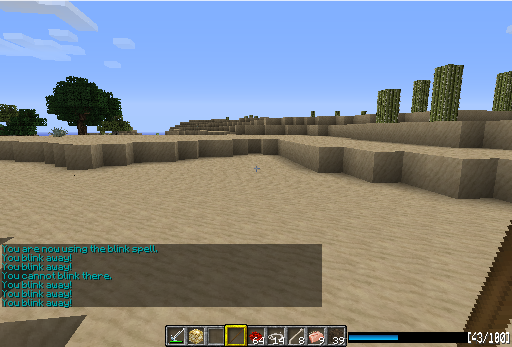
Screenshot
I'm very interested in suggestions, so if you have some, just open a ticket!
How to install OceManaBar
A server on Paper or Spigot
The plugin runs on the server core; players do not need to install anything.
File goes into the plugins folder
Download the file OceManaBar.jar (24 KB) and put it into the server’s plugins folder.
Restart the server
On startup the plugin creates its own settings folder in plugins.
Or use the “To hosting” button
On Millida Hosting, the button at the top of the page uploads the file to your server and restarts it for you.
Versions
With dependencies
| Minecraft | Loader | File | Date | Actions |
|---|---|---|---|---|
| — | — | v2.924.5 KB | ||
| — | — | v0.46.7 KB | ||
| — | — | v0.14 KB |
FAQ
Do players need to install OceManaBar?
No, the plugin goes only on the server, into the plugins folder: players do not need to download anything.
Where can I download OceManaBar safely?
On this page: the file OceManaBar.jar (24 KB) is stored on Millida’s server, with no link shorteners. SHA-1 checksum: 5325126ff7b10ae2f61850cdece26171d5183a19.
Reviews
Be the first to rate OceManaBar


