
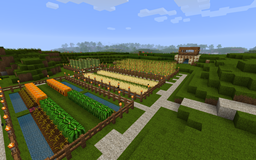
About the CHDistantFarm plugin
CHDistantFarm is a lightwight and highly optimized plugin that keeps your plants growing when you're away and the chunk is unloaded.
Features:
- Keeps ur plants growing, while the chunk is unloaded
- Supports all important plants
- Nether Warts
- Crops
- Melons
- Pumpkins
- Cactus
- Sugar Cane
- Saplings
- Uses the original minecraft algorithms
- Low level caching for maximum performance
- Auto unregistering of plants if they are fully grown or destroyed
Installation:
- Put the plugin in your plugins directory
- The plugin uses the database from your bukkit.yml (default is sqlite)
- Replant the blocks that you want to grow when the chunk is unloaded
- Edit the configuration file
Upcomming:
- PermissionsEx support
- Disable the features for a specific player
- Disable growing for a plant on a specific world
Known bugs:
- Growing does not work for the spawn area
- Thats a minor issue, because the spawn chunk is always loaded, and the game will grow your plants without the plugin
Tags: distant, farm, grow, growing, plant, plants
How to install CHDistantFarm
A server on Paper or Spigot
The plugin runs on the server core; players do not need to install anything.
File goes into the plugins folder
Download the file CHDistantFarm.jar (37 KB) and put it into the server’s plugins folder.
Restart the server
On startup the plugin creates its own settings folder in plugins.
Use the “To server” button
On Millida Hosting, the button at the top of the page uploads the file to your server and restarts it for you.
Versions
With dependencies
| Minecraft | Loader | File | Date | Actions |
|---|---|---|---|---|
| — | — | Release Build 1.0736.9 KB |
FAQ
Do players need to install CHDistantFarm?
No, the plugin goes only on the server, into the plugins folder: players do not need to download anything.
Where can I download CHDistantFarm safely?
On this page: the file CHDistantFarm.jar (37 KB) is stored on Millida’s server, with no link shorteners. SHA-1 checksum: ebd3687819e98e6c372d5edf70d5d8ab16c1dcbc.
Reviews
Be the first to rate CHDistantFarm


