

About the CClearChat plugin
Image Removed: http://www.mediafire.com/convkey/64bc/72p4bauucxl96dyzg.jpg?size_id=4
Don't you hate it when people spam or advertise? Don't you wish you can clear the chat for people can't see the ip? or the spam? Well, this is the plugin for you! CClearChat clears the chat by doing a simple command!

Features
Clear chat for you, other players, or everyone! Clear chat when people advertise or spam! Configurable Plugin Prefix! Locks chat whenever chat is getting crazy or you just feel like it!
Installation
Download CClearChat.jar and drag the file into your plugins folder into your server folder and reload your server. Easy as that!
Commands
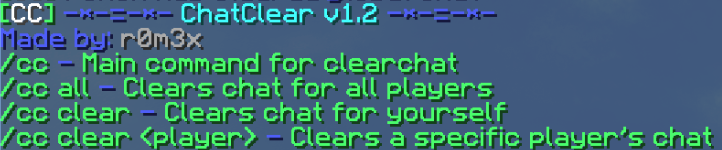
/cc - Basic command for CClearChat
/c (if enabled in config) - Clears chat for everyone /cc all - Clears chat for everyone /cc clear - Clears chat only for you /cc clear <player> - Clears specified player's chat /cc lock - Locks the chat /cc prefix <prefix> - Changes the plugin's prefix /cc reload - Reloads the config
Permissions
cc.* - Gives access to all CClearChat commands cc.use - Allows you to use /cc cc.me - Lets you clear your own chat cc.other - Lets you clear another player's chat cc.all - Lets you clean everyone's chat cc.lock - Lets you lock the chat cc.lock.bypass - Lets you talk in chat while chat is locked cc.prefix - Lets you change the plugin's prefix cc.reload - Lets you reload the config
Milestones
[✔] 1000 Downloads [✔] 2000 Downloads [✔] 3000 Downloads [✔] 4000 Downloads [✔] 5000 Downloads [✔] 10000 Downloads (THANKS SO MUCH!!! <3) [✔] 15000 Downloads [✔] 25000 Downloads [✔ ] 50000 Downloads [ ] 75000 Downloads [ ] 100000 Downloads
Collecting Data
This plugin uses Metrics to collect some statistics about usage of the plugin and sends them to http://bstats.org/. This can be disabled by changing 'Metrics' in the config.yml to false. The statistics sent include Version Demographics, Server/Player Statistics, Server Location, Operating System etc. The stats are available to the public, including Version Demographics, Server Location, Server Version, Plugin Version, Java Version and Global Statistics. These are viewable at http://bstats.org/plugin/bukkit/CClearChat.
Bugs
Found any bugs? Report them here! I'll reply to it as soon as I can.
Also...
Checkout my other plugins!
Donate
Like my work? Buy me a cake!
How to install CClearChat
A server on Paper or Spigot
The plugin runs on the server core for Minecraft 1.8–1.13; players do not need to install anything.
File goes into the plugins folder
Download the file CClearChat.jar (28 KB) and put it into the server’s plugins folder.
Restart the server
On startup the plugin creates its own settings folder in plugins.
Or use the “To hosting” button
On Millida Hosting, the button at the top of the page uploads the file to your server and restarts it for you.
Minecraft 1.13 runs on Java 8: with a different Java version the game may close right after launch.
Versions
With dependencies
| Minecraft | Loader | File | Date | Actions |
|---|---|---|---|---|
| 1.9 | — | CClearChat v3.027.8 KB |
FAQ
Which Minecraft versions does CClearChat work on?
There are files for 1.8–1.13, 7 versions in total. The newest is 1.13.
Which Java does CClearChat need?
Minecraft 1.13 runs on Java 8. If the game closes right after launch, the usual cause is the wrong Java version in the profile settings.
Where can I download CClearChat safely?
On this page: the file CClearChat.jar (28 KB) is stored on Millida’s server, with no link shorteners. SHA-1 checksum: a0e1a3187ccc9d760dfe2a9fac7491253dabb242.
Reviews
Be the first to rate CClearChat


