

Admin Tools GUI Plugin for Minecraft 1.12
This is an GUI where you can manage important World and Server options from basic Vanilla. And adds some commands like fly invsee and similar. All commands have own permissions.
About the Admin Tools GUI plugin
If you want to test the plugin first, join my test server.
for 1.8.x edition on 1.8.8: mc-1-8.funky33.de
for 1.14+ edition on 1.17.1: mc-1-17.funky33.de
For reasons you can't change the whitelist state and you can't stop or reload the server ;)
There is no active development anymore since late 2020. In case that changes, this line will be updated.
The test servers above were stopped in the end of April 2024.
If you have an Issue please either use the issue link or send a mail to admin-tools-support@funky33.de
This will create an issue on GitLab.
English:
With this plugin, you can manage some really important Server and world options.
For example the Time of the Day, the Whitelist status, and the KeepInventory function.
Little warning:
You will find multiple different release Versions of the Plugin, be aware to download the one that has listed your used Minecraft Version. Because the 1.14 Version is not compatible with older Servers.
Of course, I'm still maintaining 1.8 to 1.13 Versions
Latest 1.8-1.13 release: https://dev.bukkit.org/projects/admin-tools-gui/files/2977671
LAtest 1.4-1.16 release: https://dev.bukkit.org/projects/admin-tools-gui/files/2977670
Support:
If you need one to one support hop on my TeamSpeak 3 ts3.funky33.de and write either directly to me or write to the support bot with !ticket "Your question". Give me some contact info within your ticket so I can answer you. Otherwise, you can create an issue at GitLab.
Commands:
/admintools -- Opens the GUI
/at -- shortcut for /admintools
/at reload -- reloads the config
/admintools server rl -- reloads the server (equal to /reload)
/admintools server stop -- stops the server (equal to /stop)
/servercontrol -- Direcly opens the Servercontrol panel
/worldcontrol -- Direcly opens the Worldcontrol panel
/spec -- Change between survival and spectatormode
/cc -- Clear the chat with 100 lines of nothing
/day -- Alias for /time set day
/night -- Alias for /time set night
/sun -- Alias for /weather clear
/rain -- Alias for /weather rain
/wl <on/off> -- Alias for /whitelist
/gr <true/false> -- Shortform for doDaylightCycle = "dc", doMobSpawning = "ms", commandBlockOutput = "cbo" and so on
/invsee <player> -- Get access to Player Inventorys and move their Items
/fly [player] -- Activate or deactivate for yourself and others flymode
/serverstats -- View some information about your Server like whitelist state, current Player count, motd and more
Permissions:
admintools.admin -- permits anything (including restarting and stopping the server)
admintools.open -- open GUIs
admintools.spec -- use /spec
admintools.cc -- permits to clear chat
admintools.wl -- permits whitelist features
admintools.time -- permits time features
admintools.weather -- permits weather features
admintools.gr -- permits to change all gamerules
admintools.invsee -- permits to look into and change Player Inventories
admintools.fly -- permits usage of /fly
admintools.stats -- allows viewing some server statistics
The Permissions not only grant usage of the commands it also grants usage of the corresponding GUI features.
GUI:
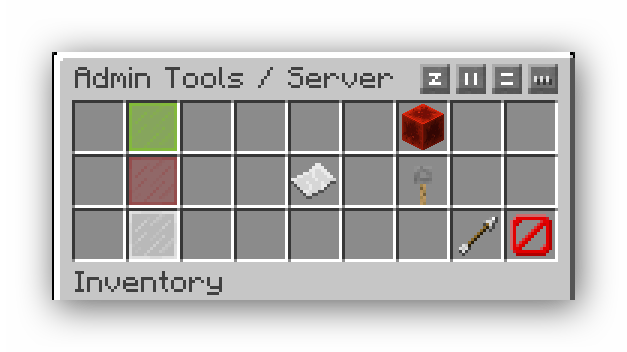
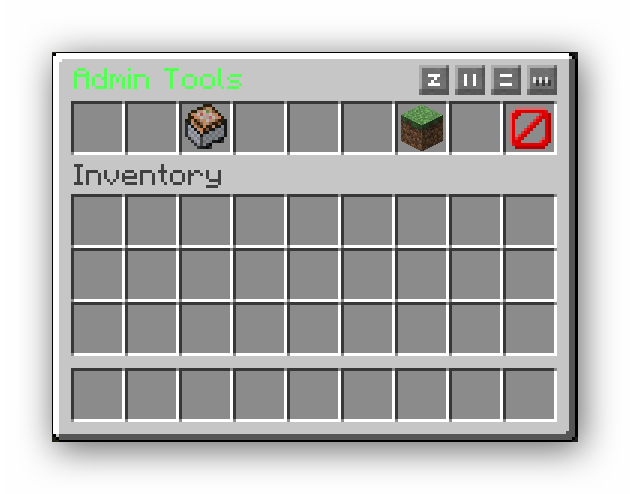
Sorted in Server category and World category.
-Server:
Whitelist:
on
off
Server stop
Server reload
Server Stats -- available since 1.4.1 Version
-World:
Night
Day
Rain
Sun
DaylightCycle on/off
KeepInventory on/off
ChatClear
doMobspawning (on/off)
What you can change within the config:
general: prefix: '&6[&7ATG&6]' -- Change the Prefix of all Chat messages to fit your Server system: no_permission: '&4You need the permission &e [Permission] &4 to perform this command!' Message: whitelist: '&aWhitelist Status:&c' whitelisted: '&aAmount of whitelisted Players:&c' onlineplayers: '&aPlayers online:&c' serverversion: '&aServer version:&c' bannedplayers: '&aAmount of banned Players:&c' onlinemode: '&aOnlineMode:&c'
TO-DO List:
✓ - Get server options to work
✓ - add missing World options
✓ - get all commands not depending on OP
✓ - make items moveable in normal inv
✓ - refactor command structure
✓ - Add /invsee
✓ - Add /fly
✓ - Implement serverstats Plugin
⏸︎ - Add freeze (sorry to say but this is more difficult for me than expected)
► - Make invsee able to open offline Players inventories
X = won't do, sorry
/ = maby if its possible for me
✓ = done
► = work in progress
⏸︎= Paused
Known bugs:
- no one can move Items in Inventory permanently and everywhere -- fixed
As of now, there are no issues/bugs known (24th of April 2024)
To Plugin devs:
Hi, if want to use my code or contribute to it, please notice, that there are different master branches for different versions of the Game.
German:
Mit diesem Plugin kann man wichtige Server und Weltoptionen steuern. Zum Beispiel: Tageszeit, den Status der Whitelist und KeepInventory.
Befehle:
/admintools -- Öffne die GUI
/at -- Alias für /admintools
/at reload -- lade die Config neu (Noch kein Inhalt)
/admintools server rl -- lade den Server neu (wie /reload)
/admintools server stop -- Stoppe den server (wie /stop)
/servercontrol -- Öffnet direkt die Serveroptionen
How to install Admin Tools GUI
A server on Paper or Spigot
The plugin runs on the server core for Minecraft 1.8–1.12; players do not need to install anything.
File goes into the plugins folder
Download the file AdminTools-1.4.1-1.8.x.jar (45 KB) and put it into the server’s plugins folder.
Restart the server
On startup the plugin creates its own settings folder in plugins.
Or use the “To hosting” button
On Millida Hosting, the button at the top of the page uploads the file to your server and restarts it for you.
Minecraft 1.12 runs on Java 8: with a different Java version the game may close right after launch.
Versions
With dependencies
| Minecraft | Loader | File | Date | Actions |
|---|---|---|---|---|
| 1.9 | — | AdminTools-1.4.1-1.8.x.jar45.2 KB 2 | ||
| 1.8.1 | — | AdminTools-Beta-2.011.5 KB | ||
| 1.9 | — | AdminTools-Alpha-1.0.5.jar6.9 KB |
FAQ
Which Minecraft versions does Admin Tools GUI work on?
There are files for 1.12, 1.11, 1.10, 1.9, 1.8.1, 1.8. The newest is 1.12.
Do players need to install Admin Tools GUI?
No, the plugin goes only on the server, into the plugins folder: players do not need to download anything.
Which Java does Admin Tools GUI need?
Minecraft 1.12 runs on Java 8. If the game closes right after launch, the usual cause is the wrong Java version in the profile settings.
Where can I download Admin Tools GUI safely?
On this page: the file AdminTools-1.4.1-1.8.x.jar (45 KB) is stored on Millida’s server, with no link shorteners. SHA-1 checksum: 33e291a45ad0c55905ac9b7f5af1b1e627d1166b.
Reviews
Be the first to rate Admin Tools GUI


