

 Fabric
 NeoForge
 Forge
About the Waystones mod
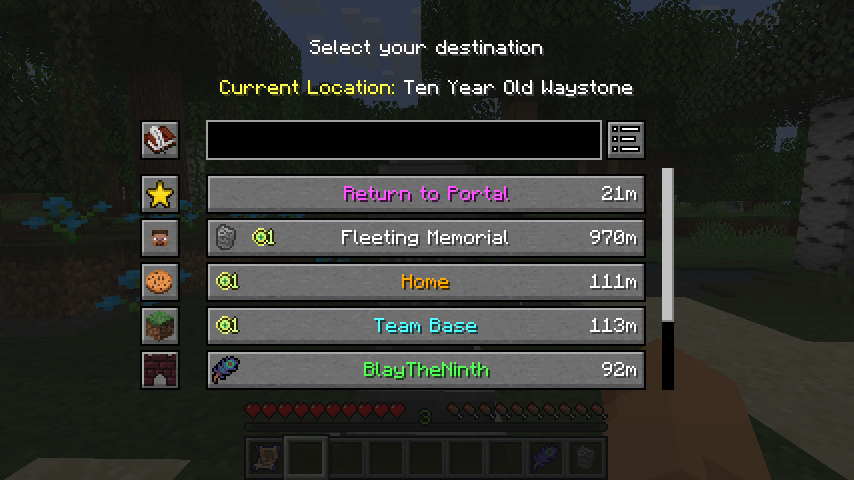
This mod adds waystone blocks that the player can return to once they've been activated, either through a Warp Scroll, a rechargeable Warp Stone, or by using an existing waystone to hop from one to the other.
It can be used in Survival Mode, for Adventure Maps or on Multiplayer Servers as an alternative to /warp and /home commands. Waystones can be made globally available for all players and a configurable inventory button can be set up to allow warping without any additional items.

This mod requires Balm, which must be installed alongside the mod.
On Minecraft 26.1 and above, it also requires Shogi, which powers the highly configurable warp requirements and many other rule-based configurations across my mods.
- Craftable Waystones, Warp Plates and Warp Scrolls
- Teleporting from one place to another using Waystones
- Global Waystones for Community Hubs or Sharing with Friends
- Optional Teleport Button in your Inventory
- Waystone Structure in Villages
Mod Showcase by Krzair
The Return Scroll and Warp Stone item icons included are by @JoeCreates and were publicly released under the CC-BY-SA 3.0 license here.

How to install Waystones
With Millida Launcher
Install Millida Launcher
The launcher is free: download it at millida.net/launcher and sign in with any nickname.
Click “Install” on this page
The launcher opens and installs the mod for Minecraft 1.16.5–26.3 on Fabric, Forge or NeoForge automatically, together with its dependencies: Balm, Fabric API, Shogi.
Launch the game
A profile with it appears in the launcher: click “Play”.
Manually
Install Fabric, Forge or NeoForge
The loader must match the game version of the mod file, for example Minecraft 26.3. After installing it, a separate profile appears in your launcher.
Download the file for your version
In the version list above, pick the file waystones-fabric-26.3-26.3.0.2.jar (1.2 MB) for your game version and loader.
Put it in the mods folder
The folder is inside .minecraft (Windows: %appdata%\.minecraft\mods). If it does not exist, create it. Required dependencies go there too: Balm, Fabric API, Shogi.
Launch the loader profile
Open “Mods” in the main menu: Waystones should be in the list.
On a server
A server on Fabric, Forge or NeoForge
The mod only works on a server with the same loader and game version, for example 26.3.
File goes into the server’s mods folder
Stop the server, put the mod file into the mods folder and start the server again.
Use the “To server” button
On Millida Hosting, the button at the top of the page uploads the file to your server and restarts it for you.
Versions
With dependencies
| Minecraft | Loader | File | Date | Actions |
|---|---|---|---|---|
| 26.1.2 | NeoForge | 26.1.21.1 MB 3 | ||
| 26.1.2 | Fabric | 26.1.21.1 MB 9 | ||
| 26.2 | Fabric | 26.21.2 MB 15 | ||
| 26.2 | NeoForge | 26.21.1 MB | ||
| 26.3 | Fabric | 26.31.2 MB 64 | ||
| 26.3 | NeoForge | 26.31.1 MB 3 | ||
| 1.21.1 | NeoForge | 1.21.11.2 MB 157 | ||
| 1.21.1 | Fabric | 1.21.11.2 MB 79 |
What it needs to run
- Balmrequired
- Fabric APIrequired
- Shogirequired
Content that requires it
FAQ
Which Minecraft versions does Waystones work on?
There are files for 1.16.5–26.3, 15 versions in total. The newest is 26.3.
Is Waystones for Forge or Fabric?
There are files for Fabric: 1.18–26.3, for Forge: 1.16.5–1.21.1 and for NeoForge: 1.21–26.3.
What does Waystones need to work?
Required: Balm, Fabric API, Shogi. Without them the mod will not start: dependencies go into the same mods folder.
Does Waystones work on a server?
Yes. Waystones works both in singleplayer and on a server.
How do I download Waystones?
With Millida Launcher: it installs Waystones into a modpack by itself, for the right game version and loader. The launcher is free.
Reviews
Be the first to rate Waystones


