
WAILA Plugins Mod for Minecraft 1.10.2
Extra WAILA info for your favorite mods!
About the WAILA Plugins mod
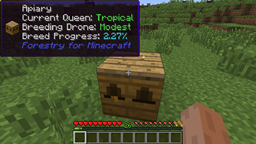
This mod adds WAILA plugins for many popular mods. The benefit of this is you are able to see information about their blocks in the WAILA HUD.
This mod requires EnderCore to run!
Currently Supported:
Blood Magic (Ported from ImLookingAtBlood, by Pokefenn)
- Capacity, LP, and tier of altars
- Progress of the altar's current craft
- Current recipe result of Chemistry set
- Progress of chemistry set
- Owner of master ritual stone
- Current ritual of master ritual stone
- Current block/item in teleposer
Flaxbeard's Steam Power [1.7 only]
- Fluids in crucibles
- Pressure percentages on gauges
- Steam amounts in tanks
- State of valve pipes
Forestry
- Sapling genomes
- Pollinated leaves info
- Current bees inside apiaries/beehouses/alvearies (and genome info)
- Apiary errors (No flowers, no drone, etc.)
- Progress percentage of current breed
- RF in of engines
- Heat in engines
Magical Crops [1.7 only]
- Growth percentage and hovering icon of the product of the plant
Mekanism [1.7 only]
- Energy amount in all energy storing blocks
- Gas stored in gas storage blocks
- Fluid stored in portable tanks
- Multiplier on salination plant
- Type of factories
Pam's Harvestcraft [1.7 only]
- Adds a growth percentage to tree fruits
Railcraft [only partial support on 1.10]
- Fluid inside machines
- Locomotive information (steam, heat, charge)
- Heat information on coal burning machines
- Whether a multiblock is formed or not
- Amount of charge in blocks
- Engine production rate
RedLogic [1.7 only]
- Ported overlay rendering from the Project:Red plugin in WAILA
- Info for certain gates such as Timer, Repeater, etc.
- Strength of red alloy wires
Resourceful Crops
- Hovering icon of the product of the plant
Thermal Expansion
- Augment info
Minefactory Reloaded [1.7 only, except for DSU]
- IDeepStorageUnit statistics
Vanilla/Forge
- IFluidHandler information
How to install WAILA Plugins
With Millida Launcher
Install Millida Launcher
The launcher is free: download it at millida.net/launcher and sign in with any nickname.
Click “Install” on this page
The launcher opens and installs the mod for Minecraft 1.10.2 automatically.
Launch the game
A profile with it appears in the launcher: click “Play”.
Manually
Download the file for your version
In the version list above, pick the file WAILAPlugins-MC1.10.2-0.3.0-26.jar (59 KB) for your game version.
Put it in the mods folder
The folder is inside .minecraft (Windows: %appdata%\.minecraft\mods). If it does not exist, create it.
Launch the loader profile
Open “Mods” in the main menu: WAILA Plugins should be in the list.
Minecraft 1.10.2 runs on Java 8: with a different Java version the game may close right after launch.
Versions
With dependencies
| Minecraft | Loader | File | Date | Actions |
|---|---|---|---|---|
| 1.10.2 | — | WAILA Plugins - MC1.10.2-0.3.0-2658.9 KB |
FAQ
Which Minecraft versions does WAILA Plugins work on?
Only Minecraft 1.10.2: there are no files for other versions.
Which Java does WAILA Plugins need?
Minecraft 1.10.2 runs on Java 8. If the game closes right after launch, the usual cause is the wrong Java version in the profile settings.
Where can I download WAILA Plugins safely?
On this page: the file WAILAPlugins-MC1.10.2-0.3.0-26.jar (59 KB) is stored on Millida’s server, with no link shorteners. SHA-1 checksum: 3f6874abf2c325c434dfd2ae1d343c3e4c6d03a0.
Reviews
Be the first to rate WAILA Plugins


