

Village Artifacts Mod for Minecraft 1.20.1, 26.1.2
Tools and magic items to help or mess with villagers
 NeoForge
 Forge
About the Village Artifacts mod
Make villagers more useful with many items to use and improve them
Convert pillagers to Town Guards, and upgrade your Iron golems to a stronger variant that will not hurt players
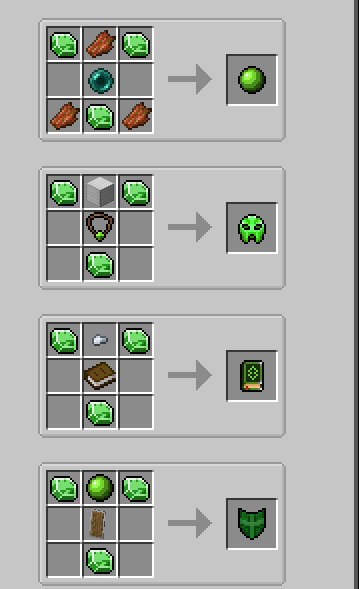
Rough Emerald Shard
Unlock trades when a villager has them blocked (red X). Also used as crafting material in many items
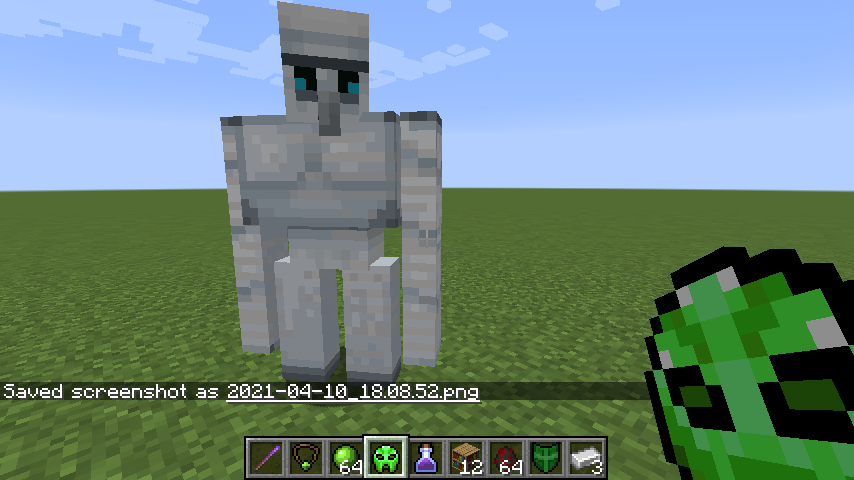
Amulet Convert pillagers into Town Guards to fight and defend against raids
Oblivion Stone Upgrade your Iron Golems. New versions are upgraded and will never attack players even when hit
War Emblem
Summons Pillagers on use
Ichor of Virtue
A bribe used to increase your reputation and erase crimes done in the village
Plague Remedy
Heal zombified villagers without needing potions
Trading Contract
Convert a Wandering Trader into a villager
Infernal Shard Corrupt villagers and traders into Pillagers, and can make some illagers even more powerful
Scroll of Hubris Use on a Villager and they will erase their profession, including all levels and trades, even if work-blocks are nearby
Grimoire of the Lost Merchants Guild
Instantly levels up their profession level without doing any trades
Golemsteel Brazier
Lure Villagers and guards to you and have them follow you as long as you hold this
Llama Key Free Wandering Trader llamas from captivity, converting them to normal
Pre-made texture credits:
https://github.com/Lothrazar/VillagerTools/blob/trunk/1.16/src/main/resources/assets/villagertools/textures/item/credits.txt
https://github.com/Lothrazar/VillagerTools/blob/trunk/1.16/src/main/resources/assets/villagertools/textures/item/read me.txt
Mod ideas based on comments by MrBysco & Gentleman_Gnu
How to install Village Artifacts
With Millida Launcher
Install Millida Launcher
The launcher is free: download it at millida.net/launcher and sign in with any nickname.
Click “Install” on this page
The launcher opens and installs the mod for Minecraft 1.20.1–26.1.2 on Forge or NeoForge automatically.
Launch the game
A profile with it appears in the launcher: click “Play”.
Manually
Install Forge or NeoForge
The loader must match the game version of the mod file, for example Minecraft 26.1.2. After installing it, a separate profile appears in your launcher.
Download the file for your version
In the version list above, pick the file villagertools-26.1.2-1.0.4.jar (51 KB) for your game version and loader.
Put it in the mods folder
The folder is inside .minecraft (Windows: %appdata%\.minecraft\mods). If it does not exist, create it.
Launch the loader profile
Open “Mods” in the main menu: Village Artifacts should be in the list.
Versions
With dependencies
| Minecraft | Loader | File | Date | Actions |
|---|---|---|---|---|
| 26.1.2 | NeoForge | Village Artifacts 26.1.2-1.0.451.3 KB 1 | ||
| 1.20.1 | NeoForge, Forge | villagertools-1.20.1-1.0.3.jar54.8 KB 5 |
FAQ
Which Minecraft versions does Village Artifacts work on?
There are files for 26.1.2, 1.20.1. The newest is 26.1.2.
Is Village Artifacts for Forge or Fabric?
There are files for Forge: 1.20.1 and for NeoForge: 1.20.1–26.1.2. There are no files for Fabric: a mod for another loader will not start.
Does Village Artifacts need other mods?
The author lists no required dependencies: the Forge or NeoForge loader is enough.
Where can I download Village Artifacts safely?
On this page: the file villagertools-26.1.2-1.0.4.jar (51 KB) is stored on Millida’s server, with no link shorteners. SHA-1 checksum: 0426d35ee6281a0b785c0599afdecf7cd982dd47.
Reviews
Be the first to rate Village Artifacts


