
 Fabric
 Forge
Forge Quilt
QuiltPotion Vapes
Adds useful vapes to the game, which use juices made out of potions.
Types of vapes
There are 3 different vape types:
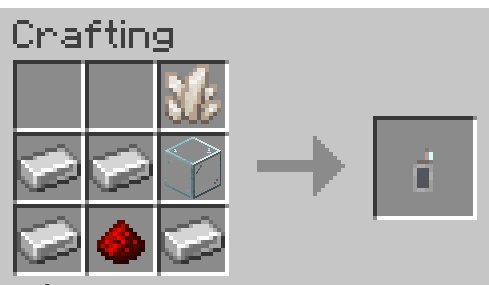
- Vape - ordinary vape crafted using iron, quartz, redstone and glass.
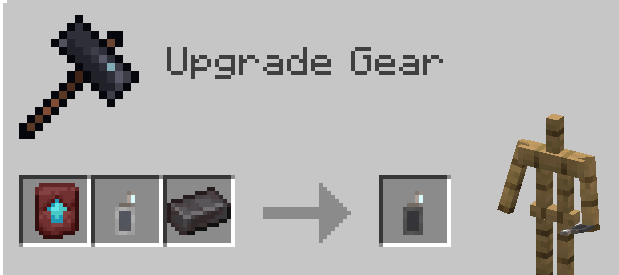
- Reinforced Vape - upgraded version of the Vape using Netherite in the Smithing Table.
- Disposable Vapes - type of vapes which can't be crafted, enchanted, and can't be refilled; they are found in various chests with random potion effects.
Vape Juicer
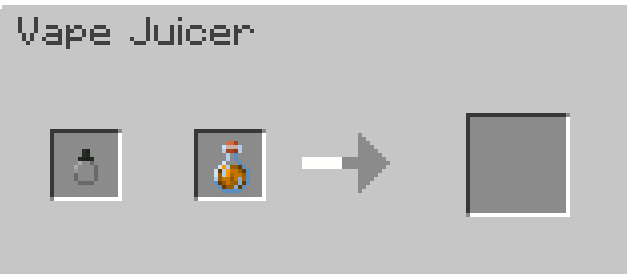
It's a new workstation which is used to make e-liquids out of potions, and to fill vapes with them.
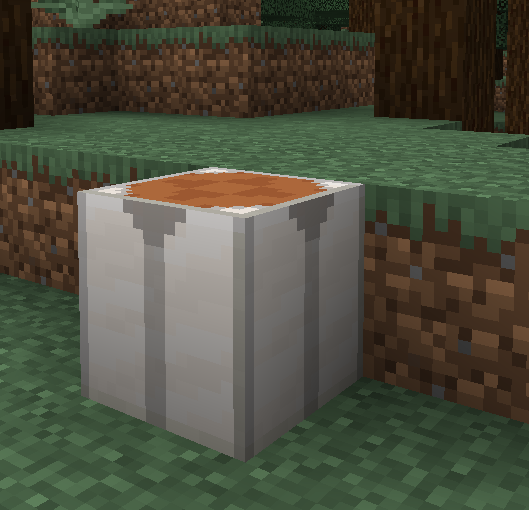
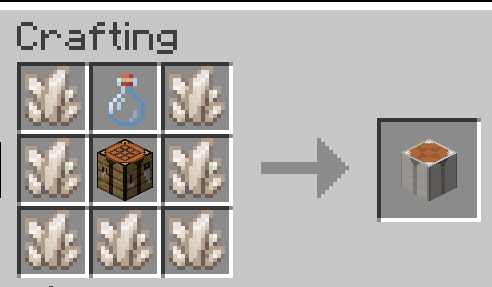
To create vape juice, you will need to put in the Vape Juicer:
- An empty vape juice bottle (crafted from 1 Nether Quartz and an empty Glass Bottle, shapeless)
- Any non-instant potion
To fill a vape with juice, you will simply put the vape in the first slot, and the juice in the second.
But don't overdo it
Unless you disable the feature in the config file (config/potionvapes.json), excessive vape use can get you lung cancer.
It can heal by itself (very slowly), and the healing process can be accelerated by drinking lots of milk.
Lung cancer comes with a couple of debuffs, like occasional nausea, slowness, blindness, and less oxygen underwater.
To prevent getting lung cancer, you can enchant your vape with the Healthy enchantment - level IV of it will make it impossible to get lung cancer.
Enchantments
Along the usual enchantments, like Unbreaking or Mending, vapes got a few new enchantments:
- Inhaling - you get more of the potion effect using the same amount of juice
- Economical - you use less vape juice
- Smoking - produces more smoke (cosmetic only)
- Healthy - slows down lung cancer progress
BisectHosting
Disclaimer
This mod should not encourage vaping in real-life! It does not give potion effects!
How to install Potion Vapes
With Millida Launcher
Install Millida Launcher
The launcher is free: download it at millida.net/launcher and sign in with any nickname.
Click “Install” on this page
The launcher opens and installs the mod for Minecraft 1.20–1.20.1 on Fabric, Forge or Quilt automatically.
Launch the game
A profile with it appears in the launcher: click “Play”.
Manually
Install Fabric, Forge or Quilt
The loader must match the game version of the mod file, for example Minecraft 1.20.1. After installing it, a separate profile appears in your launcher.
Download the file for your version
In the version list above, pick the file potionvapes-1.2.0-1.20.1-FABRIC.jar (439 KB) for your game version and loader.
Put it in the mods folder
The folder is inside .minecraft (Windows: %appdata%\.minecraft\mods). If it does not exist, create it.
Launch the loader profile
Open “Mods” in the main menu: Potion Vapes should be in the list.
Minecraft 1.20.1 runs on Java 17: with a different Java version the game may close right after launch.
Versions
With dependencies
| Minecraft | Loader | File | Date | Actions |
|---|---|---|---|---|
| 1.20.1 | Fabric | [Fabric] Potion Vapes 1.2.0 - 1.20.1439 KB | ||
| 1.20.1 | Forge | [Forge] Potion Vapes 1.2.0 - 1.20.1393 KB | ||
| 1.20.1 | Forge | [Forge] Potion Vapes 1.0.1 - 1.20.1357 KB | ||
| 1.20.1 | Fabric, Quilt | [Fabric] Potion Vapes 1.0.1 - 1.20.1352 KB | ||
| 1.20.1 | Forge | [Forge] Potion Vapes 1.0.0 - 1.20.1358 KB | ||
| 1.20.1 | Fabric, Quilt | [Fabric] Potion Vapes 1.0.0 - 1.20.1352 KB 1 |
Reviews
Be the first to rate Potion Vapes


