
 NeoForge
 Forge
ForgeAbout the Plonk mod
Available on 1.7.10, 1.12.2, 1.14.4, 1.15.2, 1.16.5, 1.18.2, 1.19.2, 1.19.4, 1.20.1, 1.21.1, 26.1.x (Files (above) > View All > Game Version). Supported versions are in bold (but I'll try to support the other versions too within reason).
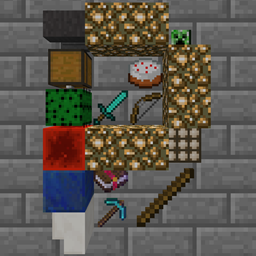
Place items down by pressing P while looking at a block. * Rotate all with Sneak + P. Rotate item with Sneak + Use. (Requires empty hands)
- Note (for 1.16.4+): The P key used by Plonk conflicts with the Social Interactions Screen key so you'll have to change one or the other!
You are free to use this mod in any modpack (no need to ask!).
Place up to 4 stacks of items on the side of any block using the Place Item key (defaults to P). (Max size of each stack is configurable and supports StackUp!)
Items can be individually rotated to 16 different directions (Sneak + Right Click using empty hands).
The whole tile of items can be rotated as a whole to 4 different directions (Sneak + Place Item key using empty hands).
Items can be extracted by automation but not inserted.
Can not be washed away by fluids anymore. Placed items can be washed away by liquids. Can be waterlogged (as of MC1.16.3+).
Config at config/plonk.cfg (before mc 1.13) or [save folder]/serverconfig/plonk-server.toml (after mc 1.13)
The look of the placed items and the mechanics are currently subject to change.
This video is very out of date
Known bugs:
Third person camera collides with block (1.7.10 and 1.12.2 only). Not sure how to tell minecraft to let the third person ray trace pass through (1.13+ has RayTraceContext.Visual) Translucent items (e.g. Stained Glass) cause other translucent things behind them not to render properly. (before mc 1.16)
How to install Plonk
With Millida Launcher
Install Millida Launcher
The launcher is free: download it at millida.net/launcher and sign in with any nickname.
Click “Install” on this page
The launcher opens and installs the mod for Minecraft 1.18–26.1.2 on Forge or NeoForge automatically.
Launch the game
A profile with it appears in the launcher: click “Play”.
Manually
Install Forge or NeoForge
The loader must match the game version of the mod file, for example Minecraft 26.1.2. After installing it, a separate profile appears in your launcher.
Download the file for your version
In the version list above, pick the file plonk-26.1.2-10.0.10-neo.jar (162 KB) for your game version and loader.
Put it in the mods folder
The folder is inside .minecraft (Windows: %appdata%\.minecraft\mods). If it does not exist, create it.
Launch the loader profile
Open “Mods” in the main menu: Plonk should be in the list.
Versions
With dependencies
| Minecraft | Loader | File | Date | Actions |
|---|---|---|---|---|
| 26.1 | NeoForge | plonk-26.1.2-10.0.10-neo.jar162 KB | ||
| 26.1 | NeoForge | plonk-26.1.1-10.0.8-neo.jar162 KB | ||
| 1.20.1 | NeoForge, Forge | plonk-1.20.1-10.0.5-forge.jar148 KB | ||
| 1.18.1 | Forge | plonk-1.18.1-10.0.1.jar147 KB |
FAQ
Which Minecraft versions does Plonk work on?
There are files for 1.18–26.1.2, 7 versions in total. The newest is 26.1.2.
Is Plonk for Forge or Fabric?
There are files for Forge: 1.18–1.20.1 and for NeoForge: 1.20–26.1.2. There are no files for Fabric: a mod for another loader will not start.
Does Plonk need other mods?
The author lists no required dependencies: the Forge or NeoForge loader is enough.
Where can I download Plonk safely?
On this page: the file plonk-26.1.2-10.0.10-neo.jar (162 KB) is stored on Millida’s server, with no link shorteners. SHA-1 checksum: 4c8d57969618899ad01a7f182a680245070bcd7d.
Reviews
Be the first to rate Plonk


