
Gravitational Modulating Additional Unit Mod for Minecraft 1.20.1, 1.21.1
Provide additional features
 NeoForge
 Forge
Forge# Gravitational Modulating Additional Unit
Provide additional features.
# Mekanism needed
https://www.curseforge.com/minecraft/mc-mods/mekanism
# Features
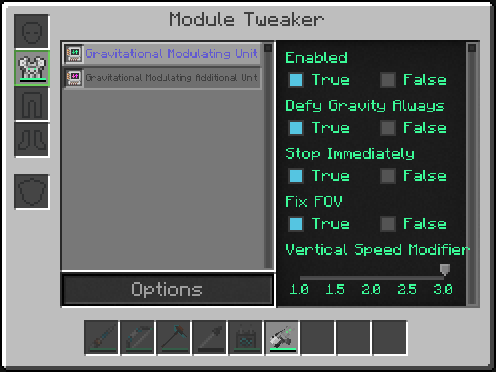
- Defy Gravity Always
Still fly even if land on floor. Except you sneak on ground. Why double press 'space' for every flying?
- Stop Immediately
As the name suggests, stop immediately when you release move key. (WASD) Can get to a you want location precisely.
- Fix FOV
Don't change FOV when player action. Like drawing bow and sprinting.
- Vertical Speed Modifier
Change up/down speed when flying. Can switch by key (default not bound)
- Mute Modulating Sound
Available from 1.19.2. Mute flying sound. It would be good using with 'Defy Gravity Always'.
# License
MIT and while 'Mekanism' allows.
# Modpacks
Can use in modpacks under license.
# Issue or suggestion?
Please "New Issue" from here.
https://github.com/gisellevonbingen/Minecraft-GravitationalModulatingAdditionalUnit/issues
How to install Gravitational Modulating Additional Unit
With Millida Launcher
Install Millida Launcher
The launcher is free: download it at millida.net/launcher and sign in with any nickname.
Click “Install” on this page
The launcher opens and installs the mod for Minecraft 1.20.1–1.21.1 on Forge or NeoForge automatically.
Launch the game
A profile with it appears in the launcher: click “Play”.
Manually
Install Forge or NeoForge
The loader must match the game version of the mod file, for example Minecraft 1.21.1. After installing it, a separate profile appears in your launcher.
Download the file for your version
In the version list above, pick the file GravitationalModulatingAdditionalUnit-1.21.1-6.4.jar (39 KB) for your game version and loader.
Put it in the mods folder
The folder is inside .minecraft (Windows: %appdata%\.minecraft\mods). If it does not exist, create it.
Launch the loader profile
Open “Mods” in the main menu: Gravitational Modulating Additional Unit should be in the list.
Minecraft 1.21.1 runs on Java 21: with a different Java version the game may close right after launch.
Versions
With dependencies
| Minecraft | Loader | File | Date | Actions |
|---|---|---|---|---|
| 1.21.1 | NeoForge | 1.21.1-6.439.2 KB | ||
| 1.20.1 | Forge | 1.20.1-3.539.8 KB |
Reviews
Be the first to rate Gravitational Modulating Additional Unit


