

Functional Armor Trims Mod for Minecraft 26.1.2
A vanilla+ mod that adds simple, fun, but balanced functionality to Minecraft's armor trims
 Fabric
 Quilt
QuiltAbout the Functional Armor Trims mod
A mod that gives purpose to every armor trim. Functional Trims reimagines Minecraft’s armor trims by turning them into unique, gameplay-affecting abilities — each material grants a distinct passive or triggered effect when worn on a full set of armor.
Overview
Tired of trims being purely cosmetic? This mod makes them functional by assigning fun, balanced abilities that encourage strategic equipment choices. Every trim material brings something new to the table, from survival perks to combat mechanics.
Trim Effects
Gold — “Lord of the Nether”
- When wearing a full set of armor trimmed with this material:
- Piglins and Piglin Brutes will become completely passive around you, even while mining gold ore, looting bastion chests, and even attacking them.
Diamond — “Shattering Resilience”
- When wearing a full set of armor trimmed with this material:
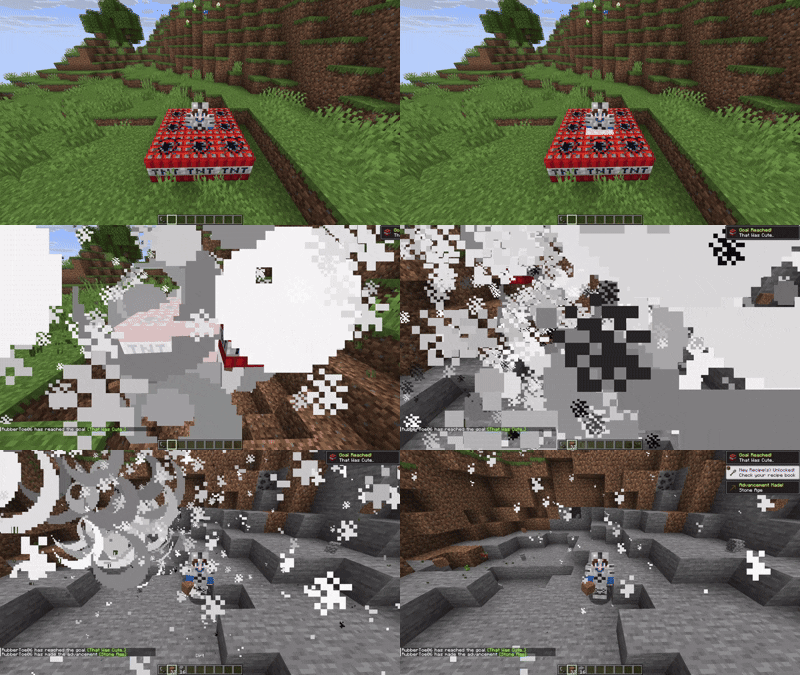
- Your armor will take the full force of a fatal attack, shattering itself in the process. When this happens a massive burst of energy is released, knocking back and damaging enemies nearby to give you room to get to safety.
Netherite — “Immoveable Object”
- When wearing a full set of armor trimmed with this material:
- You become completely immune to knockback. Strikes, projectiles, and explosions have no effect on your position. (Does not affect fluids, pistons, or status effects like Levitation.)
Iron — “Unyielding Defense”
- When wearing a full set of armor trimmed with this material:
- Incoming projectiles have a 50% chance to be completely nullified and dropped as items.
- Critical hits deal half damage.
- Shields no longer have cooldown and knock back the attacker when struck.
Copper — “Supercharged Strike”
- When wearing a full set of armor trimmed with this material:
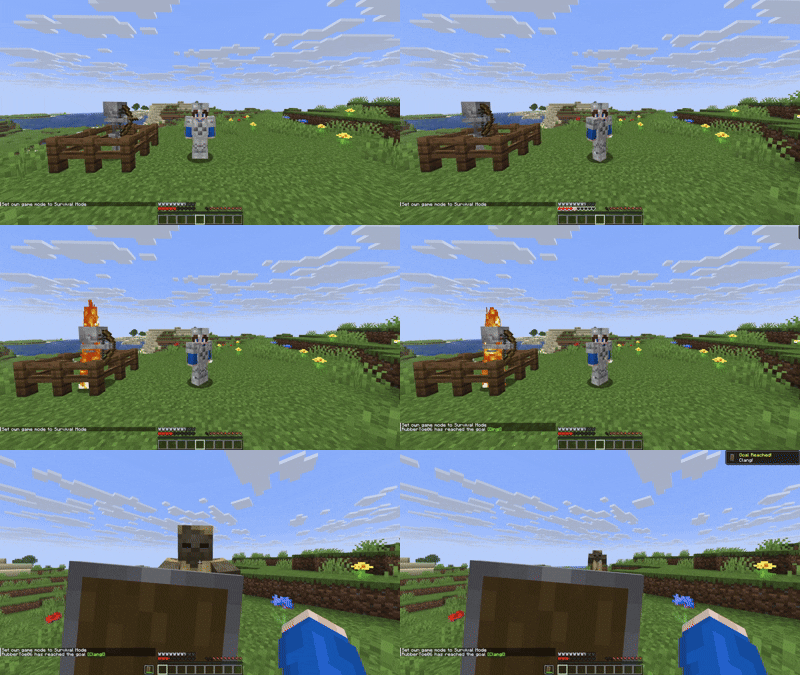
- Lightning is more likely to strike you.
- When struck, you become charged for 60 seconds.
- Your next attack deals double damage, summons lightning, and ignites your target.
“Lightning strikes you once, and you strike back harder.”
Amethyst — “Resonating Vision”
- When wearing a full set of armor trimmed with this material:
- You can see all entities in a 25m radius through walls by standing still for 3 seconds or crouching for 1.5 seconds.
- The vision fades when you move again.
Redstone — “Fully Conductive”
- When wearing a full set of armor trimmed with this material:
- The block you stand on emits a strong redstone signal, powering adjacent blocks while you remain on it.
Emerald — “Explorer’s Fortune”
- When wearing a full set of armor trimmed with this material:
- Loot chests with randomized loot tables contain more loot per chest, making rare finds easier to obtain.
Resin — “Adhesive Grip”
- When wearing a full set of armor trimmed with this material:
- Crouch near a wall to stick to it.
- You can slide slightly when falling, resetting fall distance to zero.
Quartz — “Enriched Vitality”
- When wearing a full set of armor trimmed with this material:
- Food and potion effects last 25% longer.
- Food restores more hunger and saturation.
Lapis Lazuli — “Scholar’s Insight”
- When wearing a full set of armor trimmed with this material:
- Experience orbs grant 50% more experience.
- Does not affect non-orb sources of XP.
Compatibility
- Built for Minecraft 1.21.8+
- Requires Fabric API and Cloth Config API
- Tested with most common modpacks
- Loosely tested with Quilt. Use at your own risk
Installation
- Download the latest .jar from the Files tab
- Place it in your mods folder
- Launch Minecraft with Fabric
Feedback & Support
Report bugs on the GitHub Issues page.
Credits
Created by RubberToe
Support
If you enjoy the mod, consider supporting me! Buy Me a Coffee
How to install Functional Armor Trims
With Millida Launcher
Install Millida Launcher
The launcher is free: download it at millida.net/launcher and sign in with any nickname.
Click “Install” on this page
The launcher opens and installs the mod for Minecraft 26.1–26.1.2 on Fabric or Quilt automatically.
Launch the game
A profile with it appears in the launcher: click “Play”.
Manually
Install Fabric or Quilt
The loader must match the game version of the mod file, for example Minecraft 26.1.2. After installing it, a separate profile appears in your launcher.
Download the file for your version
In the version list above, pick the file functional_trims-2.2.1-(26.2.x).jar (106 KB) for your game version and loader.
Put it in the mods folder
The folder is inside .minecraft (Windows: %appdata%\.minecraft\mods). If it does not exist, create it.
Launch the loader profile
Open “Mods” in the main menu: Functional Armor Trims should be in the list.
Versions
With dependencies
| Minecraft | Loader | File | Date | Actions |
|---|---|---|---|---|
| 26.1 | Fabric, Quilt | functional_trims-2.2.1-(26.2.x).jar106 KB 5 |
FAQ
Which Minecraft versions does Functional Armor Trims work on?
There are files for 26.1.2, 26.1.1, 26.1. The newest is 26.1.2.
Is Functional Armor Trims for Forge or Fabric?
There are files for Fabric: 26.1–26.1.2 and for Quilt: 26.1–26.1.2. There are no files for Forge or NeoForge: a mod for another loader will not start.
Does Functional Armor Trims need other mods?
The author lists no required dependencies: the Fabric or Quilt loader is enough.
Where can I download Functional Armor Trims safely?
On this page: the file functional_trims-2.2.1-(26.2.x).jar (106 KB) is stored on Millida’s server, with no link shorteners. SHA-1 checksum: 9ddf227b599c3cb2efa3616167670d73714b1992.
Reviews
Be the first to rate Functional Armor Trims


