

Food Effect Tooltips (Forge) Mod for Minecraft 1.20.1, 1.21.1
Adds Tooltips to food that gives Status Effects when eaten
 NeoForge
 Forge
Food Effect Tooltips (Forge)
1.21.11+
This is the Unofficial Forge version of Food Effect Tooltips, licensed under LGPLv3, please support the original work!

Adds Tooltips to food that gives Status Effects when eaten
Quite a few food items grant the player bonuses in the form of status effects. These effects, however, are never listed ingame. Which is a nuisance, especially in modded scenarios, where the player is not acquainted with all food options and their effects.

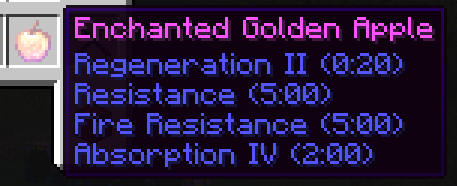
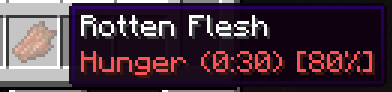
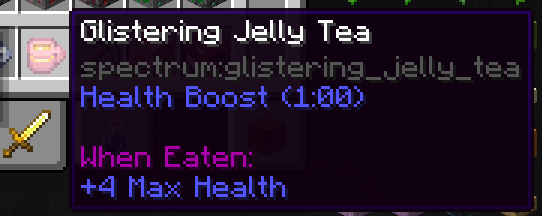
With Food Effect Tooltips all effects are shown in the items tooltip!
- includes effects that only get applied with a % chance
- shows stat changes for effects
- works fully client side
- compatible with other mods that display food information, like AppleSkin
How to install Food Effect Tooltips (Forge)
With Millida Launcher
Install Millida Launcher
The launcher is free: download it at millida.net/launcher and sign in with any nickname.
Click “Install” on this page
The launcher opens and installs the mod for Minecraft 1.16.5–1.21.10 on Forge or NeoForge automatically.
Launch the game
A profile with it appears in the launcher: click “Play”.
Manually
Install Forge or NeoForge
The loader must match the game version of the mod file, for example Minecraft 1.21.10. After installing it, a separate profile appears in your launcher.
Download the file for your version
In the version list above, pick the file foodeffecttooltips+neoforge-1.21.10-1.6.0.jar (20 KB) for your game version and loader.
Put it in the mods folder
The folder is inside .minecraft (Windows: %appdata%\.minecraft\mods). If it does not exist, create it.
Launch the loader profile
Open “Mods” in the main menu: Food Effect Tooltips (Forge) should be in the list.
Food Effect Tooltips (Forge) works on the player’s side only: there is no need to install it on a server.
Minecraft 1.21.10 runs on Java 21: with a different Java version the game may close right after launch.
Versions
With dependencies
| Minecraft | Loader | File | Date | Actions |
|---|---|---|---|---|
| 1.21.1 | NeoForge | 1.21.120.7 KB | ||
| 1.20.1 | Forge, NeoForge | 1.20.120.5 KB | ||
| 1.21.10 | NeoForge | 1.21.1020.4 KB | ||
| 1.16.5 | Forge | 1.16.521.8 KB | ||
| 1.21.8 | NeoForge | 1.21.818.2 KB | ||
| 1.21.4 | NeoForge | 1.21.418.3 KB | ||
| 1.21.3 | NeoForge | 1.21.318.3 KB | ||
| 1.21.1 | NeoForge | 1.21.118.3 KB |
What it needs to run
- Cloth Config APIoptional
Reviews
Be the first to rate Food Effect Tooltips (Forge)


