

Create: Prismatic Shine Mod for Minecraft 1.20.1, 1.21.1
A remake version of Create: Crystal Clear, adds glass casings and illumination casings to create
 NeoForge
 Forge
ForgeAbout the Create: Prismatic Shine mod
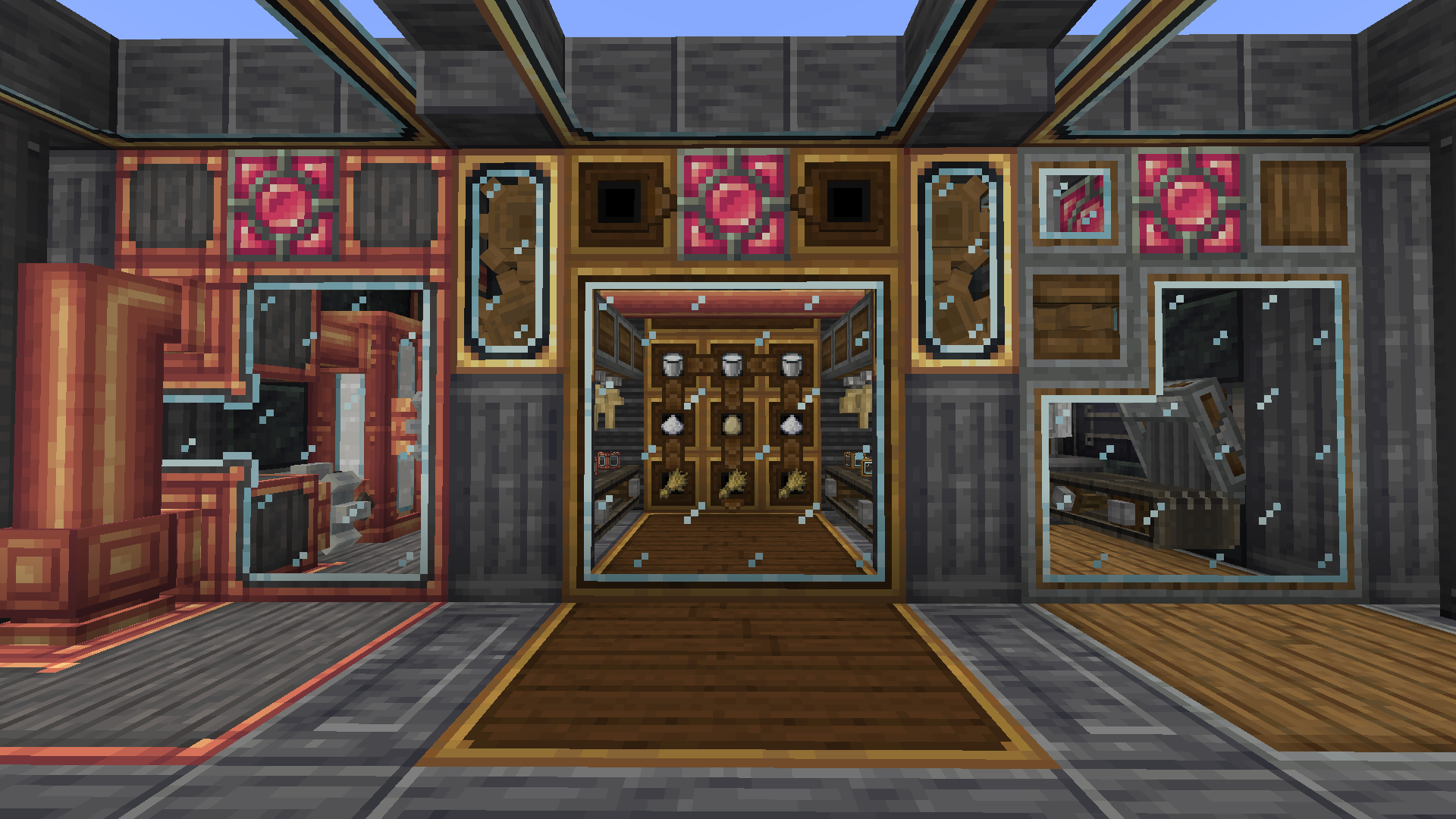
Create: Prismatic Shine
ABOUT

Create: Prismatic Shine is a remake mod for Create: Crystal Clear. It adds glass casings, glass scaffold and illumination casings to create.
This mod was created because Create: Crystal Clear has not been updated for a long time, preventing players from enjoying glass casings in NeoForge 1.21.1 and Create 6.0. Additionally, this mod builds upon Create: Crystal Clear by adding illumination casings - a type of glass casing that emits light.
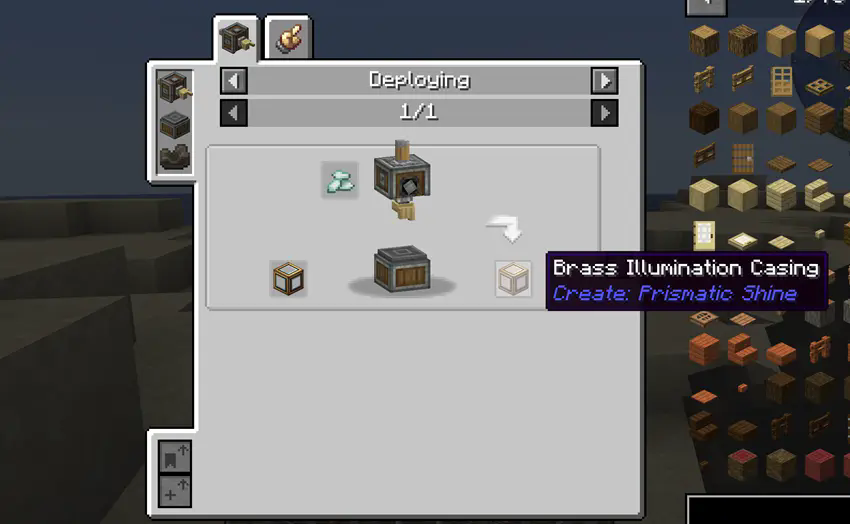
Furthermore, we have modified some recipes to make this mod more aligned with vanilla Create. For example, you can now right-click on glass with Andesite Alloy to craft Andesite Glass Casing, which can then be processed into Andesite Clear Glass Casing using a Stonecutter or Mechanical Saw. If you right-click on Andesite Clear Glass Casing with Prismarine Crystals, you'll obtain Andesite Illumination Casing.
How to install Create: Prismatic Shine
With Millida Launcher
Install Millida Launcher
The launcher is free: download it at millida.net/launcher and sign in with any nickname.
Click “Install” on this page
The launcher opens and installs the mod for Minecraft 1.20.1–1.21.1 on Forge or NeoForge automatically, together with its dependencies: Create.
Launch the game
A profile with it appears in the launcher: click “Play”.
Manually
Install Forge or NeoForge
The loader must match the game version of the mod file, for example Minecraft 1.21.1. After installing it, a separate profile appears in your launcher.
Download the file for your version
In the version list above, pick the file createprism-1.2.2.jar (1.2 MB) for your game version and loader.
Put it in the mods folder
The folder is inside .minecraft (Windows: %appdata%\.minecraft\mods). If it does not exist, create it. Required dependencies go there too: Create.
Launch the loader profile
Open “Mods” in the main menu: Create: Prismatic Shine should be in the list.
On a server
A server on Forge or NeoForge
The mod only works on a server with the same loader and game version, for example 1.21.1.
File goes into the server’s mods folder
Stop the server, put the mod file into the mods folder and start the server again.
Use the “To server” button
On Millida Hosting, the button at the top of the page uploads the file to your server and restarts it for you.
Minecraft 1.21.1 runs on Java 21: with a different Java version the game may close right after launch.
Versions
With dependencies
| Minecraft | Loader | File | Date | Actions |
|---|---|---|---|---|
| 1.21.1 | NeoForge | 1.21.11.2 MB | ||
| 1.21.1 | NeoForge | 1.21.11.2 MB | ||
| 1.20.1 | Forge | 1.20.11.2 MB 2 | ||
| 1.20.1 | Forge | 1.20.11.2 MB | ||
| 1.21.1 | NeoForge | 1.21.11.2 MB | ||
| 1.20.1 | Forge | 1.20.11.2 MB | ||
| 1.21.1 | NeoForge | 1.21.11.2 MB | ||
| 1.21.1 | NeoForge | 1.21.11.2 MB |
What it needs to run
- Createrequired
FAQ
Which Minecraft versions does Create: Prismatic Shine work on?
There are files for 1.21.1, 1.20.1. The newest is 1.21.1.
Is Create: Prismatic Shine for Forge or Fabric?
There are files for Forge: 1.20.1 and for NeoForge: 1.21.1. There are no files for Fabric: a mod for another loader will not start.
What does Create: Prismatic Shine need to work?
Required: Create. Without it the mod will not start: dependencies go into the same mods folder.
Does Create: Prismatic Shine work on a server?
Yes. Create: Prismatic Shine works both in singleplayer and on a server.
Which Java does Create: Prismatic Shine need?
Minecraft 1.21.1 runs on Java 21. If the game closes right after launch, the usual cause is the wrong Java version in the profile settings.
Where can I download Create: Prismatic Shine safely?
On this page: the file createprism-1.2.2.jar (1.2 MB) is stored on Millida’s server, with no link shorteners. SHA-1 checksum: 2c911b9b9abaac0572f0935ccfc9ae91c02eb4c7.
Reviews
Be the first to rate Create: Prismatic Shine


