
Construction Sticks Mod for Minecraft 1.20.1, 1.21.1
Sticks that make building easier
 NeoForge
 Forge
ForgeAbout the Construction Sticks mod
Construction Sticks allow you to place multiple blocks at once, up to 1024 at a time, extending your build in the direction you're facing. You can upgrade your stick to enhance its abilities, making construction faster and more efficient.
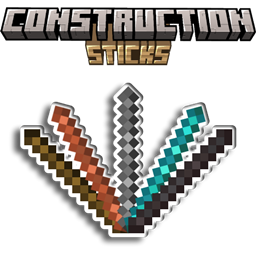
Sticks
There are five different tiers of Construction Sticks: Wood, Copper, Iron, Diamond, and Netherite. Each tier offers improved durability and block placement abilities, and can be further upgraded with templates.
Stick Durability Max. Blocks Upgradeable Angel Distance Max. Blocks (Destroy)
Wood 59 3 Yes 1 1
Copper 131 9 Yes 2 3
Iron 250 27 Yes 4 9
Diamond 1561 128 Yes 8 25
Netherite 2031 1024 Yes 16 81
Upgrade Templates
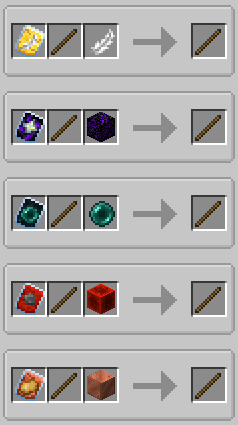
Templates add special upgrades to your Construction Sticks. To apply a template, combine the stick, template, and an additional item in a Smithing Table.
Available Templates:
- Angel: Place blocks behind the ones you're facing or in mid-air.
- Destruction: Remove blocks quickly and efficiently.
- Unbreakable: Removes durability consumption, allowing infinite block placement.
- Battery: Lets the stick use RF instead of durability.
Additional Features
- Shulker Boxes, Bundles, and Other Containers: Use them as sources for building blocks.
- Offhand Placement: Place blocks from your offhand instead of the one you're looking at.
Disclaimer
This is a fork of the original ConstructionWand mod, which is MIT licensed. It has been modified to add new features and improvements, including new tiers, templates, and functionality. The original mod was created by Theta-Dev.
Need a server? Get 20% off your first month by using promo code "mrbysco"
For questions feel free to join my Discord.
Want to support us?
-Mrbysco
-ShyNieke
How to install Construction Sticks
With Millida Launcher
Install Millida Launcher
The launcher is free: download it at millida.net/launcher and sign in with any nickname.
Click “Install” on this page
The launcher opens and installs the mod for Minecraft 1.20.1–26.1.2 on Forge or NeoForge automatically.
Launch the game
A profile with it appears in the launcher: click “Play”.
Manually
Install Forge or NeoForge
The loader must match the game version of the mod file, for example Minecraft 26.1.2. After installing it, a separate profile appears in your launcher.
Download the file for your version
In the version list above, pick the file ConstructionSticks-26.1.2-3.2.1.jar (264 KB) for your game version and loader.
Put it in the mods folder
The folder is inside .minecraft (Windows: %appdata%\.minecraft\mods). If it does not exist, create it.
Launch the loader profile
Open “Mods” in the main menu: Construction Sticks should be in the list.
Versions
With dependencies
| Minecraft | Loader | File | Date | Actions |
|---|---|---|---|---|
| 26.1.2 | NeoForge | ConstructionSticks-26.1.2-3.2.1.jar264 KB | ||
| 1.21.1 | NeoForge | ConstructionSticks-1.21.1-1.5.0.jar259 KB 4 | ||
| 1.20.1 | Forge, NeoForge | ConstructionSticks-1.20.1-1.2.7.jar253 KB 5 | ||
| 1.20.1 | Forge, NeoForge | ConstructionSticks-1.20.1-1.2.6.jar253 KB | ||
| 1.21.1 | NeoForge | ConstructionSticks-1.21.1-1.0.0.jar189 KB |
Reviews
Be the first to rate Construction Sticks


