
Block Pops Mod for Minecraft 1.20.1, 1.21.7
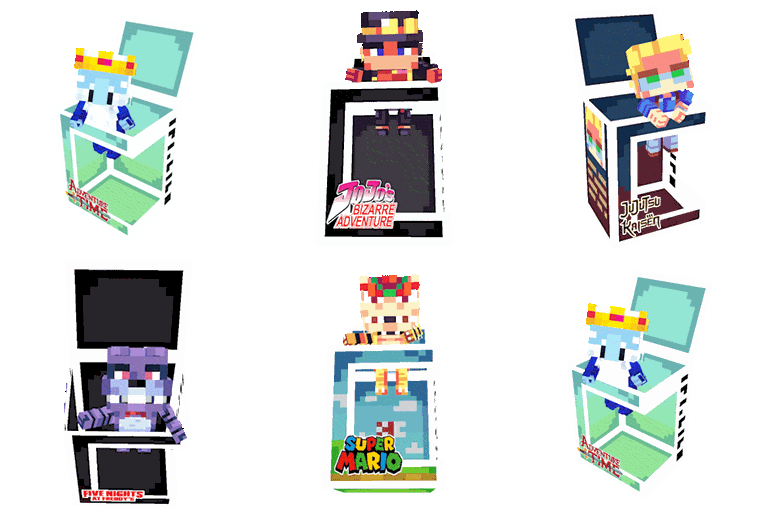
Collectible figures of players from your server and from multiple series/anime/games
 NeoForge
 Fabric
 Forge
ForgeAbout the Block Pops mod
✨ Block Pops ✨
Block Pops introduces a collectible figure system to Minecraft. Whether you want to collect characters from your favorite media or miniature versions of your friends, Block Pops brings the thrill of the hunt to your world.
🎨 Core Features
Unlock figures in your favorite collections
The mod comes with built-in collections with over 150 different starting figures.

Get figures of your friends
This mod is compatible with servers, featuring a special dynamic collection that allows you to obtain figures of all players who have visited the server.

The Claw Machine & Collection System
Block Pops uses a fair, time-based token system to help you build your collection. This gives players an incentive to play.
- The Claw Machine: Craft and place this machine to access the menu that allows you to spend tokens on different collections
- Regular Tokens: You hold up to 3 Regular Tokens at a time. Each token drops a random box from your selected collection and regenerates automatically every 3 hours of gameplay.
- Guaranteed Token: Hate duplicates? Once every day (resetting at 18:00 UTC), you receive a special Golden Token. This guarantees a new, undiscovered figure from the collection you choose, ensuring you can eventually complete every set!

Select your favorite color
When you first enter the world, you can choose your favorite color. That way, when a player gets your figurine, it will come out of the box in the color you chose.

🔧 Technical Details
- Compatibility: Forge 1.20.1.
- Dependencies:
- Architectury API
- GeckoLib
- Built-in compatibility with Quick Skin. If installed, figures will take on the appearance of players with it and will also allow you to use figures with HD skins or transparency!
If you find any conflicts or bug, please report them!
~ Discord Server ~
How to install Block Pops
With Millida Launcher
Install Millida Launcher
The launcher is free: download it at millida.net/launcher and sign in with any nickname.
Click “Install” on this page
The launcher opens and installs the mod for Minecraft 1.20.1–1.21.7 on Fabric, Forge or NeoForge automatically.
Launch the game
A profile with it appears in the launcher: click “Play”.
Manually
Install Fabric, Forge or NeoForge
The loader must match the game version of the mod file, for example Minecraft 1.21.7. After installing it, a separate profile appears in your launcher.
Download the file for your version
In the version list above, pick the file BlockPops - Neoforge - 1.21.7-1.5.0.jar (5.3 MB) for your game version and loader.
Put it in the mods folder
The folder is inside .minecraft (Windows: %appdata%\.minecraft\mods). If it does not exist, create it.
Launch the loader profile
Open “Mods” in the main menu: Block Pops should be in the list.
Minecraft 1.21.7 runs on Java 21: with a different Java version the game may close right after launch.
Versions
With dependencies
| Minecraft | Loader | File | Date | Actions |
|---|---|---|---|---|
| 1.21.7 | NeoForge | BlockPops - Neoforge - 1.21.7-1.5.0.jar5.3 MB | ||
| 1.21.7 | Fabric | BlockPops - Fabric - 1.21.7-1.5.0.jar5.3 MB | ||
| 1.20.1 | Forge | BlockPops - Forge - 1.20.1-1.5.0.jar5.3 MB |
FAQ
Which Minecraft versions does Block Pops work on?
There are files for 1.21.7, 1.20.1. The newest is 1.21.7.
Is Block Pops for Forge or Fabric?
There are files for Fabric: 1.21.7, for Forge: 1.20.1 and for NeoForge: 1.21.7.
Does Block Pops need other mods?
The author lists no required dependencies: the Fabric, Forge or NeoForge loader is enough.
Which Java does Block Pops need?
Minecraft 1.21.7 runs on Java 21. If the game closes right after launch, the usual cause is the wrong Java version in the profile settings.
Where can I download Block Pops safely?
On this page: the file BlockPops - Neoforge - 1.21.7-1.5.0.jar (5.3 MB) is stored on Millida’s server, with no link shorteners. SHA-1 checksum: 3418b800e642c7c7a9646e236c56618cee9f3d7c.
Reviews
Be the first to rate Block Pops


