

Total Animation Build for Minecraft 1.19
A modpack that makes Minecraft look just like the trailers.
- downloads
- 2 downloads
- views
- 25 views
- Updated
- Updated 24.10.2026
- 1.19
 Fabric
About the Total Animation modpack
First things first, let me get something out of the way: You MUST enable the resource packs for the proper experience! You also need to install Optifine because many of said resource packs WILL NOT WORK without it!
Do you wish that Minecraft looked like the animated trailers? Well, with this modpack, now it does! Using a few mods, several resource packs, and shaders, I've recreated the trailers as best as I possibly can! I've also included a few quality-of-life mods, just so it's a little more enjoyable ;)

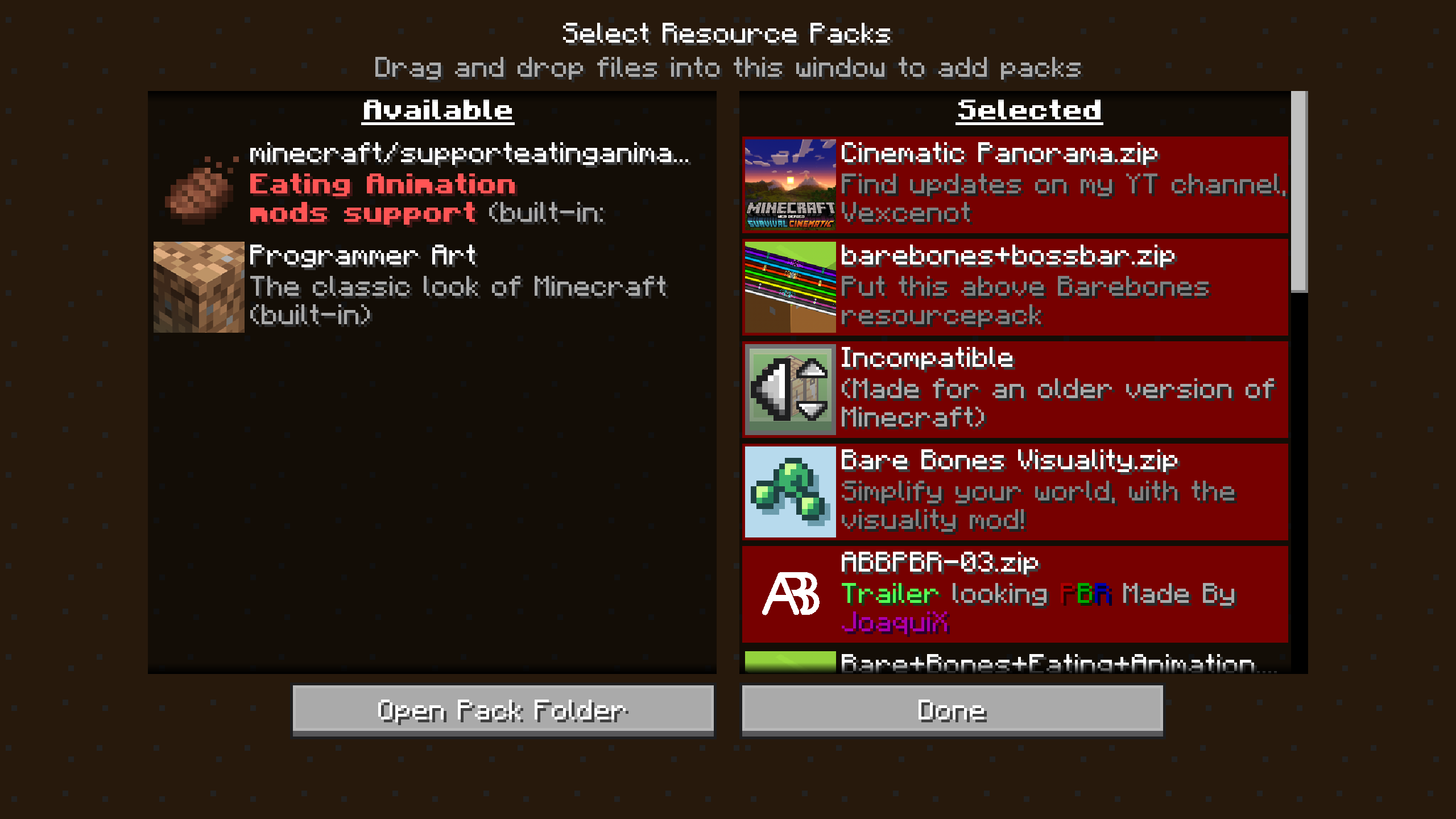
Resource pack setup (IMPORTANT!)
The resource packs have to be put in a specific order to prevent some textures from being overwritten. See the images tab for an example.
Mods:
- Visuality (by PinkGoosik)
- Eating Animation [Fabric] (by theone_ss)
- Not Enough Animations (by tr9zw)
- Entity Culling Fabric/Forge (by tr9zw)
- Item Model Fix (Fabric) (by Pepper_Bell)
- Puzzles Lib (by Fuzs_)
- Better Third Person (by Socolio)
- Effective 💦 (by doctor4t)
- Crawl (Fabric) (by fewizz_)
- Skin Layers 3D (Fabric/Forge) (by tr9zw)
- Fabric API (by modmuss50)
- Superflat World No Slimes (Fabric) (by Serilum)
- Sound Physics Remastered (by henkelmax)
- CameraOverhaul (by Mirsario)
- First-person Model (Forge/Fabric) (by tr9zw)
- Amplified Nether (by Starmute)
- Interactic (by gliscowo)
- Mod Menu (by ProspectorDev)
- Ambient Environment (by Jaredlll08)
- On Soul Fire (by MoriyaShiine)
- More Banner Features (by KxmischesDomi)
- Couplings (by HeckinChloe)
- Load My Resources [Fabric] (by Keksuccino)
- Forge Config API Port (by Fuzs_)
- [FABRIC/QUILT] Disable Custom Worlds Advice (by rdvdev2)
- Chat Heads (by dzwdz)
- OptiFabric (by Chocohead)
- Visual Workbench (by Fuzs_)
- Collective (Fabric) (by Serilum)
- Cloth Config API (Fabric/Forge) (by shedaniel)
- Axolotl Bucket Fix (by colderlavalamp)
- FancyMenu [Fabric] (by Keksuccino)
- SlimyFloor (by Pouille)
- Konkrete [Fabric] (by Keksuccino)
- Clear Despawn [Fabric] (by StrikerRocker)
- Visual Overhaul (by Motschen)
- Presence Footsteps [Fabric] (by S0llace)
- Wavey Capes (by tr9zw)
Resource packs:
- Another Bare Bones PBR (by joaquix1021_)
- Bare Bones (by robotpant)
- Bare Bones Eating Animation Addon (by vaaritu)
- Bare Bones Visuality Addon (by TheFoxineer)
- Bare Bones x Fresh Animations (by Specimen_69)
- Barebones Bossbars (by Vexcenot)
- Barely Better Bones (by LizterZapZap)
- Cinematic Panorama Menu (by Vexcenot) (version 1.0 only)
- Fresh Animations (by Fresh__LX)
Shaders:
- BSL Shaders (by capttatsu) (Shader settings from Low Res Trailer Recreation which I tweaked a bit to my liking)
How to install Total Animation
With Millida Launcher
Install Millida Launcher
The launcher is free: download it at millida.net/launcher and sign in with any nickname.
Click “Install” on this page
The launcher opens and installs the modpack for Minecraft 1.19 on Fabric automatically.
Launch the game
A profile with it appears in the launcher: click “Play”.
Manually
Download the modpack archive
In the version list above, pick the file TotalAnimation1.1.zip (104 MB).
Import it into a launcher
A launcher that supports modpacks (Millida Launcher, Prism) takes the archive via “Add modpack”, then “From file”. No need to unpack it yourself.
Allocate memory
Modpacks need more memory than the plain game: set 4–6 GB in the profile settings.
On a server
Use the “To server” button
On Millida Hosting, the button at the top of the page uploads the file to your server and restarts it for you.
Invite friends: they install the same modpack
To join the server, every player needs the same modpack version.
Minecraft 1.19 runs on Java 17: with a different Java version the game may close right after launch.
Versions
With dependencies
| Minecraft | Loader | File | Date | Actions |
|---|---|---|---|---|
| 1.19 | Fabric | Total Animation 1.1104 MB 2 |
FAQ
Which Minecraft versions does Total Animation work on?
Only Minecraft 1.19: there are no files for other versions.
Is Total Animation for Forge or Fabric?
Only for Fabric: 1.19.
Which Java does Total Animation need?
Minecraft 1.19 runs on Java 17. If the game closes right after launch, the usual cause is the wrong Java version in the profile settings.
Where can I download Total Animation safely?
On this page: the file TotalAnimation1.1.zip (104 MB) is stored on Millida’s server, with no link shorteners. SHA-1 checksum: 6bdddf2cb8e9512ad4e56caeb9e807af9892528d.
Reviews
Be the first to rate Total Animation


