

Star Optimized Build for Minecraft 1.20.1, 1.21
✨ This is a modpack that will make your game much more enjoyable and comfortable than you are used to.
- downloads
- 2 downloads
- views
- 73 views
- Updated
- Updated 03.09.2026
- 1.20.1 — 1.21
 Fabric
- Client
Star Optimized - The Optimized Modpack
Welcome to the Star Optimized - The Optimized Modpack! Dive into the world of Minecraft like never before with this meticulously crafted modpack, designed to enhance every aspect of your gameplay while ensuring optimal performance.

Key Features:
- 🔥Performance Optimization: I has worked tirelessly to create a seamless and lag-free experience. Say goodbye to frame drops and long loading times, as this modpack has been fine-tuned to run smoothly on a wide range of systems.
- ⬇️Optifine on Fabric: Immerse yourself in stunning visuals with improved textures, shaders, and lighting effects. Witness the beauty of Minecraft's landscapes like never before, from the shimmering waters to the majestic mountains.
- 🙋♂️Multiplayer: Join a thriving community of players who share your passion for Minecraft. Connect with others, trade resources, and team up for epic adventures in multiplayer mode.
- 🛠️Regular Updates: Our modpack is continually updated to ensure compatibility with the latest Minecraft versions and to introduce exciting new content, ensuring that your adventure never grows stale.
- 🔧Mod Compatibility: I carefully selected and tested a curated collection of mods that work seamlessly together, eliminating compatibility issues and providing a hassle-free experience.
- ⚙️Customization: Tailor your Minecraft journey with an array of configurable options. Adjust gameplay settings, difficulty levels, and mod parameters to create a personalized experience.
Experience Minecraft like never before with the Star Optimized - The Optimized Modpack. Whether you're a seasoned player or new to the world of Minecraft, this modpack promises to deliver an unparalleled and optimized gaming experience that will keep you hooked for hours on end. Dive in today and start your ultimate adventure!

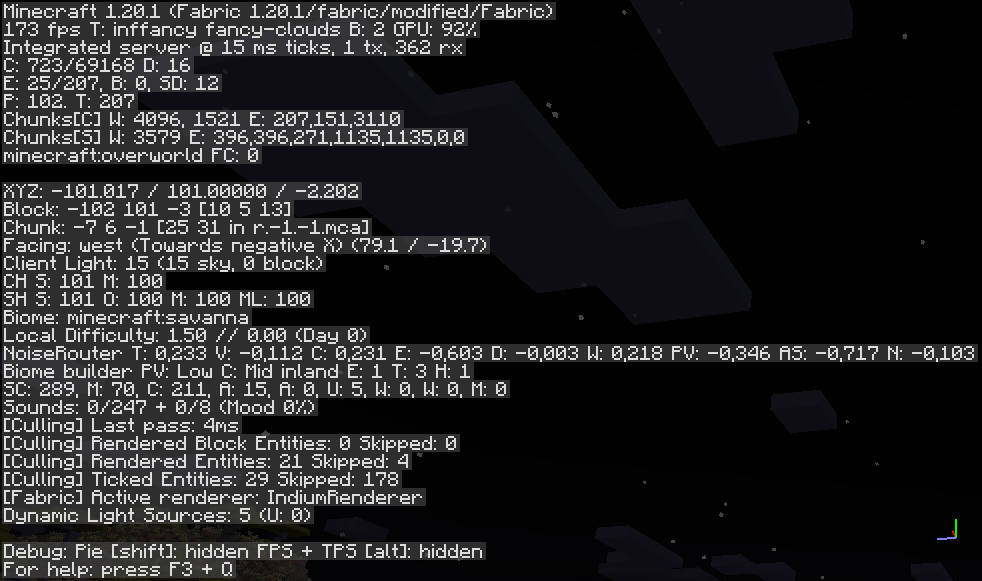
Vanilla (No Mods) FPS:
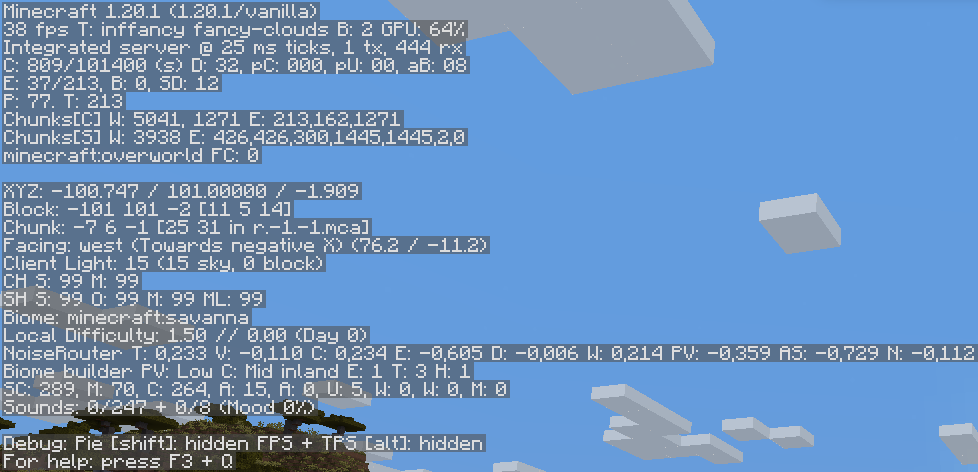
Star Optimized Modpack:
MODS
- Animatica (by FoundationGames)
- AntiGhost
- Blur (Fabric) (by Motschen)
- Borderless Mining (by comp500)
- Concurrent Chunk Management Engine (Fabric) (by ishlandmc)
- [Capes [Fabric/Forge] (by VictorKohler)](https://modrinth.com/mod/capes)
- Custom Entity Models (CEM) (by dorianpb)
- CIT Resewn (by SHsuperCM)
- Cloth Config API
- Continuity (by Pepper_Bell)
- Dark Loading Screen (by Neecko5b84)
- Debugify (by XanderIsDev)
- Dynamic FPS (by juliand665)
- [[ETF] Entity Texture Features - [Fabric & Forge] (by traben_0)](https://modrinth.com/mod/entitytexturefeatures)
- Entity Culling Fabric/Forge (by tr7zw)
- Fabric API (by modmuss50)
- Fabric Language Kotlin (by modmuss50)
- FabricSkyboxes (by AMereBagatelle)
- Falling Leaves (Fabric) (by RandomMcSomethin)
- FerriteCore
- ImmediatelyFast (by RaphiMC)
- Indium (by comp500)
- Iris Shaders (by coderbot)
- Krypton (by tuxed)
- LambDynamicLights (by LambdAurora)
- Language Reload (by Jerozgen)
- LazyDFU (by tuxed)
- Lithium
- Main Menu Credits (by XanderIsDev)
- Memory Leak Fix
- Model Gap Fix (MehVahdJukaar)
- Mod Menu
- More Chat History (by JackFred2)
- More Culling
- Not Enough Animations (by tr7zw)
- Presence Footsteps
- Reese's Sodium Options (by FlashyReese)
- Sodium Extra (by FlashyReese)
- Sodium (by jellysquid3_)
- Starlight (Fabric) (by Spottedstar)
- YetAnotherConfigLib (by XanderIsDev)
- Your Options Shall Be Respected (YOSBR)
- Zoomify (by isxander)
SHADERS PACK
- BSL Shaders
- Complementary Shaders v4
- Complementary Reimagined
RESOURCEPACKS
- xali's Bushy Leaves
- xali's Enchanted Books
How to install Star Optimized
With Millida Launcher
Install Millida Launcher
The launcher is free: download it at millida.net/launcher and sign in with any nickname.
Click “Install” on this page
The launcher opens and installs the modpack for Minecraft 1.20.1–1.21 on Fabric automatically.
Launch the game
A profile with it appears in the launcher: click “Play”.
Manually
Download the modpack archive
In the version list above, pick the file Star Optimized 2.0.0beta6.mrpack (84 KB).
Import it into a launcher
A launcher that supports modpacks (Millida Launcher, Prism) takes the archive via “Add modpack”, then “From file”. No need to unpack it yourself.
Allocate memory
Modpacks need more memory than the plain game: set 4–6 GB in the profile settings.
Minecraft 1.21 runs on Java 21: with a different Java version the game may close right after launch.
Versions
With dependencies
| Minecraft | Loader | File | Actions |
|---|---|---|---|
| 1.21 | Fabric | 1.2183.5 KB 1 | |
| 1.20.1 | Fabric | 1.20.1179 KB |
What it needs to run
- Continuityalready included
- YetAnotherConfigLib (YACL)already included
- [EMF] Entity Model Featuresalready included
- Cloth Config APIalready included
- Sodiumalready included
- Reese's Sodium Optionsalready included
- Dependencyalready included
- Dynamic FPSalready included
- Dependencyalready included
- Memory Leak Fixalready included
- Sodium Extraalready included
- BSL Shadersalready included
- Complementary Shaders - Unboundalready included
- Concurrent Chunk Management Engine (Fabric)already included
- Your Options Shall Be Respected (YOSBR)already included
- Dependencyalready included
- Dependencyalready included
- ModernFixalready included
- Dependencyalready included
- FerriteCorealready included
Reviews
Be the first to rate Star Optimized


