

MacOS Optimized Build for Minecraft 1.21, 26.3
A Modpack for those that play Minecraft on macOS with Apple Silicon [M Series] or Intel systems
- downloads
- 8 downloads
- views
- 89 views
- Updated
- Updated 26.10.2026
- 1.21 — 26.3
 Fabric
- Client
🏕️ ⛏️ Version 26.3 Available NOW!!! ⛏️ 🏕️
MacOS Optimized
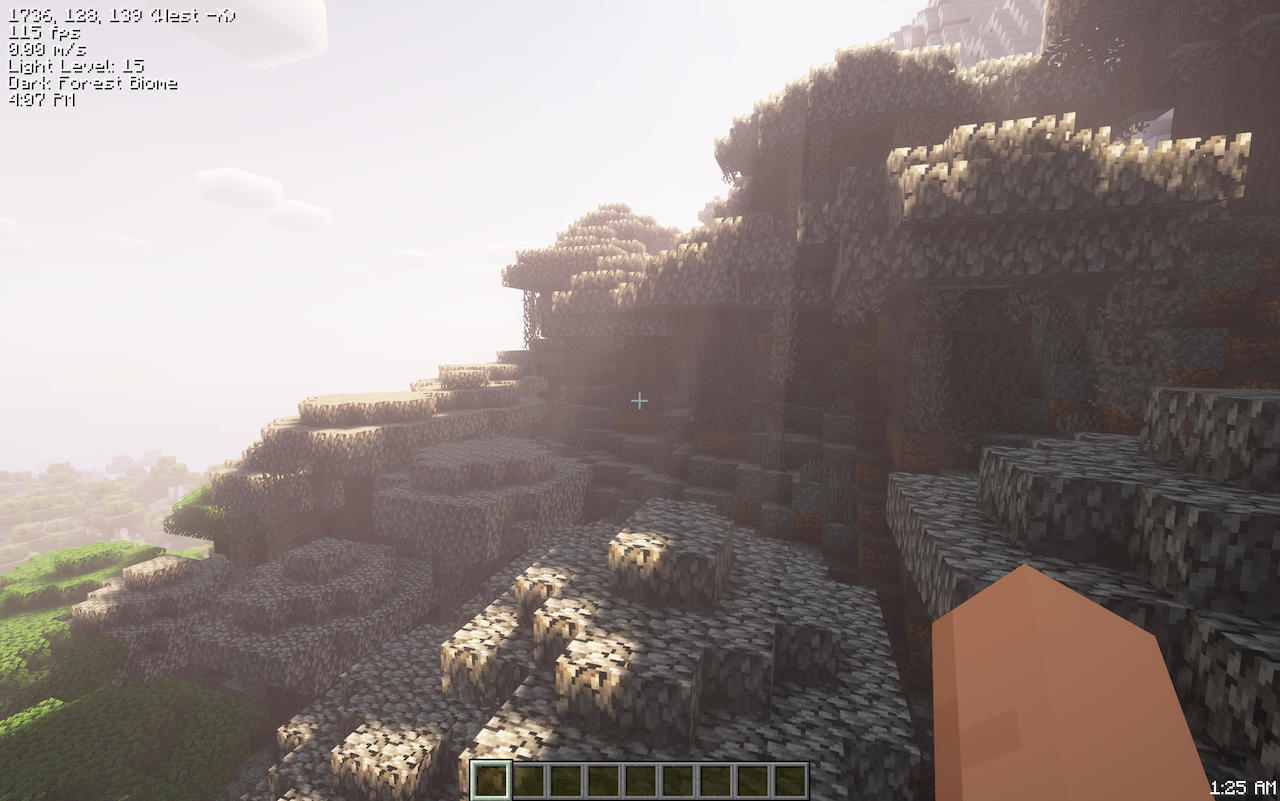
This Fabric based Modpack is for those that play Minecraft on macOS with Apple Silicon [M Series] or Intel systems. The modpack includes the necessary Fabric mods and supporting libraries to enable a better game play experience. Plus we've added a few extra quality of life (QOL) mods to enhance the vanilla game play.
Features
- Massively improved FPS (100+ on M Serices)
- Ability to run popular sharders (Complementary, BSL, etc.)
- Keyboard & mouse combo fixes for combat & PvP
- Not overloaded with unnecessary mods
- Updated available as soon as possible

How to Support
- Give this project a heart ❤️
- If any other versions of Minecraft support is wanted, please add your request via the Issue link.
- If additional mods, shader packs, resource packes or tweaks are wanted, please add your request via the Issue link.

What to Know
Versions Available
- Minecraft 26.3 Wilderness Bound
- Minecarft 26.2 Chaos Cubed
- Minecarft 26.1.x Tiny Takeover
- Minecraft 1.21.11 Mounts of Mayhem
- Minecraft 1.21.10 The Copper Age
- Minecraft 1.21.8 Chase the Skies
- Minecraft 1.21.6 Chase the Skies
- Minecraft 1.21.5 Spring to Life
- Minecraft 1.21.4 The Garden Awakens
- Minecarft 1.21.1 Tricky Trials
- Minecraft 1.20.4 Trails & Tales
Supported Launchers
- Modrinth
- ATLauncher
- MultiMC
Tweaking Your Experience
- Maximize FPS:
- Disable VSync & set Max Framerate to Unlimited in Options->Video Settings
- Reduce Display resoltion System Settings->Displays
- Shaders: Be sure to adjust shader pack quality for better game play on your system
- Zoomify: Check keybindings to make sure their isn't a conflicts in Options->Controls->Key Binds
Modpack Details
Mod List
- Better Block Entities
- Cloth config
- Clumps
- Entity Culling
- Entity Texture Features
- Fabric API
- Fabric Language Kotlin
- Ferrite Core
- Immediately Fast
- Iris
- LambDynamicLights
- Lithium
- MacOS Input Fixes
- Modmenu
- More Culling
- Reeses Sodium Options
- Retino
- Sodium
- Sodium Extra
- Yet Another Config Lib
1.21.4 & lower
- Dynamic FPS
- Indium
- Memoryleak Fix
QOL Mods
- Capes
- Elytra Contrails Mod
- Shulkerbox Tooltip
- Simple Hud Enhanced
- Simple Voice Chat
- Skinlayers 3D
- Zoomify
Resource Packs
- Highlighted Ores
- Sodium Translations
Shaders
- BSL
- Complementary Reimagined
- Complementary Unbound
- MakeUp Ultra Fast
- Mellow
- Miniature
How to install MacOS Optimized
With Millida Launcher
Install Millida Launcher
The launcher is free: download it at millida.net/launcher and sign in with any nickname.
Click “Install” on this page
The launcher opens and installs the modpack for Minecraft 1.21–26.3 on Fabric automatically.
Launch the game
A profile with it appears in the launcher: click “Play”.
Manually
Download the modpack archive
In the version list above, pick the file Mac OS Optimized-26.3.mrpack (612 KB).
Import it into a launcher
A launcher that supports modpacks (Millida Launcher, Prism) takes the archive via “Add modpack”, then “From file”. No need to unpack it yourself.
Allocate memory
Modpacks need more memory than the plain game: set 4–6 GB in the profile settings.
Versions
With dependencies
| Minecraft | Loader | File | Date | Actions |
|---|---|---|---|---|
| 26.3 | Fabric | 26.3612 KB | ||
| 26.2 | Fabric | 26.2612 KB 6 | ||
| 26.2 | Fabric | 26.2612 KB 1 | — | |
| 1.21.11 | Fabric | 1.21.11612 KB 1 | — | |
| 1.21 | Fabric | 1.2137 MB | — |
What it needs to run
- YetAnotherConfigLib (YACL)already included
- Shulker Box Tooltipalready included
- ImmediatelyFastalready included
- Capesalready included
- Simple Voice Chatalready included
- Cloth Config APIalready included
- Sodiumalready included
- Mellowalready included
- [ETF] Entity Texture Featuresalready included
- Reese's Sodium Optionsalready included
- RenderPearlalready included
- Complementary Shaders - Reimaginedalready included
- Fabric Language Kotlinalready included
- Dynamic FPSalready included
- Dependencyalready included
- Entity Cullingalready included
- Better Block Entitiesalready included
- Dependencyalready included
- Sodium Extraalready included
- BSL Shadersalready included
- Complementary Shaders - Unboundalready included
- Miniature Shaderalready included
- Iris Shadersalready included
- Dependencyalready included
- Lithiumalready included
- MakeUp - Ultra Fastalready included
- Clumpsalready included
- Zoomify (Zoom)already included
- Dependencyalready included
- LambDynamicLightsalready included
- Translations for Sodiumalready included
- Dependencyalready included
- 3D Skin Layersalready included
Reviews
Be the first to rate MacOS Optimized


