

 Data pack
 Vanilla game
Potion Descriptions Pack
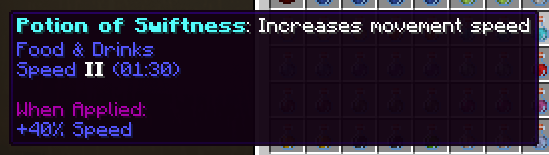
This resource pack enhances Minecraft's potion system by providing detailed descriptions of every potion directly in-game. Whether you're new or experienced, it helps you make better choices while brewing your potions.



Features
- Clear descriptions for all potions, splash potions, lingering potions, and tipped arrows
- Brewing ingredients with helpful tooltips explaining their purpose
- Clean interface without confusing duration timers
- Beginner-friendly explanations that focus on what each potion does
- Complete coverage of all vanilla Minecraft potions including newer effects

What's Included
The pack covers everything related to potion brewing:
- All base potions (Healing, Strength, Speed, etc.)
- Splash and lingering variants
- Tipped arrows with potion effects
- Brewing ingredients and equipment
- Potion modifiers like Redstone and Glowstone

How to install Potions Description
With Millida Launcher
Install Millida Launcher
The launcher is free: download it at millida.net/launcher and sign in with any nickname.
Click “Install” on this page
The launcher opens and installs the data pack for Minecraft 1.13–1.21.5 automatically.
Launch the game
A profile with it appears in the launcher: click “Play”.
Manually
Download the archive
Pick the file potions_desc.zip (81 KB) for your game version.
New world: “Data Packs”
When creating a world, click “Data Packs”, drag the archive into the window, then move it to “Selected”.
Existing world: the datapacks folder
Put the archive into saves/<world>/datapacks and type /reload in game.
On a server
Archive goes into the server world’s datapacks
The world/datapacks folder on the server; players do not need to install anything.
Reload the data
Type /reload in the server console or restart the server.
Use the “To server” button
On Millida Hosting, the button at the top of the page uploads the file to your server and restarts it for you.
Versions
With dependencies
| Minecraft | Loader | File | Date | Actions |
|---|---|---|---|---|
| 1.19.2 | Data pack | 1.19.280.8 KB | ||
| 1.18.2 | Data pack | 1.18.280.8 KB | ||
| 1.17.1 | Data pack | 1.17.180.8 KB | ||
| 1.15.2 | Data pack | 1.15.280.8 KB | ||
| 1.14.4 | Data pack | 1.14.480.8 KB | ||
| 1.16.5 | Data pack | 1.16.580.8 KB | — |
Reviews
Be the first to rate Potions Description


