

Path Craft Data pack for Minecraft 1.20.1, 1.16.5
Adds the ability to craft dirt paths from dirt blocks, making terrain customization easier
- views
- 28 views
- Updated
- Updated 19.03.2025
- 1.13 — 1.20.6
 Data pack
- Client and server
Path Craft Datapack
Transform your Minecraft landscapes with the Path Craft Datapack! This simple yet powerful tweak lets you craft dirt paths effortlessly, making it easier than ever to shape and customize your world.
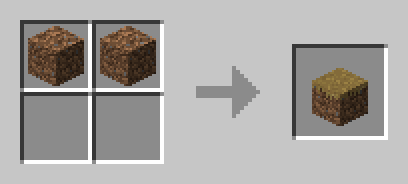
Crafting Recipe Example:
2 Dirt Blocks = 1 Dirt Path
How to Use:
- Download the Path Craft Datapack.
- Place the downloaded file into the "datapacks" folder in your Minecraft world save.
- Start crafting and create natural, winding paths with ease!
Compatibility:
- Works seamlessly with other datapacks.
- No additional dependencies required.
Shape Your World:
Whether you're building cozy villages or scenic trails, the Path Craft Datapack makes landscaping more accessible. Say goodbye to shovels – now you can craft and place dirt paths with ease.
Download Path Craft now and carve out your perfect Minecraft journey!
How to install Path Craft
With Millida Launcher
Install Millida Launcher
The launcher is free: download it at millida.net/launcher and sign in with any nickname.
Click “Install” on this page
The launcher opens and installs the data pack for Minecraft 1.13–1.20.6 automatically.
Launch the game
A profile with it appears in the launcher: click “Play”.
Manually
Download the archive
Pick the file Path Craft.zip (1016 B) for your game version.
New world: “Data Packs”
When creating a world, click “Data Packs”, drag the archive into the window, then move it to “Selected”.
Existing world: the datapacks folder
Put the archive into saves/<world>/datapacks and type /reload in game.
On a server
Archive goes into the server world’s datapacks
The world/datapacks folder on the server; players do not need to install anything.
Reload the data
Type /reload in the server console or restart the server.
Or use the “To hosting” button
On Millida Hosting, the button at the top of the page uploads the file to your server and restarts it for you.
Versions
With dependencies
| Minecraft | Loader | File | Date | Actions |
|---|---|---|---|---|
| 1.17.1 | Data pack | 1.17.11016 B | ||
| 1.16.5 | Data pack | 1.16.51016 B | ||
| 1.15.2 | Data pack | 1.15.21016 B | ||
| 1.14.4 | Data pack | 1.14.41016 B |
Reviews
Be the first to rate Path Craft


