
Enchant Everything Data pack for Minecraft 26.3
Combine enchantments you normally can't and adds some features
About the Enchant Everything data pack
Features 1.16.5 - 1.20.4
- while standing on an anvil
drop an item near you (max 4 blocks away) and an enchanted book REALLY close to it (literally one on top of the other), the item will be enchanted with the first enchantment in the book, the enchantment must be a vanilla enchantment and within vanilla levels, be aware, if the book has more than 1 enchantment, only the 1st will be applied and all the others will be lost.
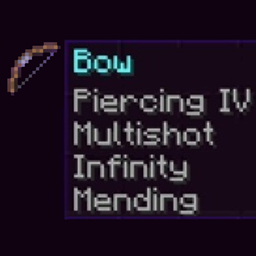
This enchanting system bypasses any enchantment incompatibility, you can put together:
- infinity and mending
- sharpness and smite
- all protection types
- in general you can put any vanilla enchantment on any item you want (except enchanted books)
Do crossbow enchantments work on bow and vice-versa? 1.16.5 - 1.20.4 --> No 1.20.5+ --> Yes, except quick charge
If, for example, you have a sharpness 1 sword and you would like to enchant it with an higher level of sharpness, you can do it only in 1.20.5 and above, previous versions don't allow enchantment level overwrite
- while standing on a grindstone
drop an item near you (max 4 blocks away): 1.16.5 - 1.20.6 --> all enchantments will be removed, curses too 1.21 and above --> all curses will be removed
- while standing on a gold block
drop an item near you (max 4 blocks away), its repair cost will be reset
- while standing on end stone
drop an elytra and a netherite ingot REALLY close to each other (and within 4 blocks of you), the netherite ingot will be destroyed and give the elytra the same armor protection as a netherite chestplate
Features 1.20.5 - 1.20.6
All the features 1.16.5 - 1.20.4 + the following:
- enchantments no longer need to be within vanilla levels to be used in this datapack's enchanting system
- newer enchantments' levels overwrite older enchantments' levels
if you have a sword with sharpness 2, using the datapack's enchanting system to enchant the sword with a different level of sharpness will overwrite the sharpness level, whether it's higher or lower
- all enchantments are craftable
use JEI or the vanilla recipe book to see craftings, to unlock all recipes in the vanilla recipe book you can use /recipe give @s *
Features 1.21+
All the features 1.16.5 - 1.20.6 + the following:
- sharpness comes back to its prime, adding 1.25 attack damage each level, as it was before 1.9
- soul speed no longer takes away durability while walking on soul sand (because it makes no sense to me), I also removed the sound and the particles
- thorns no longer takes away durability while damaging enemies
- the unbreaking enchantment's formula has been changed to be more understandable by everyone. The formula is now the same for both armor and tools, the 1st level has a 60% chance of not consuming durability, each additional level adds an additional 10%, which means that level 5 is enough to make anything unbreakable.
- lunge no longer uses durability and hunger when used, in addition, it can be used vertically, while falling and underwater.
How to install Enchant Everything
With Millida Launcher
Install Millida Launcher
The launcher is free: download it at millida.net/launcher and sign in with any nickname.
Click “Install” on this page
The launcher opens and installs the data pack for Minecraft 26.3 automatically.
Launch the game
A profile with it appears in the launcher: click “Play”.
Manually
Download the archive
Pick the file EnchantEverything-26.3_v3.2.zip (69 KB) for your game version.
New world: “Data Packs”
When creating a world, click “Data Packs”, drag the archive into the window, then move it to “Selected”.
Existing world: the datapacks folder
Put the archive into saves/<world>/datapacks and type /reload in game.
On a server
Archive goes into the server world’s datapacks
The world/datapacks folder on the server; players do not need to install anything.
Reload the data
Type /reload in the server console or restart the server.
Use the “To server” button
On Millida Hosting, the button at the top of the page uploads the file to your server and restarts it for you.
Versions
With dependencies
| Minecraft | Loader | File | Date | Actions |
|---|---|---|---|---|
| 26.3 | — | EnchantEverything-26.3_v3.268.8 KB 10 |
FAQ
Which Minecraft versions does Enchant Everything work on?
Only Minecraft 26.3: there are no files for other versions.
Does Enchant Everything work on a server?
Yes: the data pack goes into the datapacks folder of the server world, and players do not need to install anything.
Where can I download Enchant Everything safely?
On this page: the file EnchantEverything-26.3_v3.2.zip (69 KB) is stored on Millida’s server, with no link shorteners. SHA-1 checksum: 11e8d9704d8a1f6ed5d815120d312a88527379eb.
Reviews
Be the first to rate Enchant Everything


