

Waypoints Teleport
Save, teleport to, and manage named waypoints across all dimensions
Download both the resource and behaviour pack for crafting the waypoint rod
else bp is enough when using /wp to open menu

Features
Commands
Command Effect
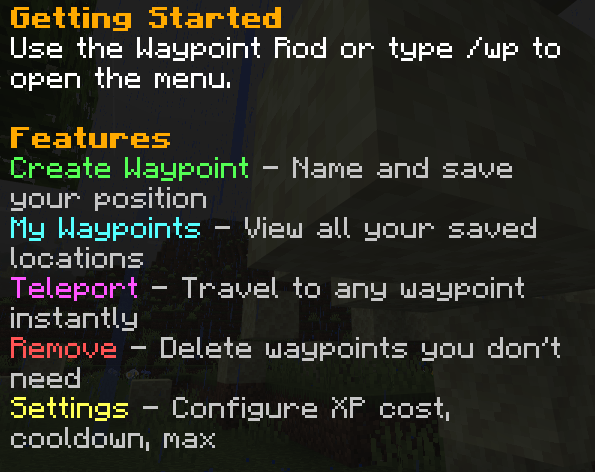
/wp Open the Waypoints main menu
/wprod Get a Waypoint Rod
Getting Started
Obtaining the Waypoint Rod
Craft it: (new)
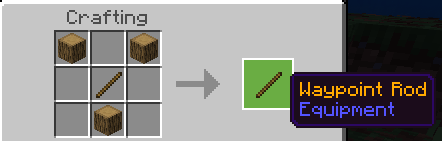
- R = Oak_Log, S = Stick
Or use /wprod to receive one directly.
Using the Menu
- Right-click (use) the Waypoint Rod, or type /wp
- Choose from:
- Create Waypoint Enter a name and save your position
- My Waypoints View all saved locations
- Teleport Select a waypoint to travel to
- Remove Delete waypoints
- Settings Adjust XP cost, cooldown, and limits
Settings
Open Settings from the main menu to change:
- XP Cost per Teleport - Choose from preset values (0, 1, 2, 3, 5, 10 levels)
- Cooldown - Choose from preset values (0, 5, 10, 15, 30, 60 seconds)
- Max Waypoints - Choose from preset values (5, 10, 20, 30, 40, 50)
Versions
| Minecraft | Loader | File | Date | Actions |
|---|---|---|---|---|
| 1.21.101 | — | Waypoints.mcaddon200 KB |
Reviews
Be the first to rate Waypoints Teleport
Comments 0
Sign in to commentSign in
