

Über das WARDEN SHADER-Ressourcenpaket
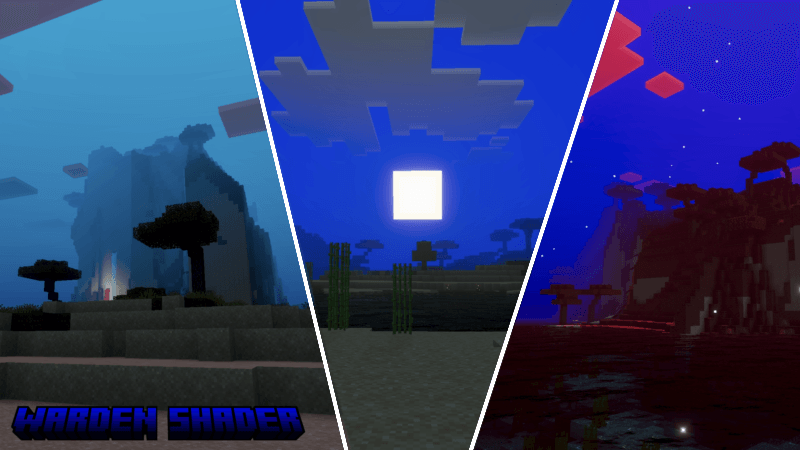
Warden Shader transforms your Minecraft world into a darker and more mysterious environment inspired by the atmosphere of the Warden. This addon adds a deep blue color tone to the sky and lighting, creating a cold and eerie feeling across the world.
The shader enhances sunlight with a soft glow effect and improves fog rendering, making distant landscapes look more cinematic and immersive. Mountains, forests, and oceans appear deeper and more dramatic, while the horizon fades smoothly into thick atmospheric fog.

Water surfaces look darker and more reflective, giving oceans and rivers a calm but mysterious appearance. The lighting system also adds stronger contrast between bright areas and shadows, making the environment feel more alive and atmospheric.
Warden Shader is perfect for players who want a moody, cinematic, and mysterious Minecraft experience while exploring the overworld.
Warden Shader is owned by Monster Expansion. By using this add-on, you agree not to repost, remake, showcase without proper credit, or use it on a server without credit. (you can get my perms on discord only)
This addon lets you experience the Warden’s visual detector ability.
See all my portfolio below:

Installation von WARDEN SHADER
With Millida Launcher
Install Millida Launcher
The launcher is free: download it at millida.net/launcher and sign in with any nickname.
Click “Install” on this page
The launcher opens and installs the resource pack for Minecraft 26.20 automatically.
Launch the game
A profile with it appears in the launcher: click “Play”.
Manually
Download the archive
Pick the file warden shader 1.4.mcpack (1.1 MB) for your game version. No need to unpack it.
Put it in the resourcepacks folder
The easiest way: “Options”, then “Resource Packs”, then “Open Pack Folder”, and drag the archive there.
Enable the pack
In the same window, move the pack to the right-hand “Selected” column and click “Done”.
Versionen
Mit Abhängigkeiten
| Minecraft | Loader | Datei | Datum | Aktionen |
|---|---|---|---|---|
| 26.20 | — | warden shader 1.41.1 MB |
FAQ
Which Minecraft versions does WARDEN SHADER work on?
Only Minecraft 26.20: there are no files for other versions.
Where can I download WARDEN SHADER safely?
On this page: the file warden shader 1.4.mcpack (1.1 MB) is stored on Millida’s server, with no link shorteners. SHA-1 checksum: c19769f41ef483dbdefc15ca791ccb9163079c74.
Bewertungen
Bewerten Sie WARDEN SHADER als Erster


