

Visual Enchantments Ressourcenpaket für Minecraft 1.20.1, 1.21.1
Ein Ressourcenpaket, das verzauberten Gegenständen visuelle Indikatoren hinzufügt
- Downloads
- 19 Downloads
- Aufrufe
- 112 Aufrufe
- Aktualisiert
- Aktualisiert 27.10.2026
- 1.15.1 — 26.3
 Vanilla-Spiel
- Client
Über das Visual Enchantments-Ressourcenpaket
Ever found yourself not recognising enchantments on a chest? Spending time checking every item description to see if it's the tool you want? Do you want this to be different, know what tool someone's using at a simple glance? Visual Enchantments fixes this for you!
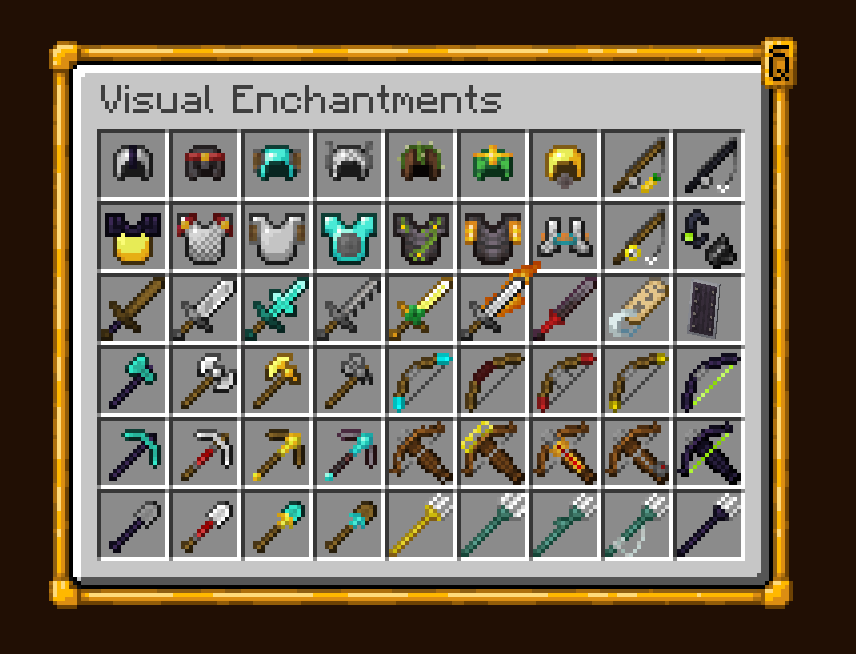
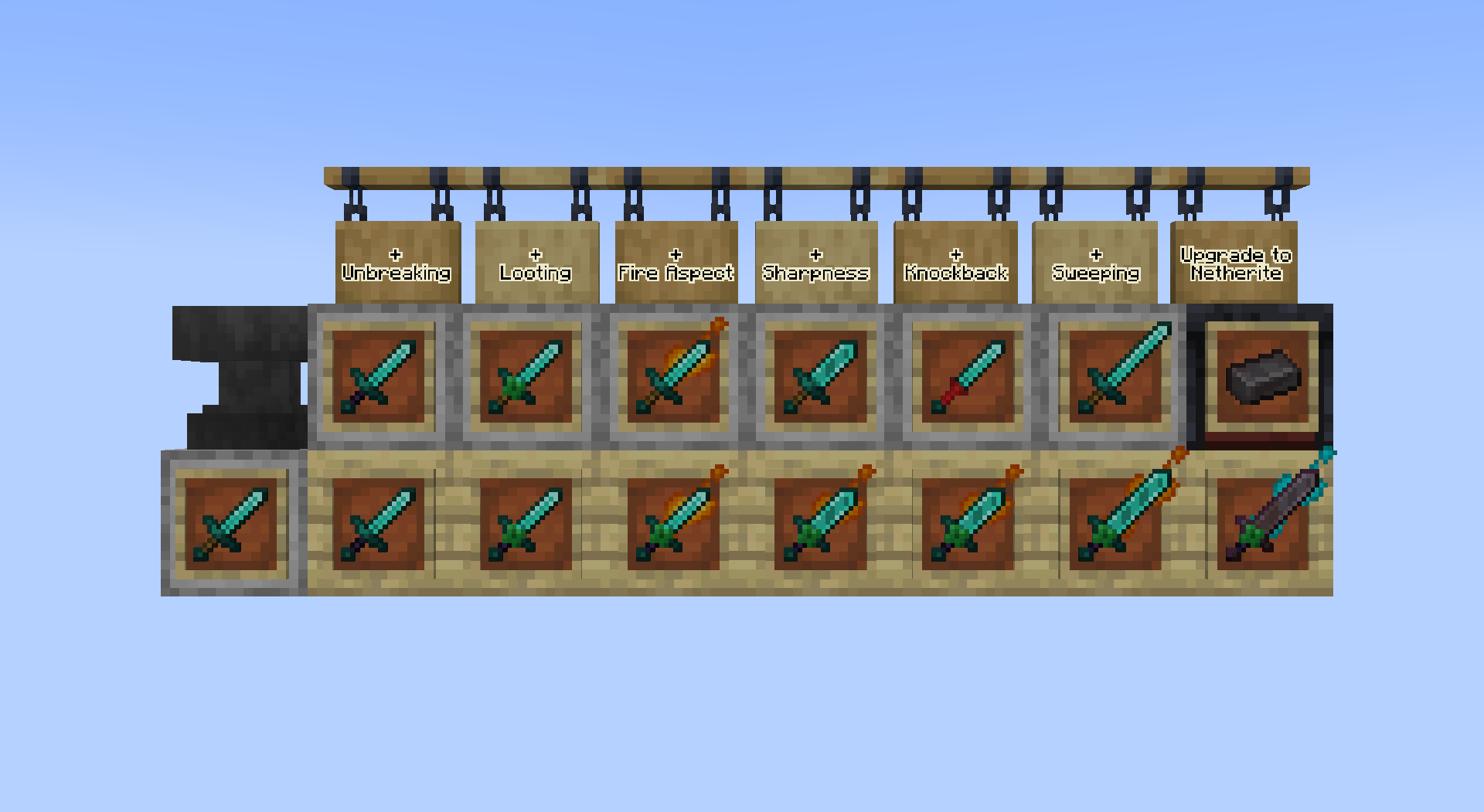
Every enchantment is now represented by simple and consistent texture changes, so you can identify the attributes of a tool with a simple look.

All Enchantment Motifs
General enchantments:

- Unbreaking: Wood parts to obsidian
- Vanishing curse: Crooked item
- Mending: Green xp orb/motiv
Swords:
- Knockback: Baseball bat / no guard
- Looting: Four-leaved clover
- Sweeping: Longer blade
- Fire aspect: Flaming blade
Swords & Axes:
- Sharpness: Wider and sharper blade on swords, double filo on axes
- Smite: Cross-shaped blade on swords, elongated filo on axes
- Bane of arthropods: Dented blade
Axes, Pickaxes, Hoes and Shovels:
- Efficiency: Redstone grip
- Fortune: Golden tool head
- Silk touch: Diamond tool head
Bows:
- Power: Golden themed
- Punch: Red glove arrow
- Flame: Fiery arrow
- Infinity: Diamond themed / soul arrow
Tridents:
- Impaling: Wider trident
- Loyalty: String
- Riptide: Dolphin fin
- Channeling: Golden trident
General Armor:
- Binding curse: Red padlocks
- Protection: Enchanted book bands
- Blast protection: Metallic shields
- Projectile protection: Wooden shields
- Fire protection: Golden shields
- Thorns: Vines on top of the armor
Helmet:
- Respiration: Mouth piece
- Aqua affinity: Guardian fins
Boots:
- Depth strider: Guardian fins
- Frost walker: Frosted boots
- Feather falling: Feathered boots
- Soul speed: Swirling Souls
Leggings:
- Swift Sneak: Socks
Versions below minecraft 1.21.5 require either OptiFine or CITresewn

Installation von Visual Enchantments
With Millida Launcher
Install Millida Launcher
The launcher is free: download it at millida.net/launcher and sign in with any nickname.
Click “Install” on this page
The launcher opens and installs the resource pack for Minecraft 1.15.1–26.3 automatically.
Launch the game
A profile with it appears in the launcher: click “Play”.
Manually
Download the archive
Pick the file 5.0.7v_VisualEnchantments.zip (2.7 MB) for your game version. No need to unpack it.
Put it in the resourcepacks folder
The easiest way: “Options”, then “Resource Packs”, then “Open Pack Folder”, and drag the archive there.
Enable the pack
In the same window, move the pack to the right-hand “Selected” column and click “Done”.
Versionen
Mit Abhängigkeiten
| Minecraft | Loader | Datei | Datum | Aktionen |
|---|---|---|---|---|
| 26.3 | — | 26.32.7 MB 2 | ||
| 26.3 | — | 26.32.7 MB 5 | ||
| 26.2 | — | 26.22.7 MB 3 | — | |
| 26.1 | — | 26.12.7 MB | — | |
| 1.21.11 | — | 1.21.112.6 MB 2 | — | |
| 1.21 | — | 1.2124.7 MB 2 | — | |
| 1.20.1 | — | 1.20.127.5 MB 4 | — | |
| 1.19.2 | — | 1.19.227.5 MB | — |
FAQ
Which Minecraft versions does Visual Enchantments work on?
There are files for 1.15.1–26.3, 30 versions in total. The newest is 26.3.
Does Visual Enchantments need mods?
No, the resource pack works in the plain game without loaders: put it into the resourcepacks folder and enable it in the options.
Bewertungen
Bewerten Sie Visual Enchantments als Erster



