
Visible Debris Ressourcenpaket für Minecraft 1.21, 26.30
Sichtbare Trümmer von LazyLegend95
Visible Debris
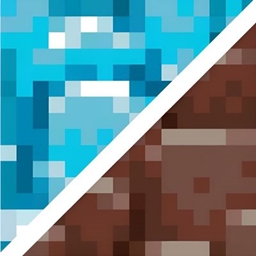
Visible Debris is a sleek, high-contrast aesthetic pack that re-imagines the toughest material in Minecraft. Say goodbye to the muddy browns of the Nether-this pack transforms the Netherite tier into a collection of glowing, electric blue artifacts.
💎 Key Features
Vibrant Ancient Debris: Features a glowing blue center, making it significantly easier to spot while mining in the Nether.
Neon-Infused Equipment: All Netherite tools, swords, and bows feature a dark metallic base with detailing.
Lightweight Performance: Built to be resource-friendly, ensuring high FPS even on lower-end devices.
📥 Installation Guide
Click the Download button on the right sidebar.
Once downloaded, double-click the .mcpack file to launch Minecraft and import automatically.
Navigate to Settings > Global Resources and move "Visible Debris" to the top of your Active list.
Installation von Visible Debris
With Millida Launcher
Install Millida Launcher
The launcher is free: download it at millida.net/launcher and sign in with any nickname.
Click “Install” on this page
The launcher opens and installs the resource pack for Minecraft 1.21–26.30 automatically.
Launch the game
A profile with it appears in the launcher: click “Play”.
Manually
Download the archive
Pick the file Visible Debris v2.1_v1.2.mcpack (44 KB) for your game version. No need to unpack it.
Put it in the resourcepacks folder
The easiest way: “Options”, then “Resource Packs”, then “Open Pack Folder”, and drag the archive there.
Enable the pack
In the same window, move the pack to the right-hand “Selected” column and click “Done”.
Versionen
Mit Abhängigkeiten
| Minecraft | Loader | Datei | Datum | Aktionen |
|---|---|---|---|---|
| 1.21.30 | — | Visible Debris v2.2.mcpack44 KB 3 |
Bewertungen
Bewerten Sie Visible Debris als Erster



