
Über das Ultimate Night Vision-Ressourcenpaket
Ultimate Night Vision is a lightweight Minecraft Bedrock resource pack that makes caves, the Deep Dark and nighttime exploration much easier to see, without potions or commands.
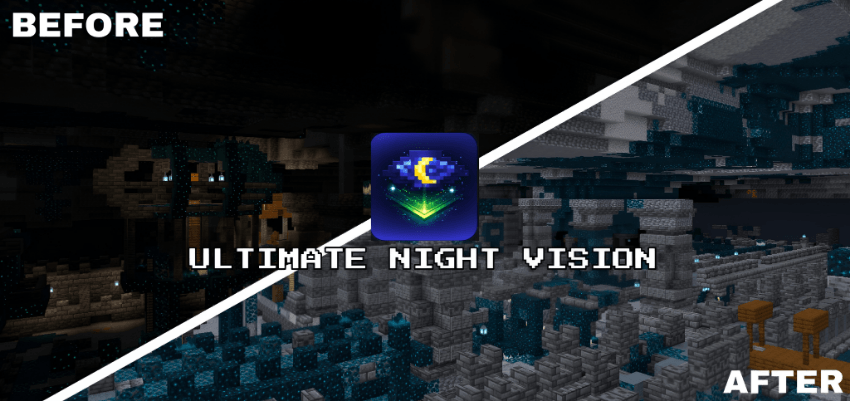
It works in every graphics mode (Simple, Fancy and Vibrant Visuals) and looks its best with Vibrant Visuals turned on.
🌙 Features

- Clear, balanced night vision with no harsh colours or overexposure
- No Night Vision potion, commands or extra settings needed
- Built for caves, the Deep Dark and underground exploration
- Clear fog in all 89 biomes in Simple & Fancy mode, plus a catch-all so new biomes are never missed
- Brighter Vibrant Visuals lighting in every biome lighting set, including the Nether and the End
- Pumpkin blur and screen vignette removed for a clearer view
🎨 Graphics Mode Support
Ultimate Night Vision includes a separate subpack for each graphics mode:
- Simple & Fancy Graphics. A light HUD night vision filter, combined with clear per-biome fog for long sightlines.
- Vibrant Visuals (recommended). Raises ambient and moonlight brightness through Vibrant Visuals' own lighting system, so dark areas become readable while shadows and lighting still look natural.
👉 Pick the subpack that matches your graphics setting before playing.
⚙ Installation
- Download the .mcpack file
- Open it, and Minecraft will import it automatically
- Activate it in Global Resources or in a world's Resource Packs
- Tap the pack and select the subpack that matches your graphics mode
🛠 Compatibility
- Minecraft Bedrock Edition 1.21.90 or newer, updated for 26.50
- Android, iOS/iPadOS, Windows 10/11, Xbox, PlayStation
- Works in single-player, on servers and on Realms
- No experimental features required

Installation von Ultimate Night Vision
With Millida Launcher
Install Millida Launcher
The launcher is free: download it at millida.net/launcher and sign in with any nickname.
Click “Install” on this page
The launcher opens and installs the resource pack for Minecraft 1.21–26.50 automatically.
Launch the game
A profile with it appears in the launcher: click “Play”.
Manually
Download the archive
Pick the file Ulitmate Night Vision v1.12.1.mcpack (543 KB) for your game version. No need to unpack it.
Put it in the resourcepacks folder
The easiest way: “Options”, then “Resource Packs”, then “Open Pack Folder”, and drag the archive there.
Enable the pack
In the same window, move the pack to the right-hand “Selected” column and click “Done”.
Versionen
Mit Abhängigkeiten
| Minecraft | Loader | Datei | Datum | Aktionen |
|---|---|---|---|---|
| 1.21.30 | — | Ulitmate Night Vision v1.12.1.mcpack543 KB 122 |
FAQ
Which Minecraft versions does Ultimate Night Vision work on?
There are files for 1.21–26.50, 23 versions in total. The newest is 26.50.
Where can I download Ultimate Night Vision safely?
On this page: the file Ulitmate Night Vision v1.12.1.mcpack (543 KB) is stored on Millida’s server, with no link shorteners. SHA-1 checksum: a6451126a6b9a517f74f5b30eb9d807494779d2d.
Bewertungen
Bewerten Sie Ultimate Night Vision als Erster


