

Numbered Hotbar Ressourcenpaket für Minecraft 1.20.1, 1.21.1
I present you a numbered hotbar
- Downloads
- 19 Downloads
- Aufrufe
- 145 Aufrufe
- Aktualisiert
- Aktualisiert 11.08.2026
- 1.20 — 26.2
 Vanilla-Spiel
- Client
English
expand to find out more...

Welcome!
One day I thought, "Why not number the hotbar?".

What does this resource pack do?
This resource pack numbers the hot panel
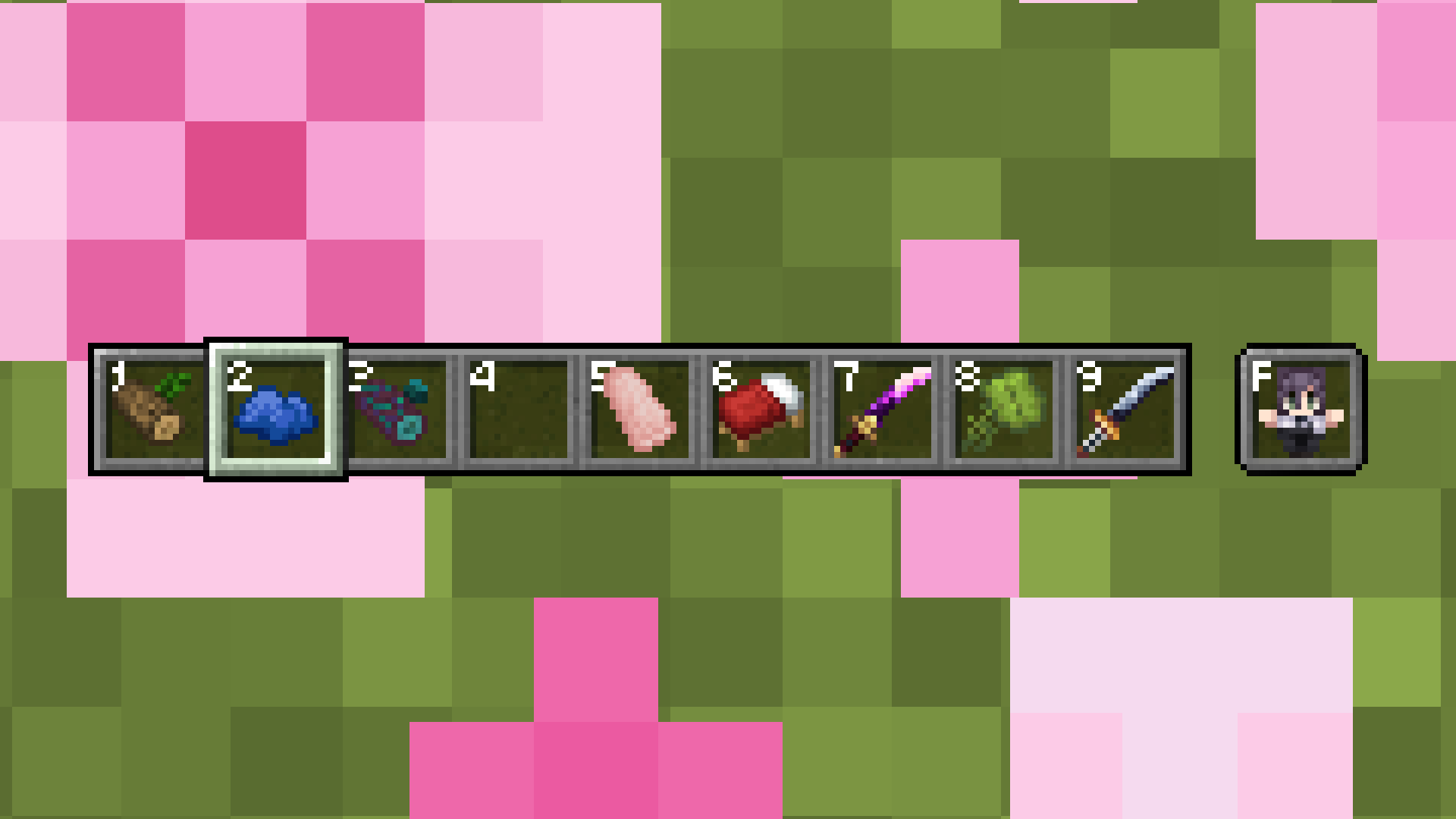
Initially, I made several versions of the numbered hotbar: A Clean numbered hotbar and a Simply numbered hotbar, but the simple numbered hotbar was much more popular, so the clean one no longer gets updated.
"Forgive me for my poor English".
Resource packs from the cover and more
expand to find out more...
- Anime Waifu Totem - Anime Waifu Totem
- Fresh wood - 2D wood sprites
- Fresh planks - 2D board sprites
- Fresh mushrooms - 2D sprites of mushroom blocks
- Bed items similar Bedrock Edition - 2D sprites of beds similar to Bedrock Edition
- 2D-Dripleaf items - 2D sprites dripleaf items
- 2D-Spore blossom items - 2D sprites spore blossom items
- 2D-Azalea items - 2D sprites azalea items
- 2D-Cactus items - 2D sprites cactus items
I also highly recommend you to get acquainted:
- Mod/Data pack Bamboo block into charcoal
Installation von Numbered Hotbar
With Millida Launcher
Install Millida Launcher
The launcher is free: download it at millida.net/launcher and sign in with any nickname.
Click “Install” on this page
The launcher opens and installs the resource pack for Minecraft 1.20–26.2 automatically.
Launch the game
A profile with it appears in the launcher: click “Play”.
Manually
Download the archive
Pick the file Numbered Hotbar-08.zip (29 KB) for your game version. No need to unpack it.
Put it in the resourcepacks folder
The easiest way: “Options”, then “Resource Packs”, then “Open Pack Folder”, and drag the archive there.
Enable the pack
In the same window, move the pack to the right-hand “Selected” column and click “Done”.
Versionen
Mit Abhängigkeiten
| Minecraft | Loader | Datei | Datum | Aktionen |
|---|---|---|---|---|
| 26.2 | — | 26.228.7 KB 14 |
Bewertungen
Bewerten Sie Numbered Hotbar als Erster



